Turning Claude Code into a Conversational Data Analyst with the Minds Plugin

Chandre Van Der Westhuizen, Community & Marketing Co-ordinator at MindsDB
AI assistants like Claude are becoming powerful collaborators for developers and data teams. They can generate code, summarize documents, and help reason through complex problems.
But there is still a major limitation.
Most AI assistants operate without direct access to your company’s data.
They generate responses based only on prompts and training data. When questions involve real metrics, revenue numbers, or operational insights, the model cannot verify answers against the systems where the truth actually lives.
The Minds Plugin for Claude code solves this problem.
By connecting Claude to Minds, MindsDB’s conversational analytics product, Claude can ask questions about live data and receive grounded answers generated from structured SQL queries.
Instead of guessing, Claude becomes a data-aware conversational analyst.
What Is Minds?
Minds is designed to behave like a thoughtful data analyst you can talk to.
You ask questions in natural language, and Minds translates them into structured SQL queries against your databases. It retrieves the relevant data, analyzes it, and returns clear results.
Think of it as a teammate who understands:
Business metrics
Time-based analysis
Filtering and aggregation
Comparisons across categories
For example, instead of writing SQL manually, you might ask:
“What was the total revenue for Product A in Q2 2024?”
“How many new customers joined in EMEA during January 2025?”
“Which product had the highest profit margin in Q3 2024?”
Behind the scenes, Minds converts these questions into queries, executes them against the data, and returns the result.
The goal is simple: turn natural language into precise, traceable analytics.
Why Use Minds Plugin Instead of Another MCP Server?
While MCP servers allow AI assistants to connect to external tools, most MCP implementations expose only a single service or data source. This often leads developers to build multiple connectors for different databases, APIs, or analytics systems.
Minds simplify this architecture.
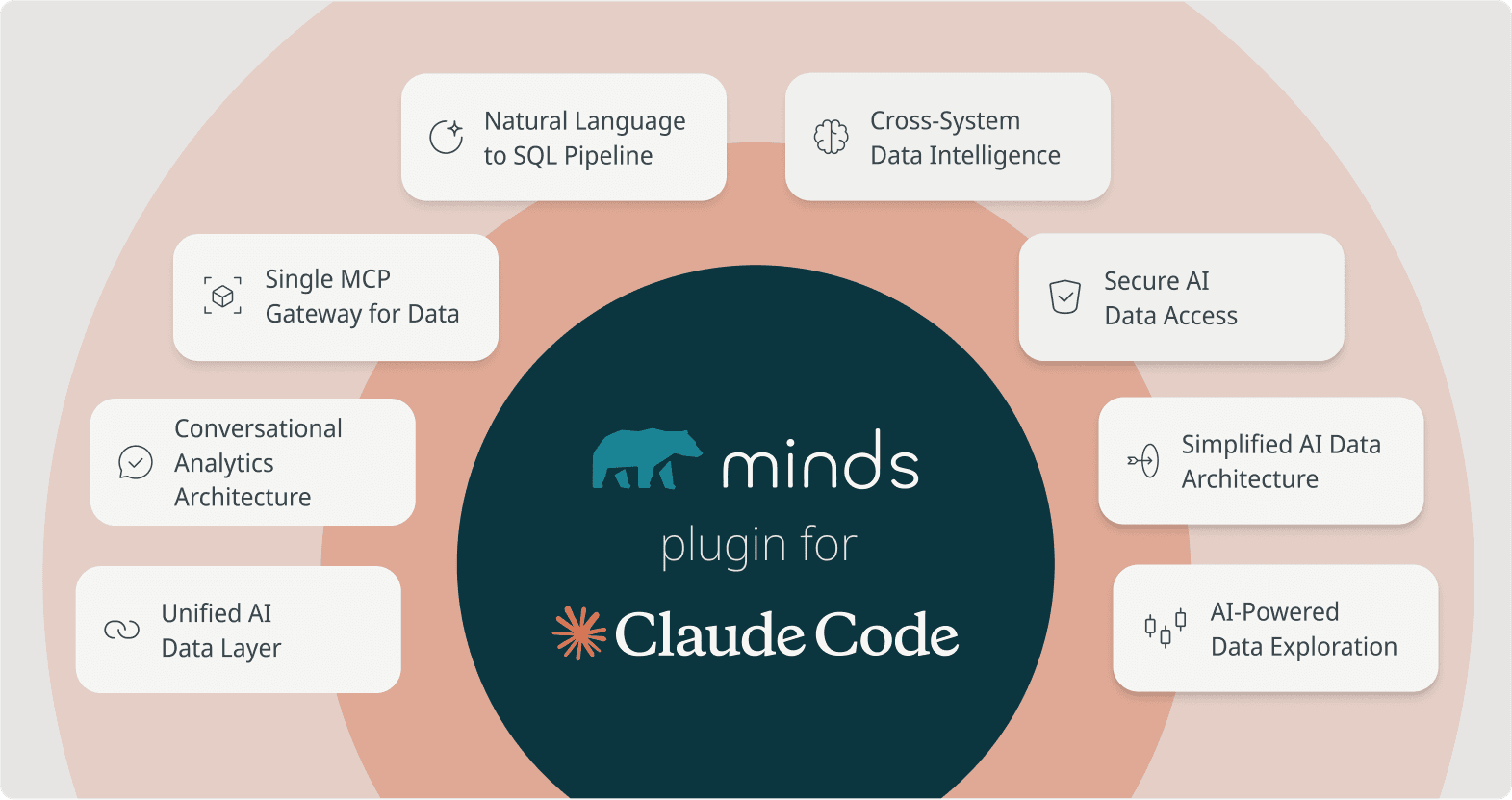
Instead of creating separate MCP integrations for every system, Minds acts as a unified data intelligence layer that Claude can query through a single MCP server.
This offers several key benefits:
1.One Server, Multiple Data Sources
Instead of creating separate MCP servers for each database, Minds connects to multiple systems like Postgres, Snowflake, and BigQuery. Claude can query all of them through a single plugin.
2.Cross-System Analysis
Because Minds sits above your data sources, Claude can analyze information across systems without developers writing custom orchestration logic.
3.Centralized Data Access
Minds translates natural language questions into SQL and routes them to the appropriate data source, enabling analysis across systems without exposing their complexity.
4.User Management and Authentication
Minds provides built-in authentication and permission controls so organizations can manage access to data securely.
5.Conversation-Based Data Exploration
Most MCP tools execute one operation at a time. With Minds, users can ask follow-up questions and refine analysis step by step while maintaining context.
6.Built-in Natural Language to SQL
Minds automatically translates natural language questions into SQL queries. You don’t need to build custom query-generation logic inside your MCP server.
7.Less Custom Infrastructure
Without Minds, teams often build multiple MCP connectors, query generation logic, and access control layers. The Minds plugin consolidates these capabilities into a single integration.
8.Governance and Query Transparency
Minds generates structured SQL queries, which makes insights traceable and auditable. Organizations can maintain visibility into how results are produced.
By combining Claude’s reasoning capabilities with Minds’ data access layer, teams can build AI workflows that analyze real business data without creating dozens of custom integrations.
What the Minds Plugin Enables
The Minds Plugin connects Claude directly to a running Minds instance, allowing Claude to ask questions about your organization’s data and retrieve answers grounded in real records.
Instead of relying only on prompts or training data, Claude can analyze live information through Minds. This enables workflows such as:
Analyzing revenue trends across products, regions, or time periods
Investigating product performance and growth patterns
Exploring customer behavior and segmentation
Breaking down metrics by geography, timeframe, or category
Because Minds translates natural language questions into structured SQL queries, Claude can reason over actual database results rather than generating hypothetical responses.
The result is a much more powerful workflow: Claude becomes a conversational interface for analytics, capable of exploring business data step-by-step like a thoughtful analyst.
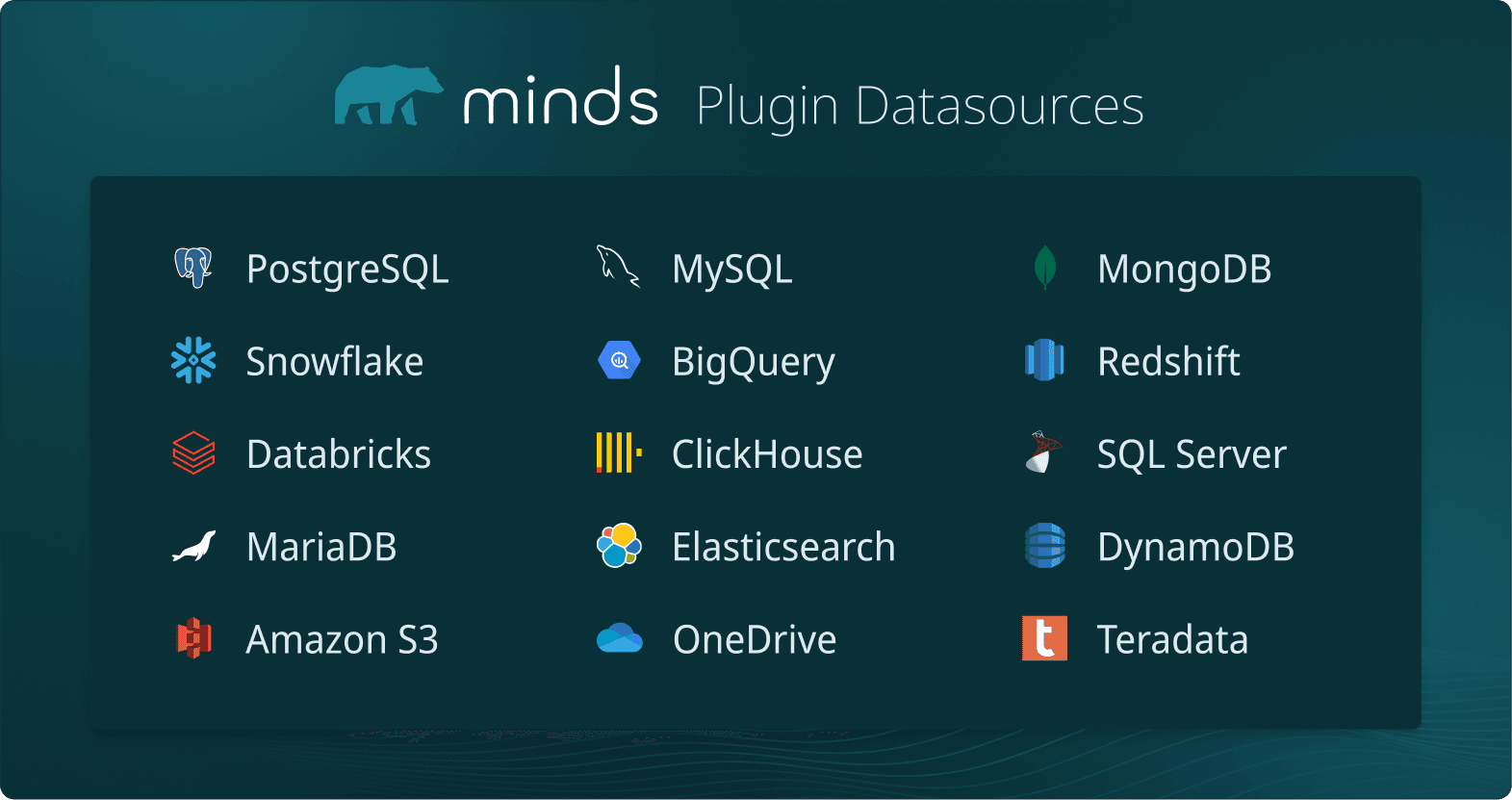
You can connect to various databases:
How the Minds Plugin for Claude Works
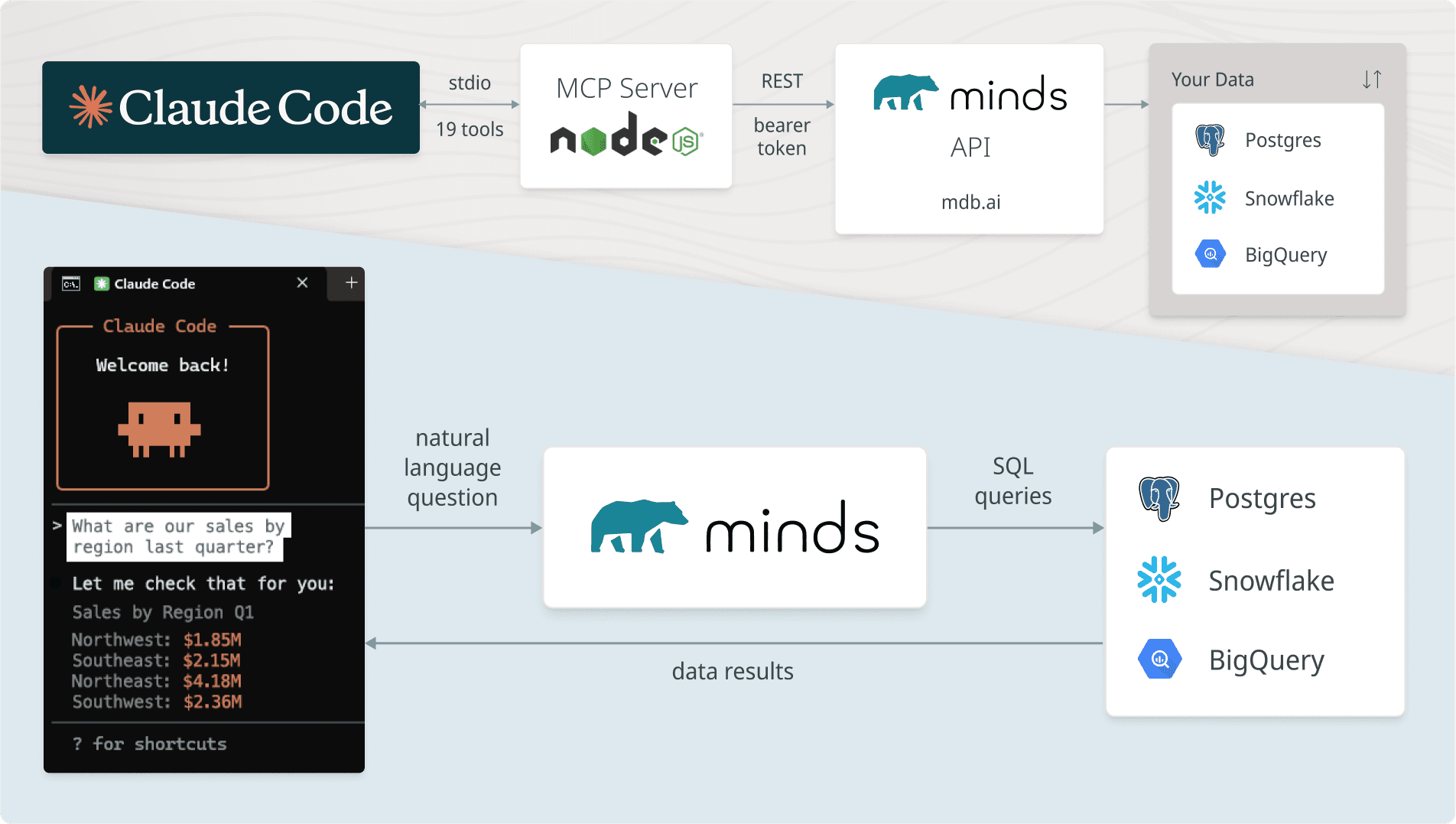
Under the hood, the plugin connects Claude to Minds through the Model Context Protocol (MCP). This architecture allows Claude to call external tools that execute queries against your data.
Here’s what happens step by step:
Claude receives a question: A user asks Claude a question about business data.
Claude calls a Minds tool: Through MCP, Claude can access a set of tools exposed by the plugin.
The MCP server forwards the request: A lightweight Node.js MCP server sends the request to the Minds API.
Minds executes the query: Minds translates the request into SQL and runs it against connected data sources such as Postgres, Snowflake, or BigQuery.
Results return to Claude: Claude receives the structured results and can explain, summarize, or continue the analysis.
Importantly, the MCP server acts only as a thin REST wrapper. It does not store state or cache data. Every request goes directly through Minds to your underlying databases, ensuring responses reflect the latest information available.
The flow looks like this:
Project Structure
The Minds Plugin is designed to stay lightweight and easy to extend. Its structure reflects the simple architecture behind the integration:
MCP Server
Built with Node.js
Exposes the tools Claude can use
Routes requests to the Minds API
Tool Definitions
Each tool corresponds to a Minds API endpoint
Enables operations such as querying data or retrieving insights
Authentication
Uses a Bearer token to authenticate with the Minds API
External Data Layer
Minds connects to your databases and data warehouses
Examples include Postgres, Snowflake, BigQuery, and other supported sources
Because the server does not maintain internal state, the system stays fast, predictable, and easy to operate.
├── .claude-plugin/
│   └── marketplace.json          # Marketplace catalog
└── plugins/
    └── minds/
        ├── .claude-plugin/
        │   └── plugin.json       # Plugin manifest
        ├── .mcp.json             # MCP server config
        ├── package.json
        ├── src/
        │   └── index.mjs         # MCP server — 19 tools, pure fetch
        ├── skills/
        │   └── minds-data/
        │       └── SKILL.md      # Auto-invoked skill for data workflows
        └── commands/
            ├── connect.md        # /minds:connect
            ├── ask.md            # /minds:ask
            └── explore.md        # /minds:explore
├── .claude-plugin/
│   └── marketplace.json          # Marketplace catalog
└── plugins/
    └── minds/
        ├── .claude-plugin/
        │   └── plugin.json       # Plugin manifest
        ├── .mcp.json             # MCP server config
        ├── package.json
        ├── src/
        │   └── index.mjs         # MCP server — 19 tools, pure fetch
        ├── skills/
        │   └── minds-data/
        │       └── SKILL.md      # Auto-invoked skill for data workflows
        └── commands/
            ├── connect.md        # /minds:connect
            ├── ask.md            # /minds:ask
            └── explore.md        # /minds:explore
├── .claude-plugin/
│   └── marketplace.json          # Marketplace catalog
└── plugins/
    └── minds/
        ├── .claude-plugin/
        │   └── plugin.json       # Plugin manifest
        ├── .mcp.json             # MCP server config
        ├── package.json
        ├── src/
        │   └── index.mjs         # MCP server — 19 tools, pure fetch
        ├── skills/
        │   └── minds-data/
        │       └── SKILL.md      # Auto-invoked skill for data workflows
        └── commands/
            ├── connect.md        # /minds:connect
            ├── ask.md            # /minds:ask
            └── explore.md        # /minds:explore
├── .claude-plugin/
│   └── marketplace.json          # Marketplace catalog
└── plugins/
    └── minds/
        ├── .claude-plugin/
        │   └── plugin.json       # Plugin manifest
        ├── .mcp.json             # MCP server config
        ├── package.json
        ├── src/
        │   └── index.mjs         # MCP server — 19 tools, pure fetch
        ├── skills/
        │   └── minds-data/
        │       └── SKILL.md      # Auto-invoked skill for data workflows
        └── commands/
            ├── connect.md        # /minds:connect
            ├── ask.md            # /minds:ask
            └── explore.md        # /minds:explore
Quickstart: Getting Started with the Minds Plugin in Claude Code
In this quickstart, we’ll connect Claude to Minds using the Minds Plugin. Once configured, Claude will be able to send natural language questions to Minds, which translates them into SQL queries and retrieves results directly from your databases. Within minutes, you’ll be able to explore your data conversationally.
In this tutorial, we will show how easy it is to setup this with Visual Studio code and the Claude Code VS Extension.
Pre-requisites:
Clone the Minds plugin for Claude Code repository and open in Visual studio.
Install the Claude code extension in Visual Studio and sign in with your Claude account.
Ensure Node (Node.js 18<) dependency is installed on your device. This installs the packages needed to run the MCP server.
Step 1: Get Minds API Key
You login to your Minds profile and navigate to the API Keys tab to obtain an API key.
Step 2: Set your environment variable:
export MINDS_API_KEY=your_key_here
export MINDS_API_KEY=your_key_here
export MINDS_API_KEY=your_key_here
export MINDS_API_KEY=your_key_here
A great tip is that you can actually provide Claude code your Minds API key and advise it to set it up in your environment and it will do the work for you.
This will create an env. file in the src folder:
MINDSDB_API_KEY=mdb_mxet9C9g.yS8BiOBzbXcjUlfsGSspXOtHHIFYFYF
MINDS_BASE_URL=https://mdb.ai
MINDSDB_API_KEY=mdb_mxet9C9g.yS8BiOBzbXcjUlfsGSspXOtHHIFYFYF
MINDS_BASE_URL=https://mdb.ai
MINDSDB_API_KEY=mdb_mxet9C9g.yS8BiOBzbXcjUlfsGSspXOtHHIFYFYF
MINDS_BASE_URL=https://mdb.ai
MINDSDB_API_KEY=mdb_mxet9C9g.yS8BiOBzbXcjUlfsGSspXOtHHIFYFYF
MINDS_BASE_URL=https://mdb.ai
Step 3: Install the plugin:
Let’s add the market place to Claud code. In Claude Code, open a chat and run:
/plugin marketplace add mindsdb/claude-plugin
/plugin marketplace add mindsdb/claude-plugin
/plugin marketplace add mindsdb/claude-plugin
/plugin marketplace add mindsdb/claude-plugin
This tells Claude about the Minds plugin marketplace hosted at mindsdb/claude-plugin. If you are working on a project and want this marketplace auto-discovered for everyone, add .claude/settings.json to your repository.
Once done, you will receive this message:
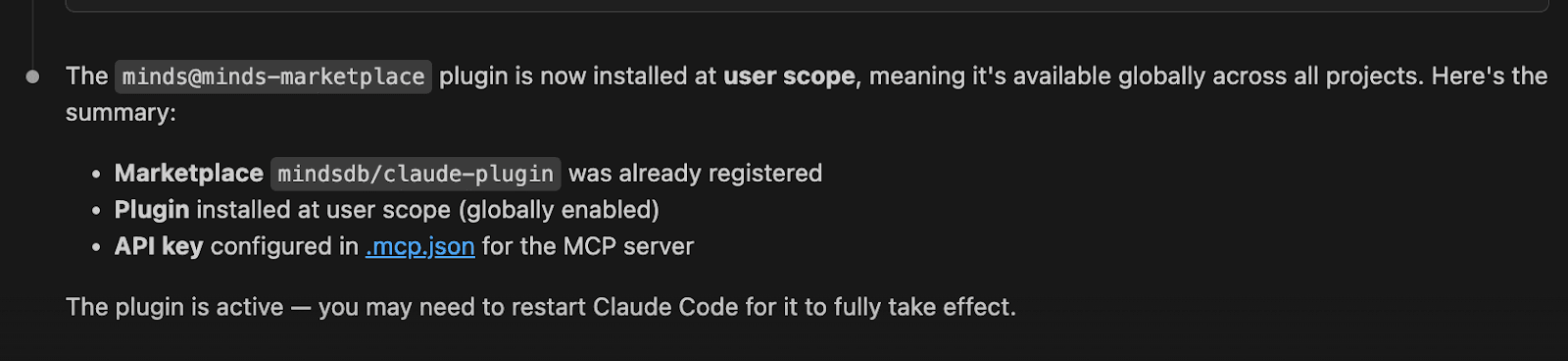
Now you can install the Minds Plugin from the Marketplace. Still in Claude Code, run:
/plugin install minds@minds-marketplace/plugin install minds@minds-marketplace/plugin install minds@minds-marketplace/plugin install minds@minds-marketplaceThis installs the Minds plugin from the new marketplace. After it succeeds, Claude will have access to the Minds MCP server and its tools (datasources, minds, queries, catalog, etc., as documented in the README).
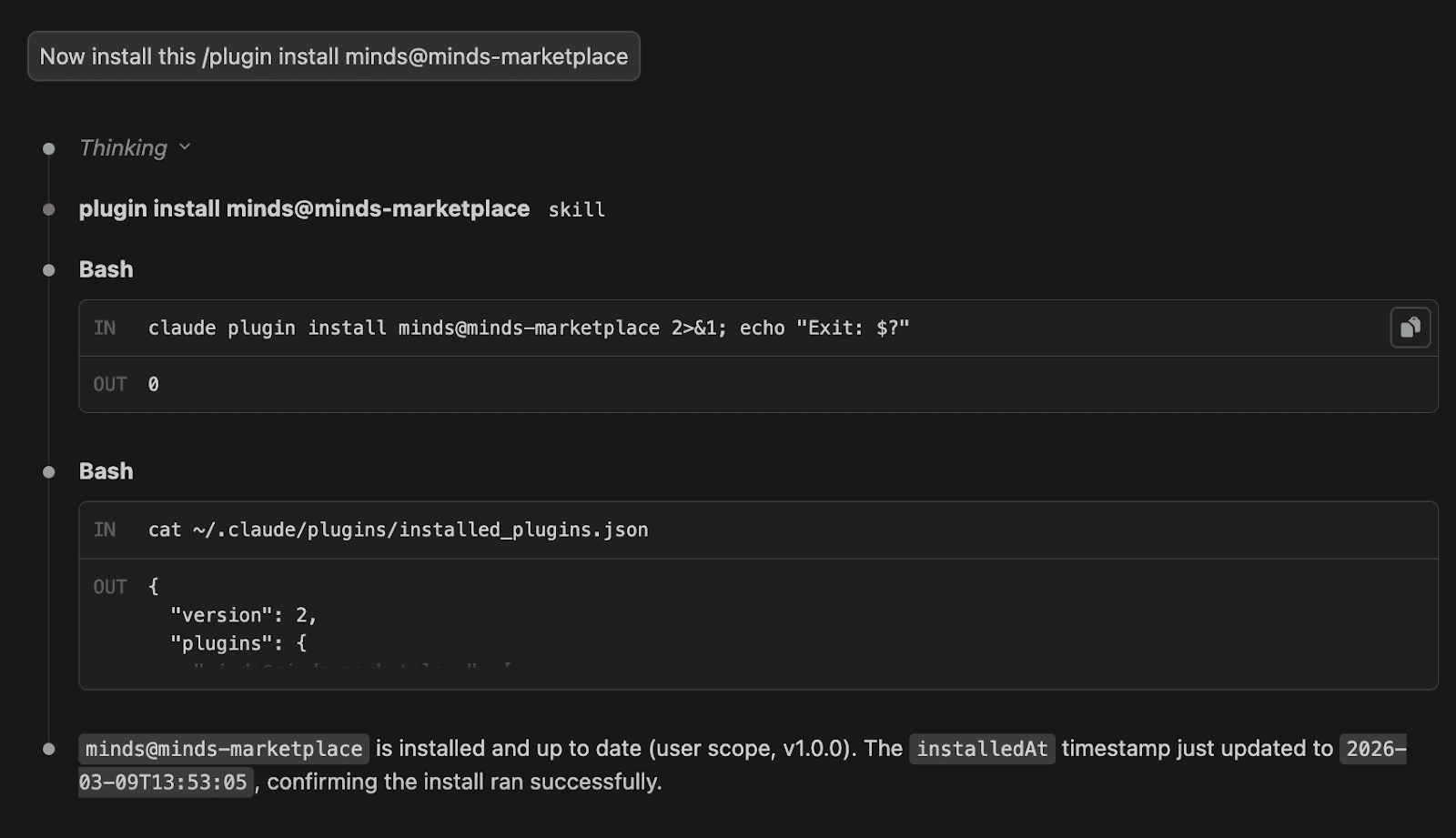
Connect Your Data and Create Your Mind
Now that the plugin is installed and connected, the next step is to create a Mind and start interacting with it from Claude Code. A Mind acts as your conversational analyst, translating natural language questions into SQL queries that retrieve insights from your connected data sources. Once created, you can begin asking questions directly in Claude Code and explore your data step by step through conversation.
In Claude Code extension, prompt it to connect to your database:
Connect to my postgres database using these credentials:
"user": "demo_user”,  "password": "demo_password”,
  "host": "samples.mindsdb.com", "port": "5432”,
  "database": "demo”, "schema": "sample_data
Connect to my postgres database using these credentials:
"user": "demo_user”,  "password": "demo_password”,
  "host": "samples.mindsdb.com", "port": "5432”,
  "database": "demo”, "schema": "sample_data
Connect to my postgres database using these credentials:
"user": "demo_user”,  "password": "demo_password”,
  "host": "samples.mindsdb.com", "port": "5432”,
  "database": "demo”, "schema": "sample_data
Connect to my postgres database using these credentials:
"user": "demo_user”,  "password": "demo_password”,
  "host": "samples.mindsdb.com", "port": "5432”,
  "database": "demo”, "schema": "sample_data
It will ask you to allow this command, select yes:
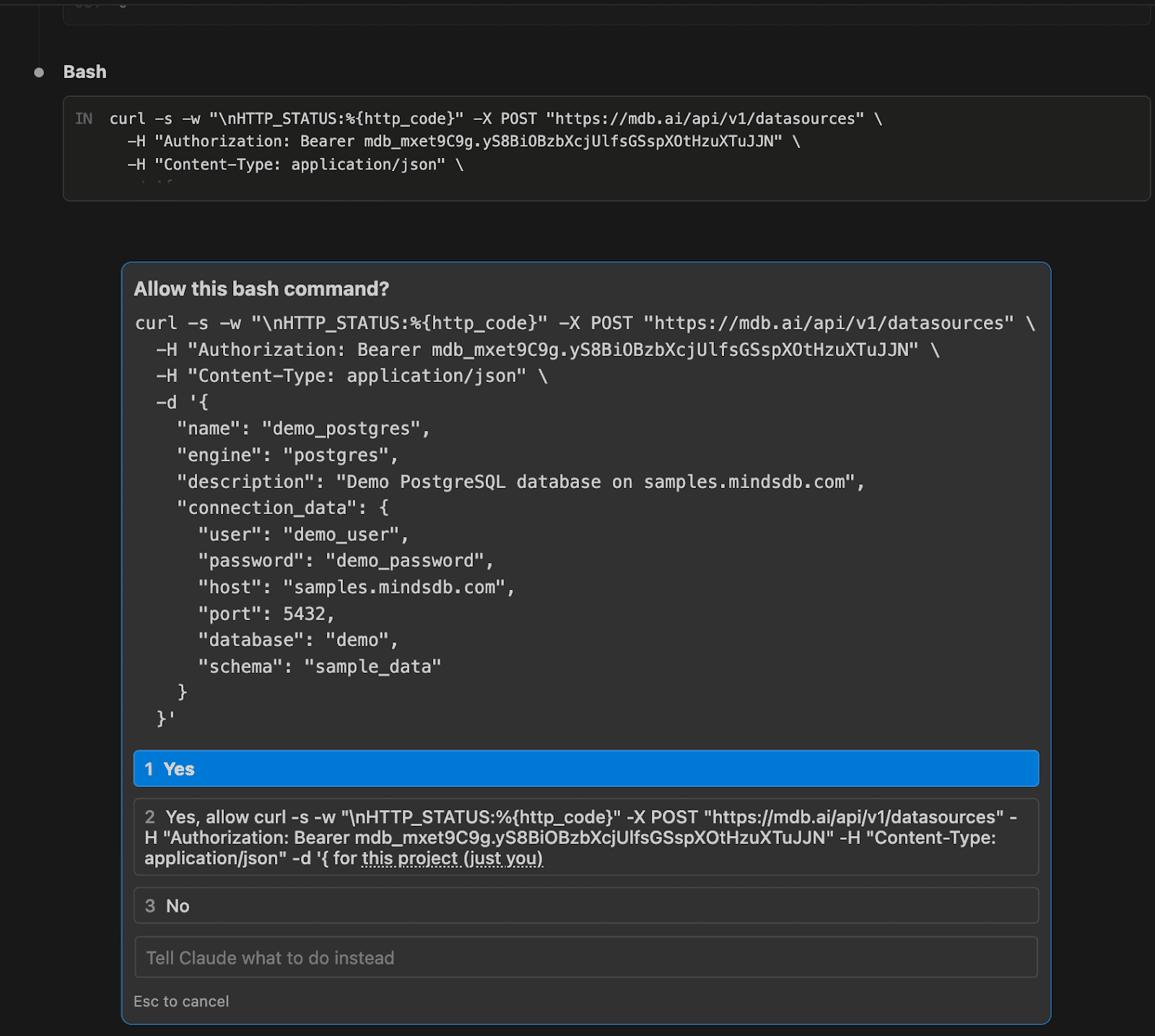
If you are connected to this datasource already, Claude will advise the following:
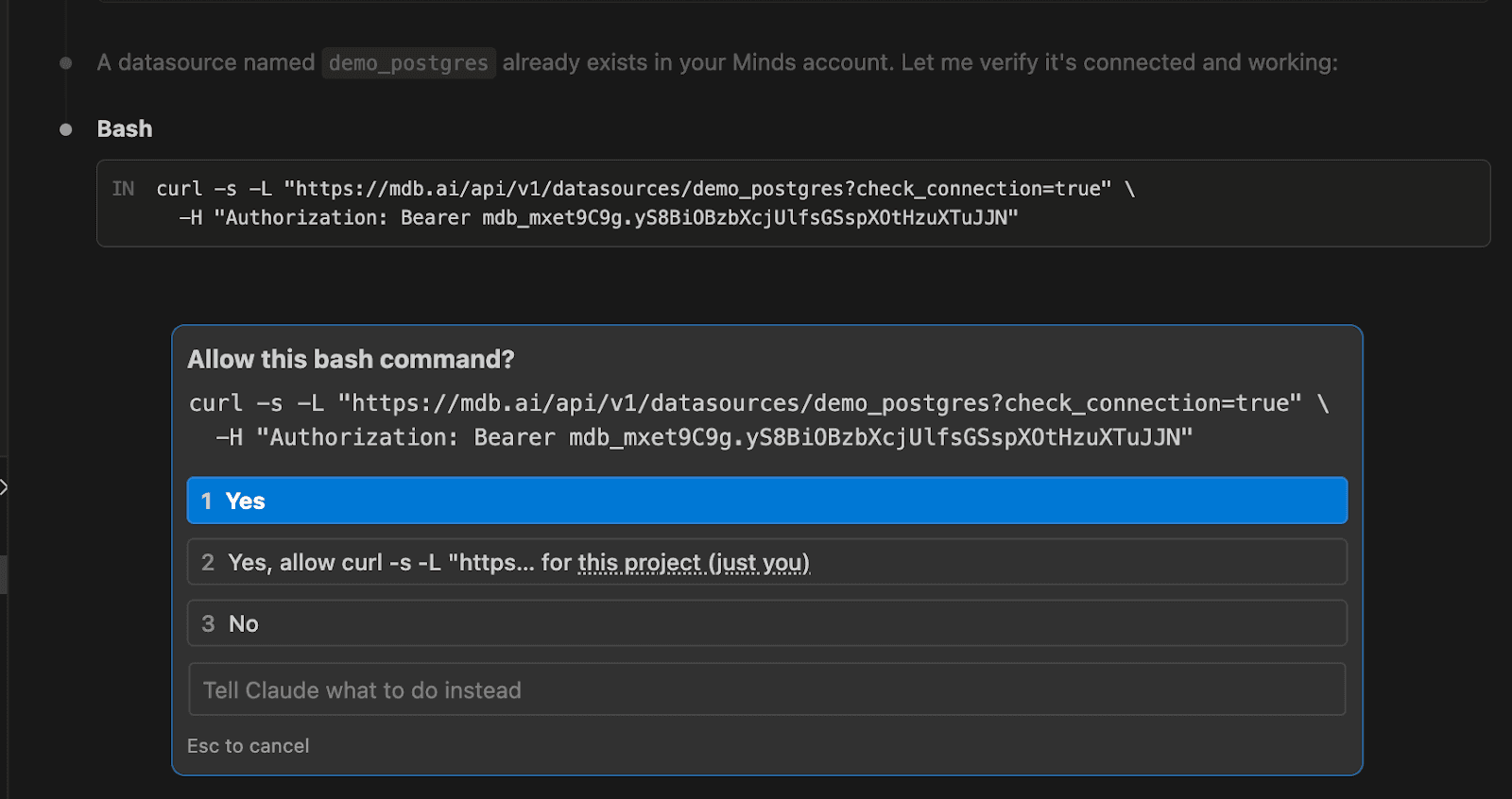
If you select yes, it will give you the following results:
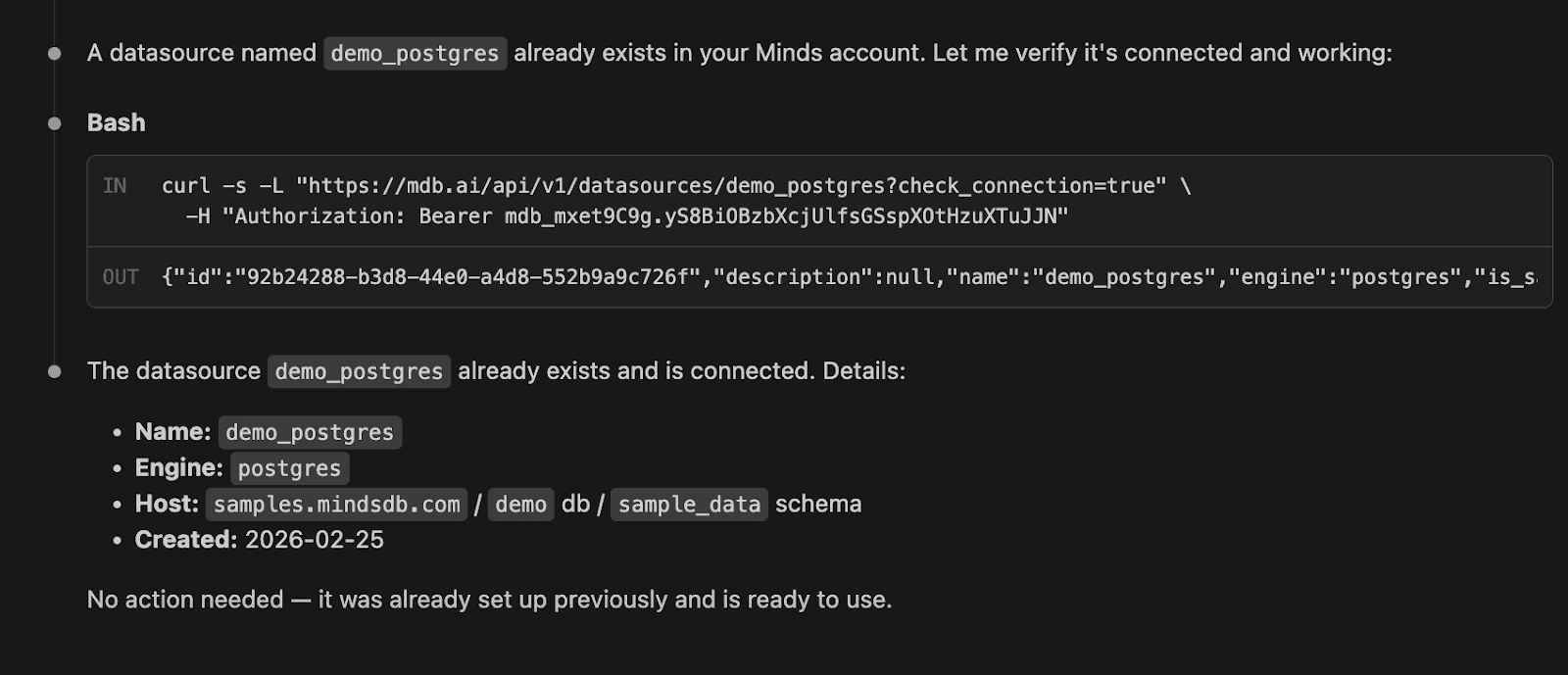
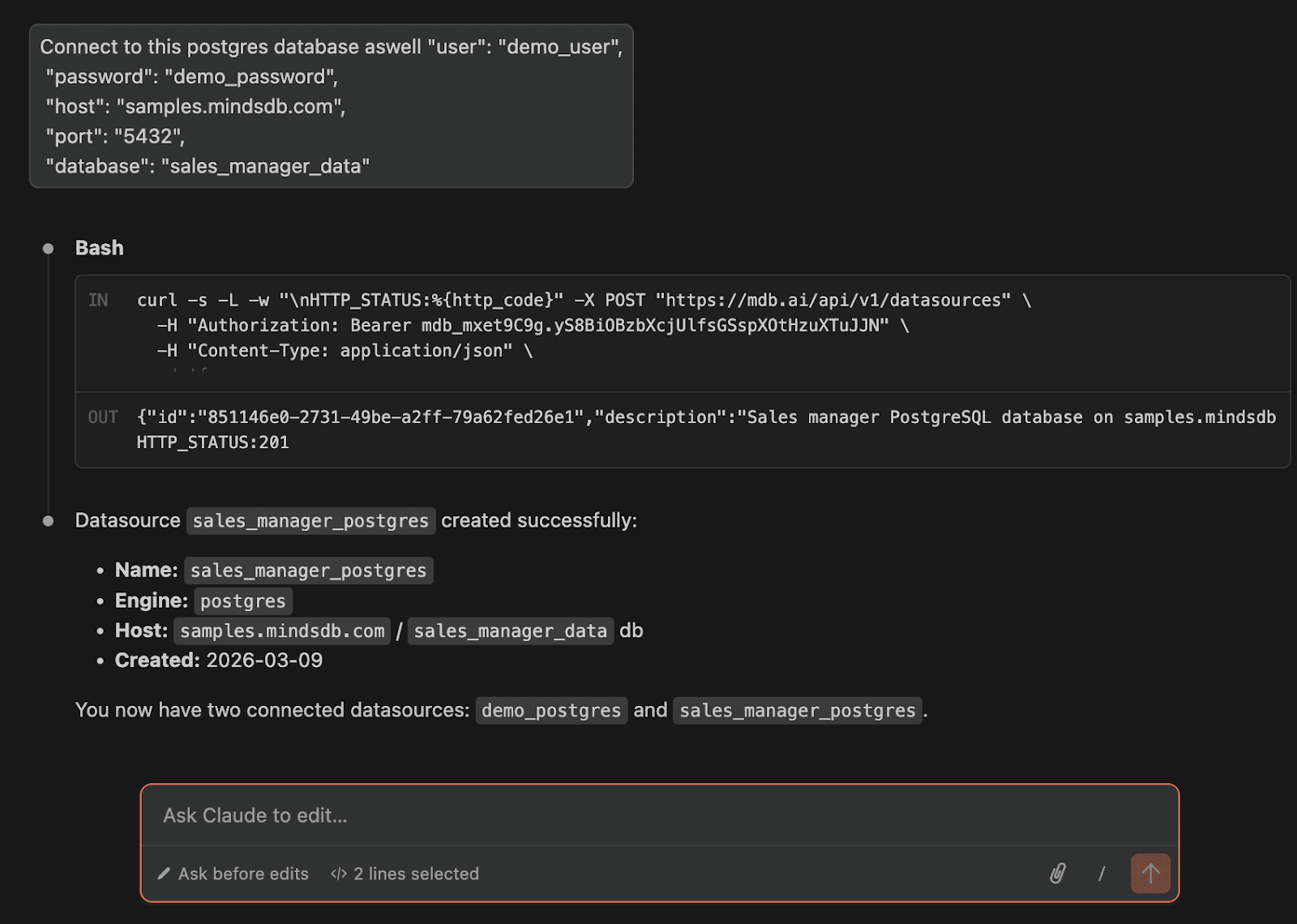
If you are connecting a database for the first time, which you have not connected to Minds yet, you will get the following results. Here we connect with another database):
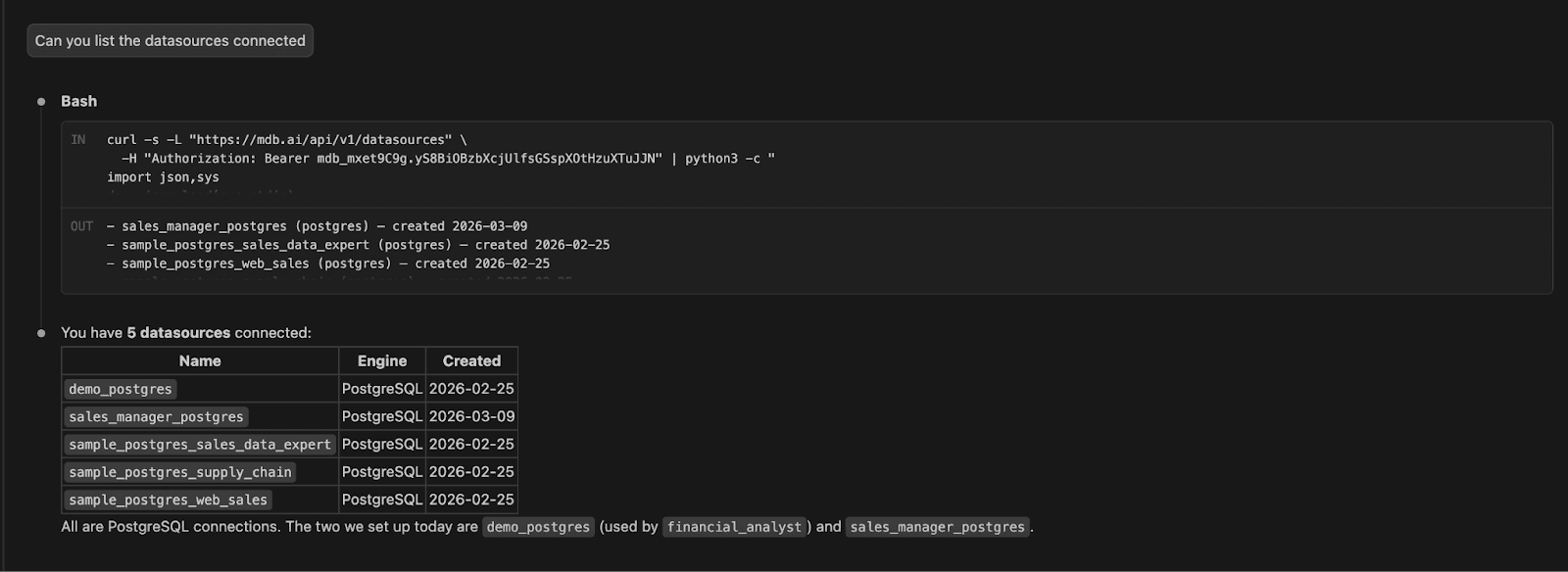
You can list all the data sources connected in Minds:
Now you can create a Mind. Create a finance analyst agent that will help you query financial data in the demo_postgres database.
Create a Mind called "financial_analyst" that can answer questions about
financial data for our investment company using the financial_portfolio
table in the demo_postgres database
Create a Mind called "financial_analyst" that can answer questions about
financial data for our investment company using the financial_portfolio
table in the demo_postgres database
Create a Mind called "financial_analyst" that can answer questions about
financial data for our investment company using the financial_portfolio
table in the demo_postgres database
Create a Mind called "financial_analyst" that can answer questions about
financial data for our investment company using the financial_portfolio
table in the demo_postgres database
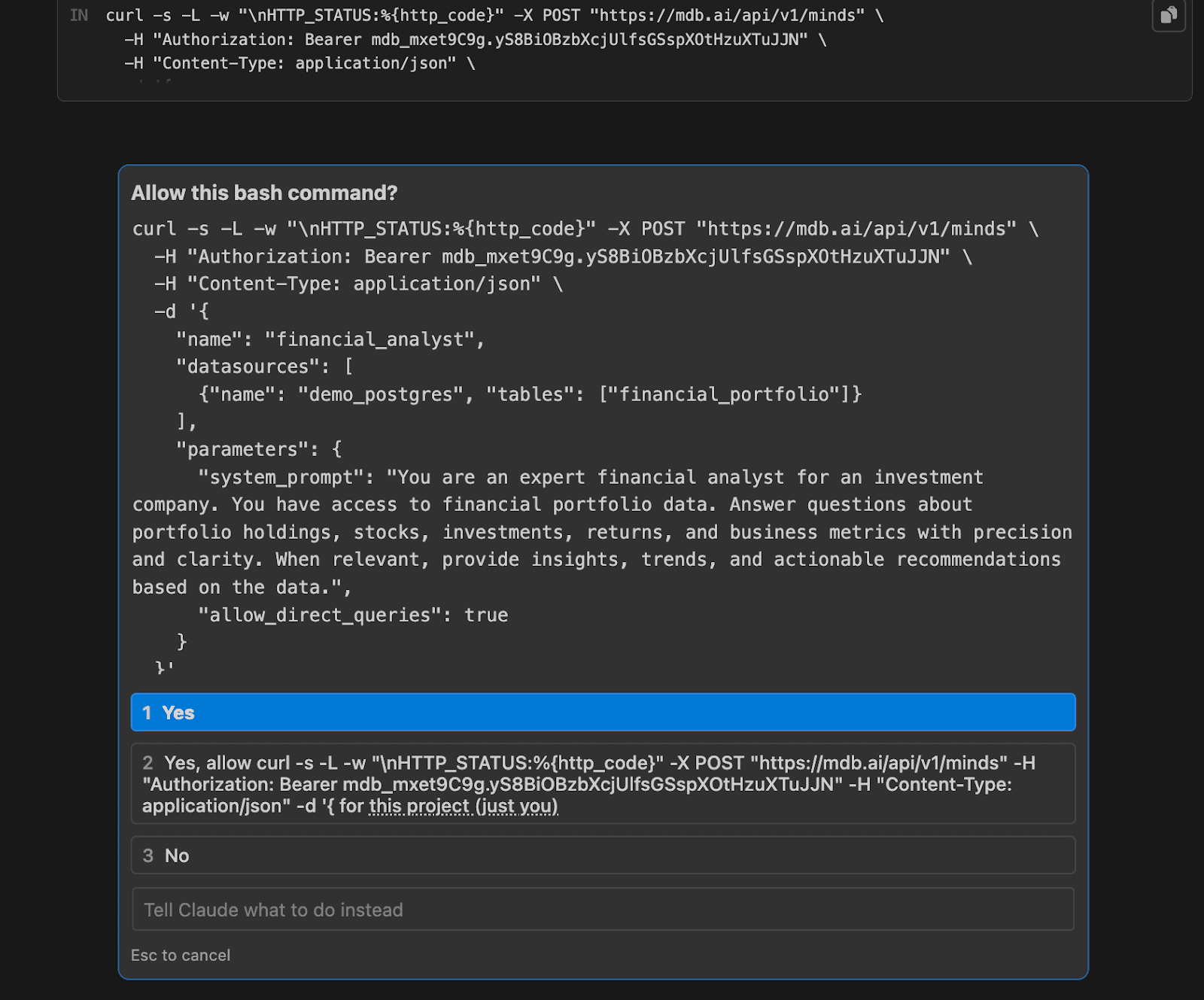
You will get prompted the below where you have to select ‘Yes’. You will see that a system prompt has been generated to instruct the Mind.
Result:

You can verify that the status of the Mind is ready for questions:
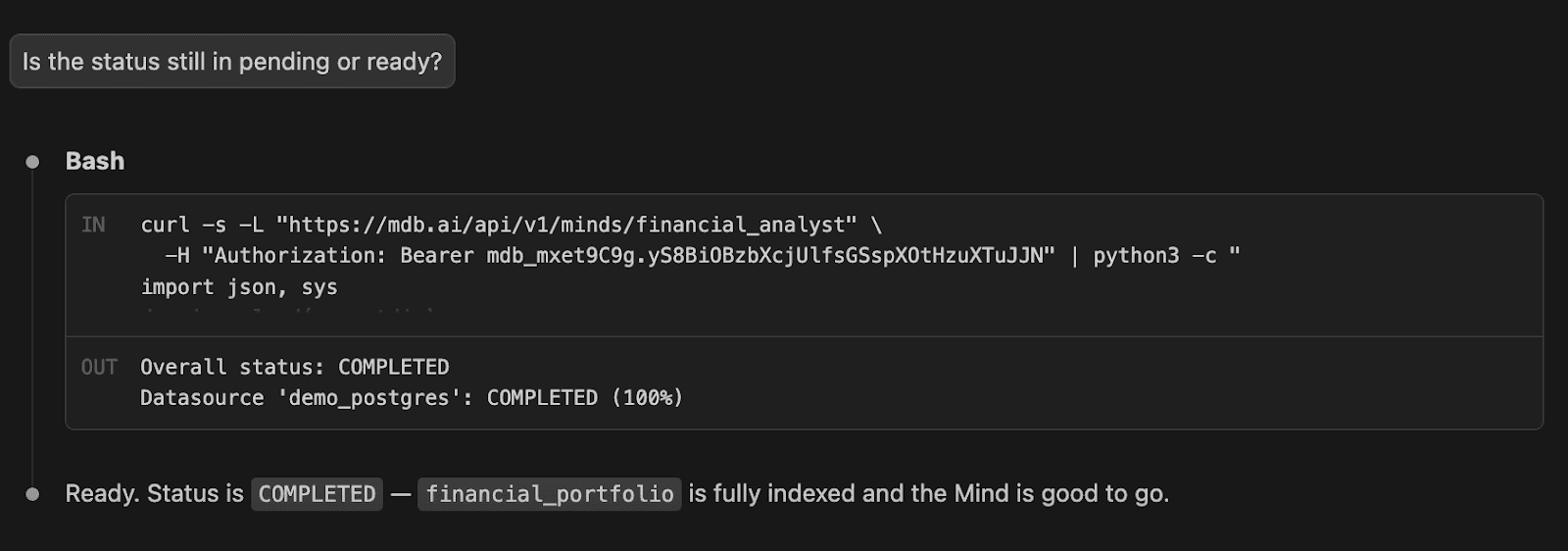
Ask Your First Question in Claude Code
Let’s ask a couple of questions in Claude Code.
Question 1: What stocks are in the portfolio?

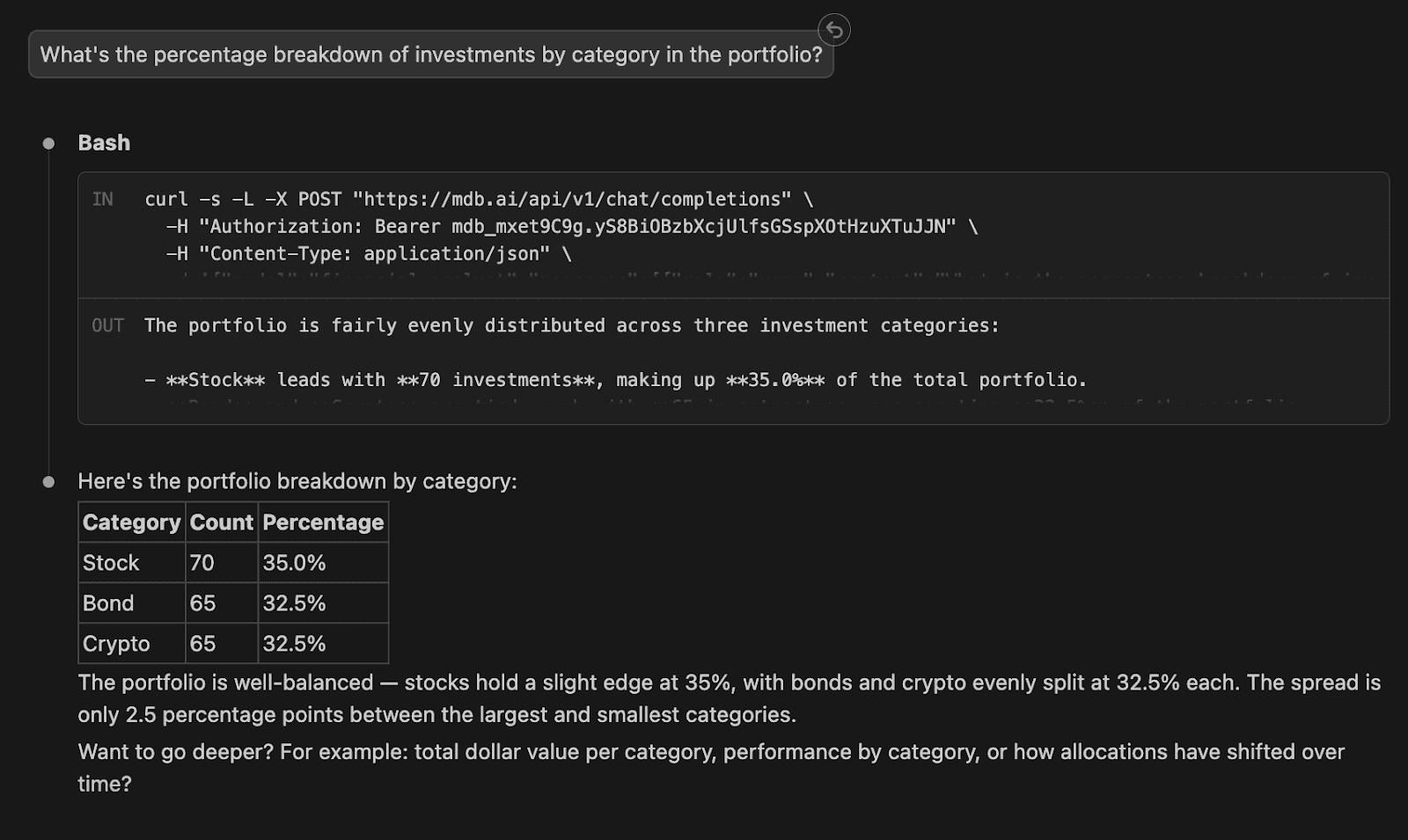
Question 2: What's the percentage breakdown of investments by category in the portfolio?
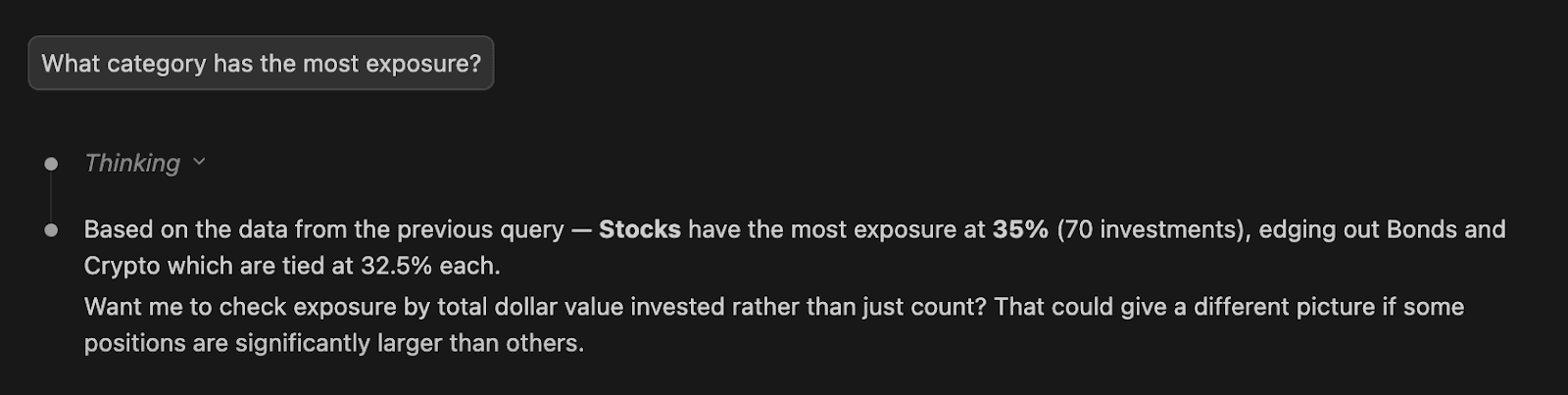
Question 3: What category has the most exposure?
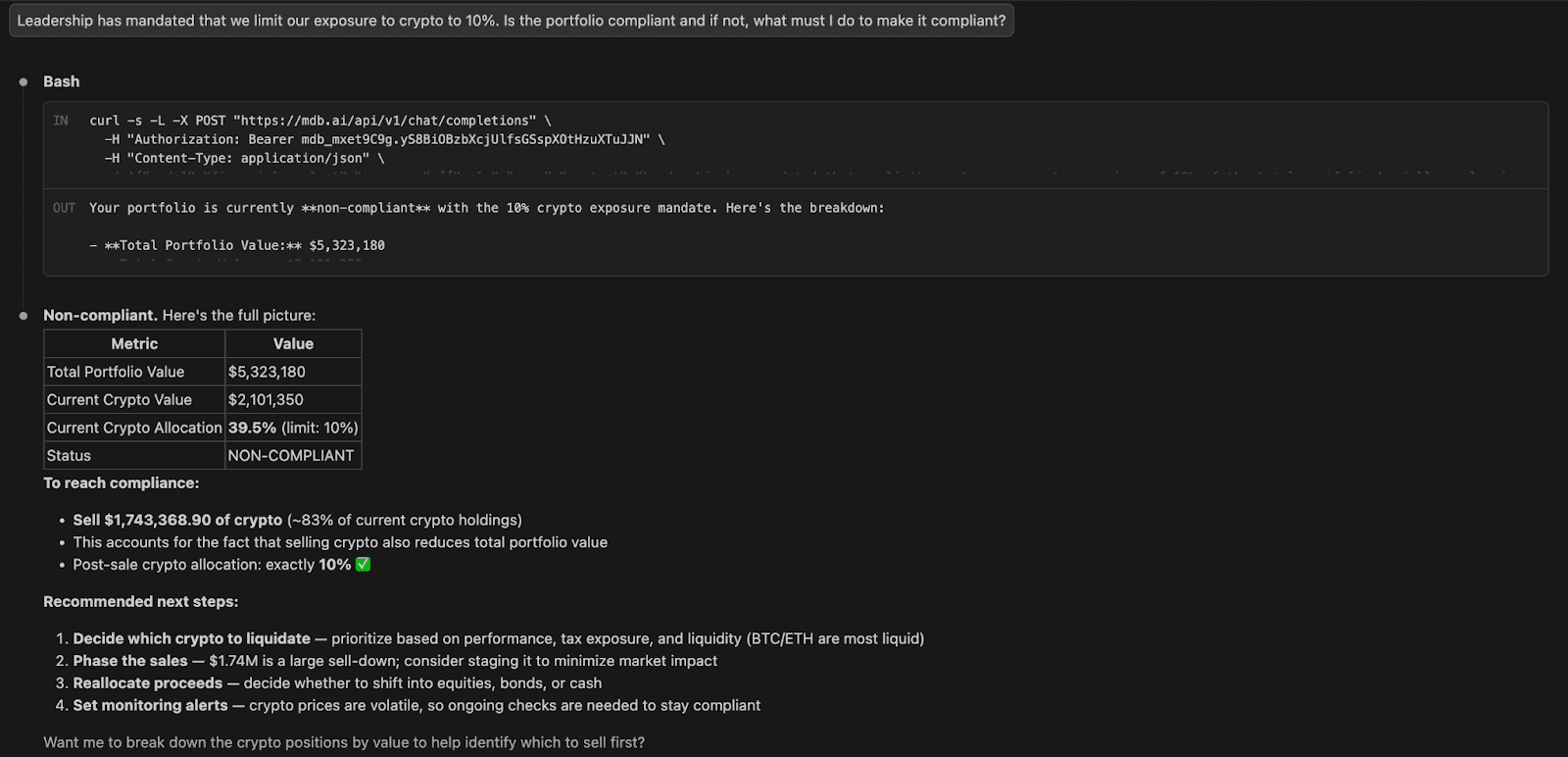
Question 4: Leadership has mandated that we limit our exposure to crypto to 10%. Is the portfolio compliant and if not, what must I do to make it compliant?
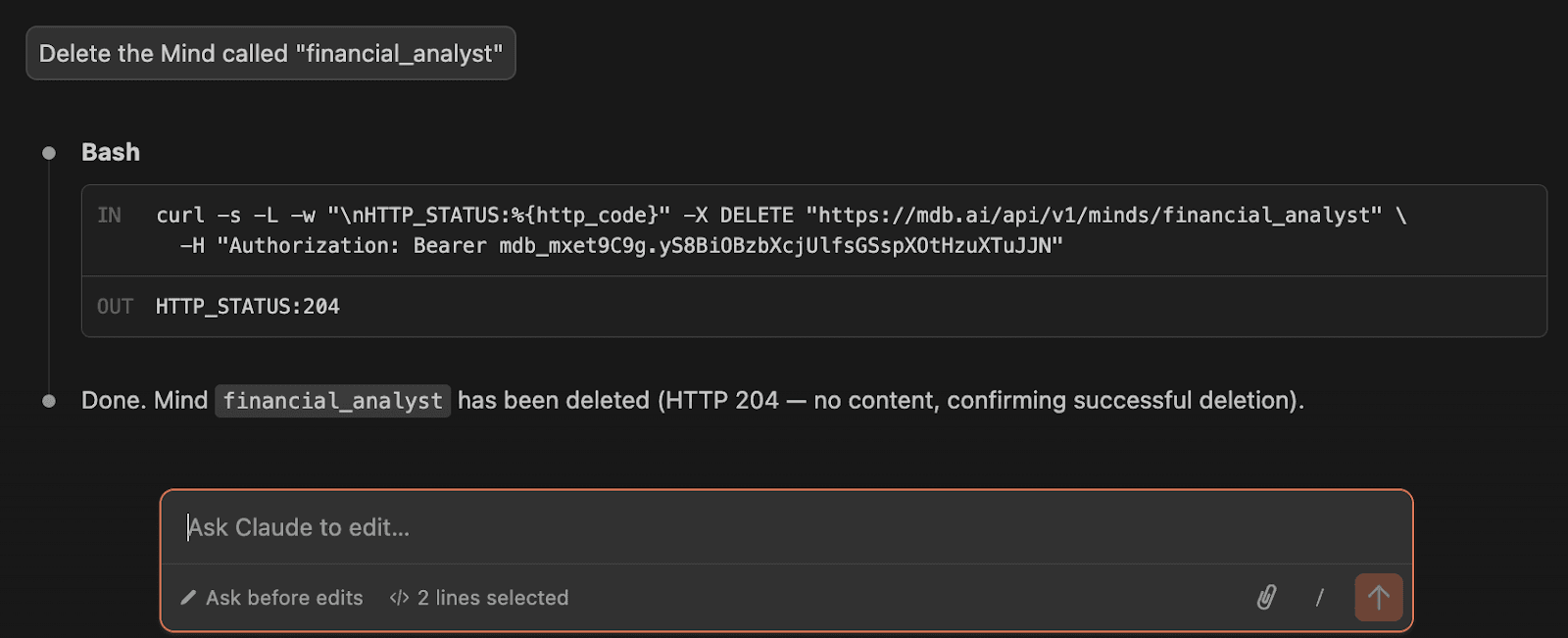
The Minds Claude Code Plugin allows you to Update or Delete a Mind:
Why the Minds Plugin for Claude Code Matters
The Minds Plugin changes what AI assistants can realistically do with data.
Most AI tools today are excellent at generating text, writing code, or summarizing documents. But when it comes to business analytics or operational data, they still operate at a distance from the systems where that data actually lives.
This creates a gap.
You can ask an AI assistant questions about strategy, revenue, or customer behavior, but without direct access to your databases, the answers remain speculative. The model might reason well, but it cannot verify anything against real records.
The Minds Plugin closes this gap by connecting Claude directly to Minds, which translates natural language questions into SQL queries and retrieves results from your databases.
Instead of guessing, the Minds Plugin for Claude code can analyze real data.
The Missing Link Between AI and Data
Conventional analytics workflows are complex and slow. Data is typically exported from operational systems, transformed through ETL pipelines, stored in warehouses, and then visualized in dashboards before teams can ask questions. While powerful, this process introduces delays, stale data, and friction when new questions arise.
The Minds Plugin for Claude Code simplifies this workflow. Instead of building dashboards or writing SQL manually, users can ask a question in natural language. Minds translates that question into SQL, runs it directly against the connected data source, and Claude explains the results. This turns analytics into a conversational process rather than a reporting exercise.
This approach also closes an important gap in the AI ecosystem. Most language models are strong reasoning engines but lack direct access to enterprise data systems like databases, warehouses, and internal business metrics. By connecting Claude to Minds, AI assistants can analyze real data in real time rather than generating speculative responses.
At the same time, it addresses a broader market challenge. Many organizations struggle with the complexity of traditional analytics stacks, while conversational AI tools often remain disconnected from the underlying data. The Minds Plugin bridges these worlds by allowing AI assistants to query business data directly through natural language, enabling faster insights while maintaining accuracy, traceability, and control.
What Does This Means for Users?
For users, this fundamentally changes how they interact with their data.
Instead of switching between tools like dashboards, SQL editors, spreadsheets, and AI assistants, users can explore insights through conversation.
They can:
Ask questions about business metrics in natural language
Retrieve results grounded in live databases
Refine analysis through follow-up questions
Investigate trends without writing SQL
This creates a workflow that feels less like querying a database and more like working with a data analyst who understands your systems.
For developers and data teams, this also removes friction. They can build applications where AI assistants can reason over operational data without exporting it into separate analytics pipelines.
Conclusion: A New Way to Work With Data
The combination of Claude and Minds represents a shift in how analytics can be performed.
Instead of building reports first and asking questions later, users can start with the question and let the system retrieve the relevant data.
AI assistants become more than productivity tools. They become analytical partners capable of reasoning over real business data.
And when natural language becomes a reliable interface for analytics, the way organizations interact with their data begins to change. Check out the Minds Plugin for Claude Code Repository and contact our team to find out more.
AI assistants like Claude are becoming powerful collaborators for developers and data teams. They can generate code, summarize documents, and help reason through complex problems.
But there is still a major limitation.
Most AI assistants operate without direct access to your company’s data.
They generate responses based only on prompts and training data. When questions involve real metrics, revenue numbers, or operational insights, the model cannot verify answers against the systems where the truth actually lives.
The Minds Plugin for Claude code solves this problem.
By connecting Claude to Minds, MindsDB’s conversational analytics product, Claude can ask questions about live data and receive grounded answers generated from structured SQL queries.
Instead of guessing, Claude becomes a data-aware conversational analyst.
What Is Minds?
Minds is designed to behave like a thoughtful data analyst you can talk to.
You ask questions in natural language, and Minds translates them into structured SQL queries against your databases. It retrieves the relevant data, analyzes it, and returns clear results.
Think of it as a teammate who understands:
Business metrics
Time-based analysis
Filtering and aggregation
Comparisons across categories
For example, instead of writing SQL manually, you might ask:
“What was the total revenue for Product A in Q2 2024?”
“How many new customers joined in EMEA during January 2025?”
“Which product had the highest profit margin in Q3 2024?”
Behind the scenes, Minds converts these questions into queries, executes them against the data, and returns the result.
The goal is simple: turn natural language into precise, traceable analytics.
Why Use Minds Plugin Instead of Another MCP Server?
While MCP servers allow AI assistants to connect to external tools, most MCP implementations expose only a single service or data source. This often leads developers to build multiple connectors for different databases, APIs, or analytics systems.
Minds simplify this architecture.
Instead of creating separate MCP integrations for every system, Minds acts as a unified data intelligence layer that Claude can query through a single MCP server.
This offers several key benefits:
1.One Server, Multiple Data Sources
Instead of creating separate MCP servers for each database, Minds connects to multiple systems like Postgres, Snowflake, and BigQuery. Claude can query all of them through a single plugin.
2.Cross-System Analysis
Because Minds sits above your data sources, Claude can analyze information across systems without developers writing custom orchestration logic.
3.Centralized Data Access
Minds translates natural language questions into SQL and routes them to the appropriate data source, enabling analysis across systems without exposing their complexity.
4.User Management and Authentication
Minds provides built-in authentication and permission controls so organizations can manage access to data securely.
5.Conversation-Based Data Exploration
Most MCP tools execute one operation at a time. With Minds, users can ask follow-up questions and refine analysis step by step while maintaining context.
6.Built-in Natural Language to SQL
Minds automatically translates natural language questions into SQL queries. You don’t need to build custom query-generation logic inside your MCP server.
7.Less Custom Infrastructure
Without Minds, teams often build multiple MCP connectors, query generation logic, and access control layers. The Minds plugin consolidates these capabilities into a single integration.
8.Governance and Query Transparency
Minds generates structured SQL queries, which makes insights traceable and auditable. Organizations can maintain visibility into how results are produced.
By combining Claude’s reasoning capabilities with Minds’ data access layer, teams can build AI workflows that analyze real business data without creating dozens of custom integrations.
What the Minds Plugin Enables
The Minds Plugin connects Claude directly to a running Minds instance, allowing Claude to ask questions about your organization’s data and retrieve answers grounded in real records.
Instead of relying only on prompts or training data, Claude can analyze live information through Minds. This enables workflows such as:
Analyzing revenue trends across products, regions, or time periods
Investigating product performance and growth patterns
Exploring customer behavior and segmentation
Breaking down metrics by geography, timeframe, or category
Because Minds translates natural language questions into structured SQL queries, Claude can reason over actual database results rather than generating hypothetical responses.
The result is a much more powerful workflow: Claude becomes a conversational interface for analytics, capable of exploring business data step-by-step like a thoughtful analyst.
You can connect to various databases:
How the Minds Plugin for Claude Works
Under the hood, the plugin connects Claude to Minds through the Model Context Protocol (MCP). This architecture allows Claude to call external tools that execute queries against your data.
Here’s what happens step by step:
Claude receives a question: A user asks Claude a question about business data.
Claude calls a Minds tool: Through MCP, Claude can access a set of tools exposed by the plugin.
The MCP server forwards the request: A lightweight Node.js MCP server sends the request to the Minds API.
Minds executes the query: Minds translates the request into SQL and runs it against connected data sources such as Postgres, Snowflake, or BigQuery.
Results return to Claude: Claude receives the structured results and can explain, summarize, or continue the analysis.
Importantly, the MCP server acts only as a thin REST wrapper. It does not store state or cache data. Every request goes directly through Minds to your underlying databases, ensuring responses reflect the latest information available.
The flow looks like this:
Project Structure
The Minds Plugin is designed to stay lightweight and easy to extend. Its structure reflects the simple architecture behind the integration:
MCP Server
Built with Node.js
Exposes the tools Claude can use
Routes requests to the Minds API
Tool Definitions
Each tool corresponds to a Minds API endpoint
Enables operations such as querying data or retrieving insights
Authentication
Uses a Bearer token to authenticate with the Minds API
External Data Layer
Minds connects to your databases and data warehouses
Examples include Postgres, Snowflake, BigQuery, and other supported sources
Because the server does not maintain internal state, the system stays fast, predictable, and easy to operate.
├── .claude-plugin/
│   └── marketplace.json          # Marketplace catalog
└── plugins/
    └── minds/
        ├── .claude-plugin/
        │   └── plugin.json       # Plugin manifest
        ├── .mcp.json             # MCP server config
        ├── package.json
        ├── src/
        │   └── index.mjs         # MCP server — 19 tools, pure fetch
        ├── skills/
        │   └── minds-data/
        │       └── SKILL.md      # Auto-invoked skill for data workflows
        └── commands/
            ├── connect.md        # /minds:connect
            ├── ask.md            # /minds:ask
            └── explore.md        # /minds:explore
Quickstart: Getting Started with the Minds Plugin in Claude Code
In this quickstart, we’ll connect Claude to Minds using the Minds Plugin. Once configured, Claude will be able to send natural language questions to Minds, which translates them into SQL queries and retrieves results directly from your databases. Within minutes, you’ll be able to explore your data conversationally.
In this tutorial, we will show how easy it is to setup this with Visual Studio code and the Claude Code VS Extension.
Pre-requisites:
Clone the Minds plugin for Claude Code repository and open in Visual studio.
Install the Claude code extension in Visual Studio and sign in with your Claude account.
Ensure Node (Node.js 18<) dependency is installed on your device. This installs the packages needed to run the MCP server.
Step 1: Get Minds API Key
You login to your Minds profile and navigate to the API Keys tab to obtain an API key.
Step 2: Set your environment variable:
export MINDS_API_KEY=your_key_here
A great tip is that you can actually provide Claude code your Minds API key and advise it to set it up in your environment and it will do the work for you.
This will create an env. file in the src folder:
MINDSDB_API_KEY=mdb_mxet9C9g.yS8BiOBzbXcjUlfsGSspXOtHHIFYFYF
MINDS_BASE_URL=https://mdb.ai
Step 3: Install the plugin:
Let’s add the market place to Claud code. In Claude Code, open a chat and run:
/plugin marketplace add mindsdb/claude-plugin
This tells Claude about the Minds plugin marketplace hosted at mindsdb/claude-plugin. If you are working on a project and want this marketplace auto-discovered for everyone, add .claude/settings.json to your repository.
Once done, you will receive this message:
Now you can install the Minds Plugin from the Marketplace. Still in Claude Code, run:
/plugin install minds@minds-marketplaceThis installs the Minds plugin from the new marketplace. After it succeeds, Claude will have access to the Minds MCP server and its tools (datasources, minds, queries, catalog, etc., as documented in the README).
Connect Your Data and Create Your Mind
Now that the plugin is installed and connected, the next step is to create a Mind and start interacting with it from Claude Code. A Mind acts as your conversational analyst, translating natural language questions into SQL queries that retrieve insights from your connected data sources. Once created, you can begin asking questions directly in Claude Code and explore your data step by step through conversation.
In Claude Code extension, prompt it to connect to your database:
Connect to my postgres database using these credentials:
"user": "demo_user”,  "password": "demo_password”,
  "host": "samples.mindsdb.com", "port": "5432”,
  "database": "demo”, "schema": "sample_data
It will ask you to allow this command, select yes:
If you are connected to this datasource already, Claude will advise the following:
If you select yes, it will give you the following results:
If you are connecting a database for the first time, which you have not connected to Minds yet, you will get the following results. Here we connect with another database):
You can list all the data sources connected in Minds:
Now you can create a Mind. Create a finance analyst agent that will help you query financial data in the demo_postgres database.
Create a Mind called "financial_analyst" that can answer questions about
financial data for our investment company using the financial_portfolio
table in the demo_postgres database
You will get prompted the below where you have to select ‘Yes’. You will see that a system prompt has been generated to instruct the Mind.
Result:
You can verify that the status of the Mind is ready for questions:
Ask Your First Question in Claude Code
Let’s ask a couple of questions in Claude Code.
Question 1: What stocks are in the portfolio?
Question 2: What's the percentage breakdown of investments by category in the portfolio?
Question 3: What category has the most exposure?
Question 4: Leadership has mandated that we limit our exposure to crypto to 10%. Is the portfolio compliant and if not, what must I do to make it compliant?
The Minds Claude Code Plugin allows you to Update or Delete a Mind:
Why the Minds Plugin for Claude Code Matters
The Minds Plugin changes what AI assistants can realistically do with data.
Most AI tools today are excellent at generating text, writing code, or summarizing documents. But when it comes to business analytics or operational data, they still operate at a distance from the systems where that data actually lives.
This creates a gap.
You can ask an AI assistant questions about strategy, revenue, or customer behavior, but without direct access to your databases, the answers remain speculative. The model might reason well, but it cannot verify anything against real records.
The Minds Plugin closes this gap by connecting Claude directly to Minds, which translates natural language questions into SQL queries and retrieves results from your databases.
Instead of guessing, the Minds Plugin for Claude code can analyze real data.
The Missing Link Between AI and Data
Conventional analytics workflows are complex and slow. Data is typically exported from operational systems, transformed through ETL pipelines, stored in warehouses, and then visualized in dashboards before teams can ask questions. While powerful, this process introduces delays, stale data, and friction when new questions arise.
The Minds Plugin for Claude Code simplifies this workflow. Instead of building dashboards or writing SQL manually, users can ask a question in natural language. Minds translates that question into SQL, runs it directly against the connected data source, and Claude explains the results. This turns analytics into a conversational process rather than a reporting exercise.
This approach also closes an important gap in the AI ecosystem. Most language models are strong reasoning engines but lack direct access to enterprise data systems like databases, warehouses, and internal business metrics. By connecting Claude to Minds, AI assistants can analyze real data in real time rather than generating speculative responses.
At the same time, it addresses a broader market challenge. Many organizations struggle with the complexity of traditional analytics stacks, while conversational AI tools often remain disconnected from the underlying data. The Minds Plugin bridges these worlds by allowing AI assistants to query business data directly through natural language, enabling faster insights while maintaining accuracy, traceability, and control.
What Does This Means for Users?
For users, this fundamentally changes how they interact with their data.
Instead of switching between tools like dashboards, SQL editors, spreadsheets, and AI assistants, users can explore insights through conversation.
They can:
Ask questions about business metrics in natural language
Retrieve results grounded in live databases
Refine analysis through follow-up questions
Investigate trends without writing SQL
This creates a workflow that feels less like querying a database and more like working with a data analyst who understands your systems.
For developers and data teams, this also removes friction. They can build applications where AI assistants can reason over operational data without exporting it into separate analytics pipelines.
Conclusion: A New Way to Work With Data
The combination of Claude and Minds represents a shift in how analytics can be performed.
Instead of building reports first and asking questions later, users can start with the question and let the system retrieve the relevant data.
AI assistants become more than productivity tools. They become analytical partners capable of reasoning over real business data.
And when natural language becomes a reliable interface for analytics, the way organizations interact with their data begins to change. Check out the Minds Plugin for Claude Code Repository and contact our team to find out more.
Products
Open Source
© 2026 All rights reserved by MindsDB.

Start conversational analytics with MindsDB
Production-ready infrastructure for agentic analytics
Start conversational analytics with MindsDB
Production-ready infrastructure for agentic analytics

Products
Open Source
© 2026 All rights reserved by MindsDB.

Products
Open Source
© 2026 All rights reserved by MindsDB.
Start conversational analytics with MindsDB
Production-ready infrastructure for agentic analytics