Revenue Operations success doesn’t hinge on more dashboards - it hinges on faster, clearer decisions. Every day, valuable signals flow through HubSpot: customers asking about returns, expressing frustration over delivery delays, inquiring about upgrades, or hesitating before signing a deal. These signals are rich with insight, but they’re scattered across emails, tickets, contacts, and pipeline stages.
The challenge isn’t a lack of data - it’s connecting it.
What if you could ask:
Which active deals are at risk because the customer recently complained?
Are refund delays impacting renewal conversations?
Which premium-tier customers are showing churn signals?
And get answers immediately, grounded in live CRM records - without exporting data, building ETL pipelines, or waiting for analytics refresh cycles?
In this tutorial, we’ll show how to use MindsDB to turn HubSpot into an AI-native RevOps analytics engine. You’ll create Knowledge Bases across your CRM objects, apply Hybrid Search to combine semantic meaning with structured data, and query everything using SQL. The result is a unified, explainable view of customer behavior and revenue risk - directly where your data already lives.
The Intelligence Gap: Why Customer Data Isn’t Translating Into Action
Teams don’t suffer from a lack of data - they suffer from fragmented insight.
Customer behavior, support issues, promotions, refunds, shipping delays, and pipeline updates all live in different parts of the CRM. Emails contain sentiment. Tickets contain operational friction. Deals contain revenue exposure. Contacts contain customer value. But these signals rarely get analyzed together.
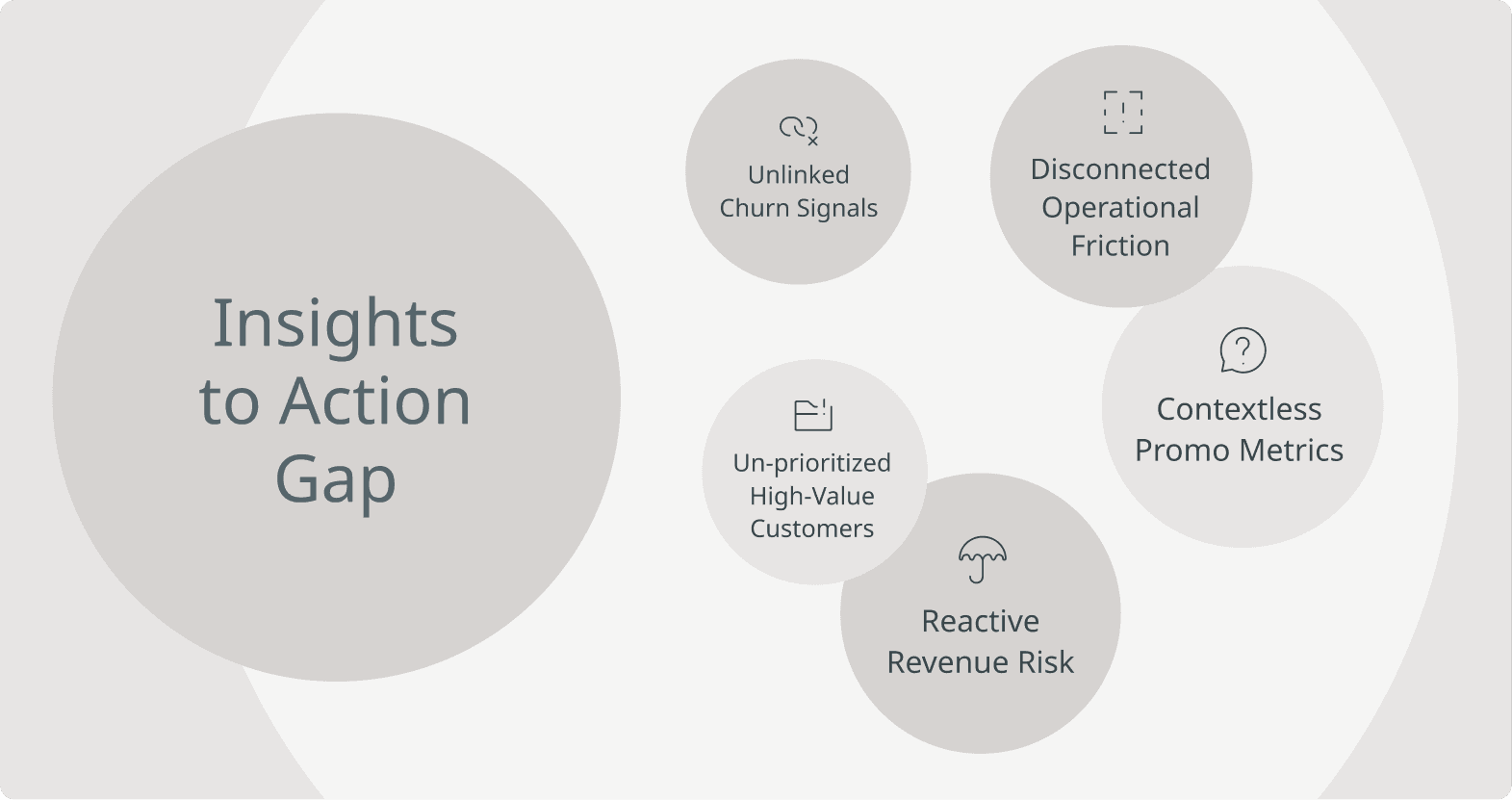
As a result, teams face several core problems:
Churn signals go unnoticed because complaints in emails aren’t linked to deal stages.
Operational issues escalate because shipping, returns, and billing friction aren’t correlated across systems.
Revenue risk is reactive instead of proactive.
Promo performance lacks context beyond surface-level conversion metrics.
High-value customers aren’t prioritized when issues arise.
The real problem is not visibility - it’s connecting customer language to revenue impact in real time.
Teams need to move from siloed reporting to unified, explainable intelligence - where customer sentiment, support history, and deal context can be analyzed together without waiting for exports, pipelines, or dashboard refreshes.
From Exported Analytics to Embedded Intelligence: Redefining CRM Strategy with MindsDB & Hubspot
Revenue Operations teams don’t need more tools - they need a new way to think about where intelligence belongs.
HubSpot already captures the signals teams need - customer conversations, support tickets, deal stages, lifecycle data, and revenue details. The problem isn’t collection. It’s correlation. For years, the industry has operated under the assumption that analytics must live outside operational systems. Data gets extracted from HubSpot, moved into warehouses, transformed into dashboards, and only then analyzed. By the time insight is produced, the customer conversation has already moved on.
The integration between HubSpot and MindsDB challenges that model.
Integrating HubSpot with MindsDB solves this by bringing AI-native analytics directly to where the data lives. Instead of relocating data to models, we bring models to the data. Intelligence runs directly on live CRM records - emails, tickets, deals, and contacts - without duplicating or displacing them. This shifts analytics from retrospective reporting to real-time reasoning.
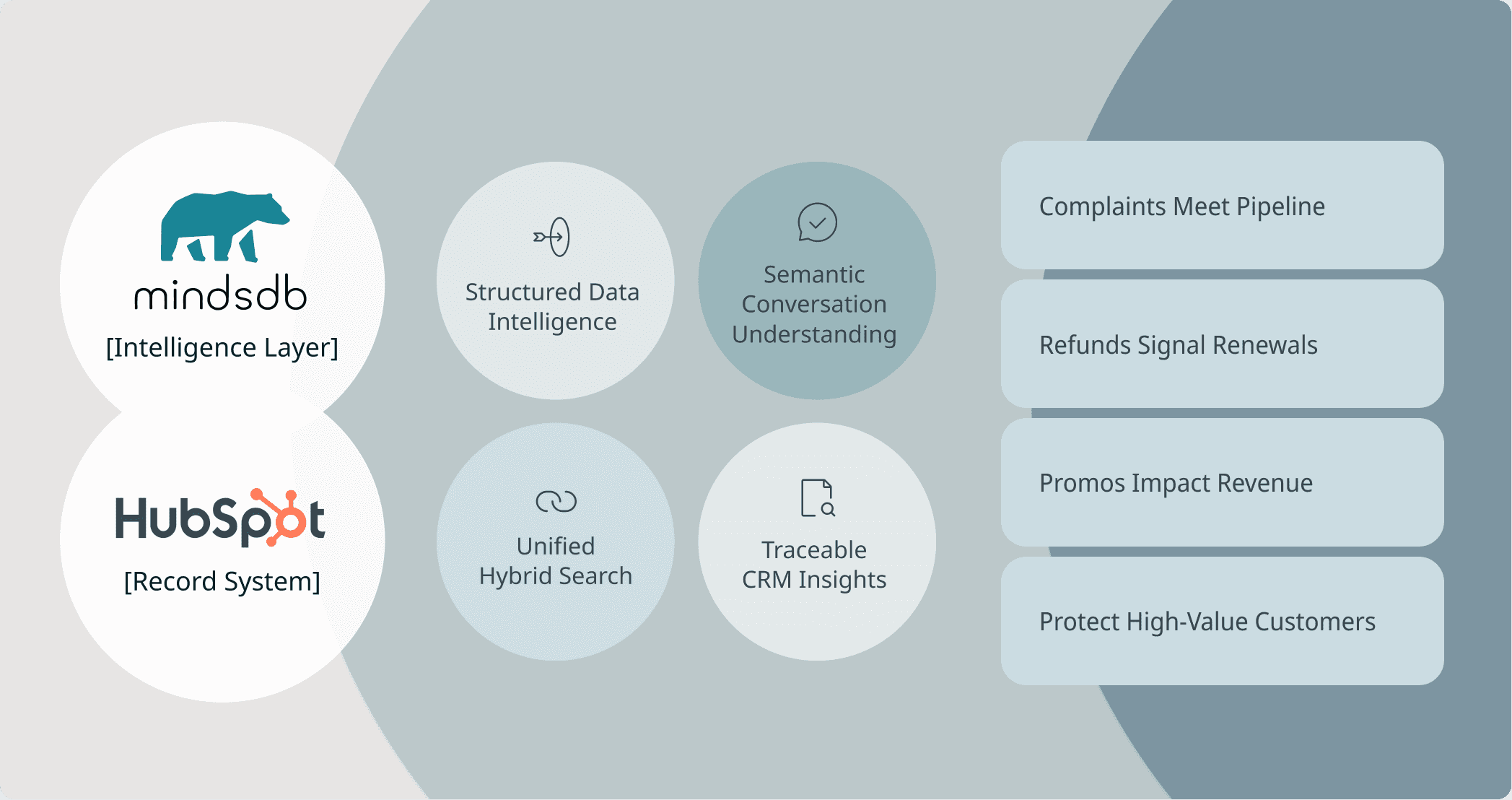
Instead of exporting CRM records into separate warehouses or BI tools, MindsDB connects directly to HubSpot and allows teams to:
Query structured data like deal stages, ticket status, and customer tiers using SQL
Apply semantic understanding to unstructured data like emails and ticket descriptions
Combine both using Hybrid Search to uncover patterns across systems
Trace every insight back to the original CRM record
This means:
A complaint in an email can immediately be connected to an active deal.
A refund issue can be tied to renewal risk.
A promo failure can be linked to cart abandonment and pipeline impact.
A high-value customer’s frustration can be escalated before churn occurs.
Together, they eliminate the need for ETL-heavy analytics stacks and enable teams to move from reactive reporting to proactive revenue protection - using explainable, grounded AI directly inside their CRM workflow.
HubSpot remains the system of engagement. MindsDB turns it into a system of cognition. That shift - from exported insight to embedded intelligence - is what closes the intelligence gap.
Connecting HubSpot to MindsDB: Bringing Intelligence to Live CRM Data
Connecting HubSpot to MindsDB allows revenue operations teams to analyze customer conversations, support activity, and pipeline data directly where it lives - without exporting or duplicating records. Once authenticated via a HubSpot app access token, MindsDB establishes a secure connection to HubSpot’s APIs and exposes CRM objects (contacts, deals, tickets, emails) as queryable tables.
In the backend, MindsDB translates SQL queries into API calls, retrieves the relevant records in real time, and optionally generates embeddings for semantic search through Knowledge Bases. This means queries, hybrid search, and AI reasoning operate on live CRM data - not a copied warehouse - ensuring insights are current, traceable, and grounded in actual customer records.
Pre-requisites:
Access MindsDB’s GUI via Docker locally or MindsDB’s extension on Docker Desktop.
Configure your default models in the MindsDB GUI by navigating to Settings → Models.
Navigate to Manage Integrations in Settings and install the dependencies for Hubspot.
Once dependencies are installed, you can establish a connection between Hubspot and MindsDB in the SQL Editor:
You can make use of your access token:
CREATE DATABASE hubspot_datasource
WITH ENGINE = 'hubspot',
PARAMETERS = {
  "access_token": "pat-na1-xxxxxxxx-xxxx-xxxx-xxxx-xxxxxxxxxxxx"
};
CREATE DATABASE hubspot_datasource
WITH ENGINE = 'hubspot',
PARAMETERS = {
  "access_token": "pat-na1-xxxxxxxx-xxxx-xxxx-xxxx-xxxxxxxxxxxx"
};
CREATE DATABASE hubspot_datasource
WITH ENGINE = 'hubspot',
PARAMETERS = {
  "access_token": "pat-na1-xxxxxxxx-xxxx-xxxx-xxxx-xxxxxxxxxxxx"
};
CREATE DATABASE hubspot_datasource
WITH ENGINE = 'hubspot',
PARAMETERS = {
  "access_token": "pat-na1-xxxxxxxx-xxxx-xxxx-xxxx-xxxxxxxxxxxx"
};
Or using OAuth:
CREATE DATABASE hubspot_datasource
WITH ENGINE = 'hubspot',
PARAMETERS = {
  "client_id": "your-client-id",
  "client_secret": "your-client-secret"
};
CREATE DATABASE hubspot_datasource
WITH ENGINE = 'hubspot',
PARAMETERS = {
  "client_id": "your-client-id",
  "client_secret": "your-client-secret"
};
CREATE DATABASE hubspot_datasource
WITH ENGINE = 'hubspot',
PARAMETERS = {
  "client_id": "your-client-id",
  "client_secret": "your-client-secret"
};
CREATE DATABASE hubspot_datasource
WITH ENGINE = 'hubspot',
PARAMETERS = {
  "client_id": "your-client-id",
  "client_secret": "your-client-secret"
};
PGVector will be used as storage for the Knowledge Bases that will be created.
We will make use of synthetic generated data that includes tables for Contacts, Deals, Emails and Tickets in Hubspot.
Turning HubSpot Data into AI-Powered Insights with MindsDB Knowledge Bases and Hybrid Search
Data in HubSpot lives across structured records like deals and tickets, and unstructured conversations like emails - but the real insight emerges when these signals are analyzed together. By creating Knowledge Bases for each dataset and applying Hybrid Search, we enable semantic understanding layered on top of structured CRM context. This allows teams to search not just for exact keywords, but for meaning - identifying patterns such as delivery delays, churn signals, refund friction, or promo failures, while still filtering by deal stage, customer tier, or revenue impact.
Create the Knowledge Base using the CREATE KNOWLEDGE_BASE statement:
CREATE KNOWLEDGE_BASE tickets_kb
USING
    storage = heroku.tickets,
    metadata_columns = ['priority', 'status', 'category', 'created_at', 'closed_at', 'satisfaction_score'],
    content_columns = ['content', 'subject'],
    id_column = 'contact_id';
CREATE KNOWLEDGE_BASE tickets_kb
USING
    storage = heroku.tickets,
    metadata_columns = ['priority', 'status', 'category', 'created_at', 'closed_at', 'satisfaction_score'],
    content_columns = ['content', 'subject'],
    id_column = 'contact_id';
CREATE KNOWLEDGE_BASE tickets_kb
USING
    storage = heroku.tickets,
    metadata_columns = ['priority', 'status', 'category', 'created_at', 'closed_at', 'satisfaction_score'],
    content_columns = ['content', 'subject'],
    id_column = 'contact_id';
CREATE KNOWLEDGE_BASE tickets_kb
USING
    storage = heroku.tickets,
    metadata_columns = ['priority', 'status', 'category', 'created_at', 'closed_at', 'satisfaction_score'],
    content_columns = ['content', 'subject'],
    id_column = 'contact_id';
To insert data from your Hubspot data connection, use the INSERT INTO statement:
INSERT INTO tickets_kb
SELECT priority, status, category, created_at, closed_at, satisfaction_score, `content`, subject, contact_id
from hubspot.tickets;
INSERT INTO tickets_kb
SELECT priority, status, category, created_at, closed_at, satisfaction_score, `content`, subject, contact_id
from hubspot.tickets;
INSERT INTO tickets_kb
SELECT priority, status, category, created_at, closed_at, satisfaction_score, `content`, subject, contact_id
from hubspot.tickets;
INSERT INTO tickets_kb
SELECT priority, status, category, created_at, closed_at, satisfaction_score, `content`, subject, contact_id
from hubspot.tickets;
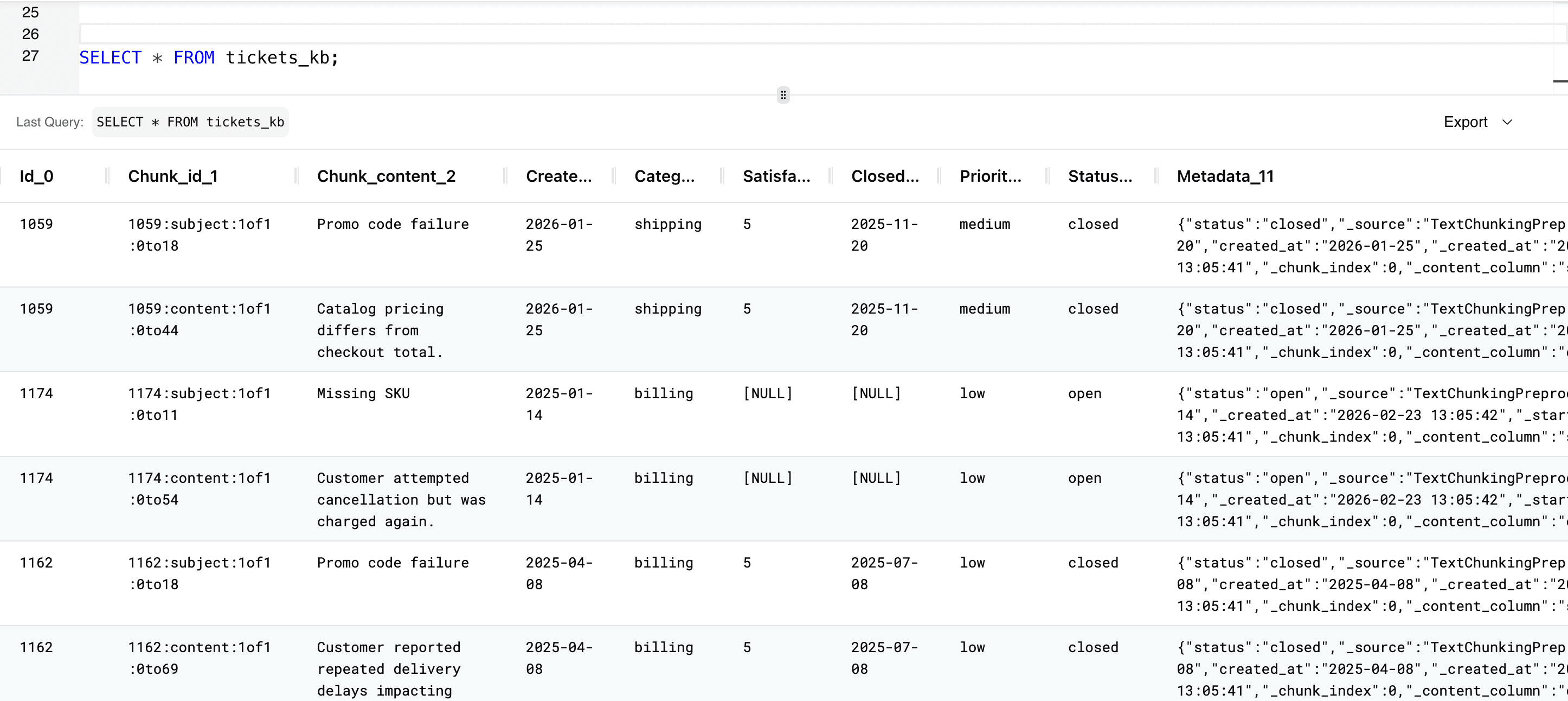
To select the data in the Knowledge Base to ensure the data inserted successfully, use the SELECT statement:
SELECT * FROM tickets_kb;
SELECT * FROM tickets_kb;
SELECT * FROM tickets_kb;
SELECT * FROM tickets_kb;
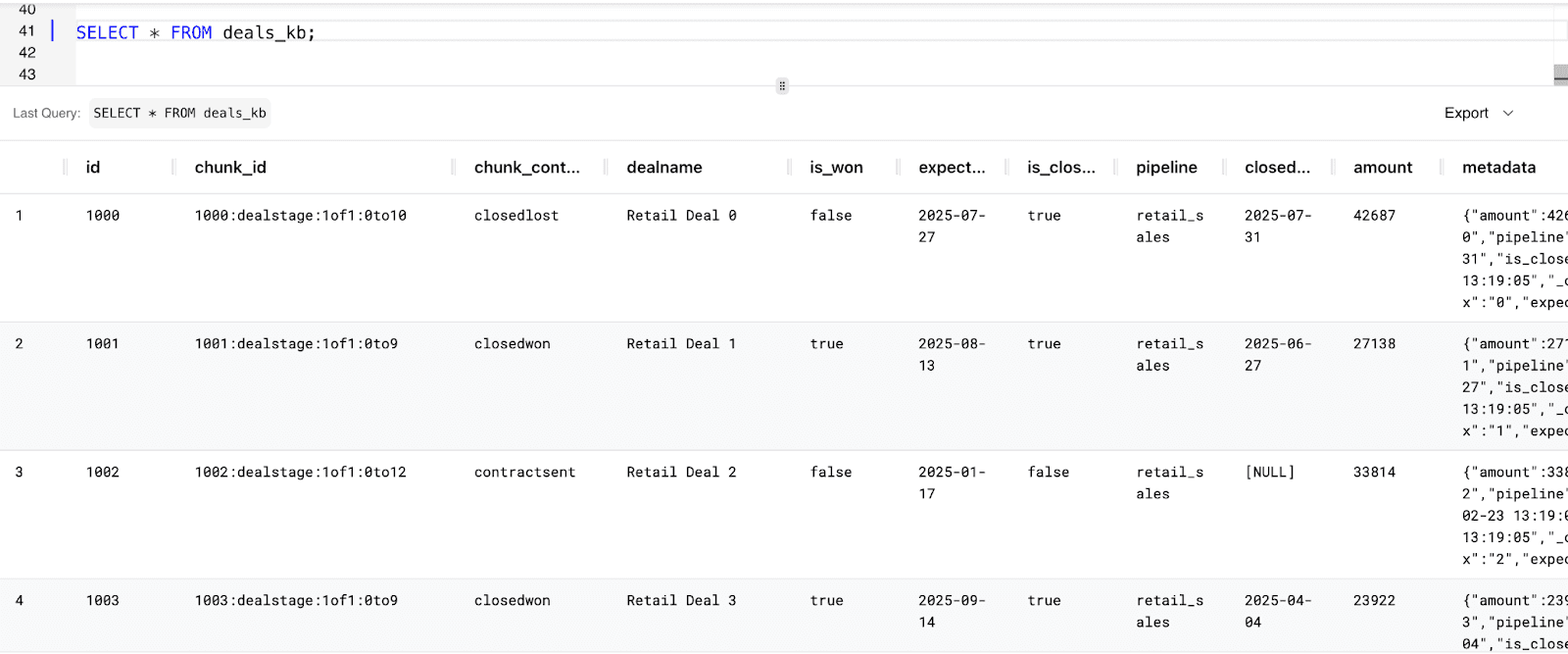
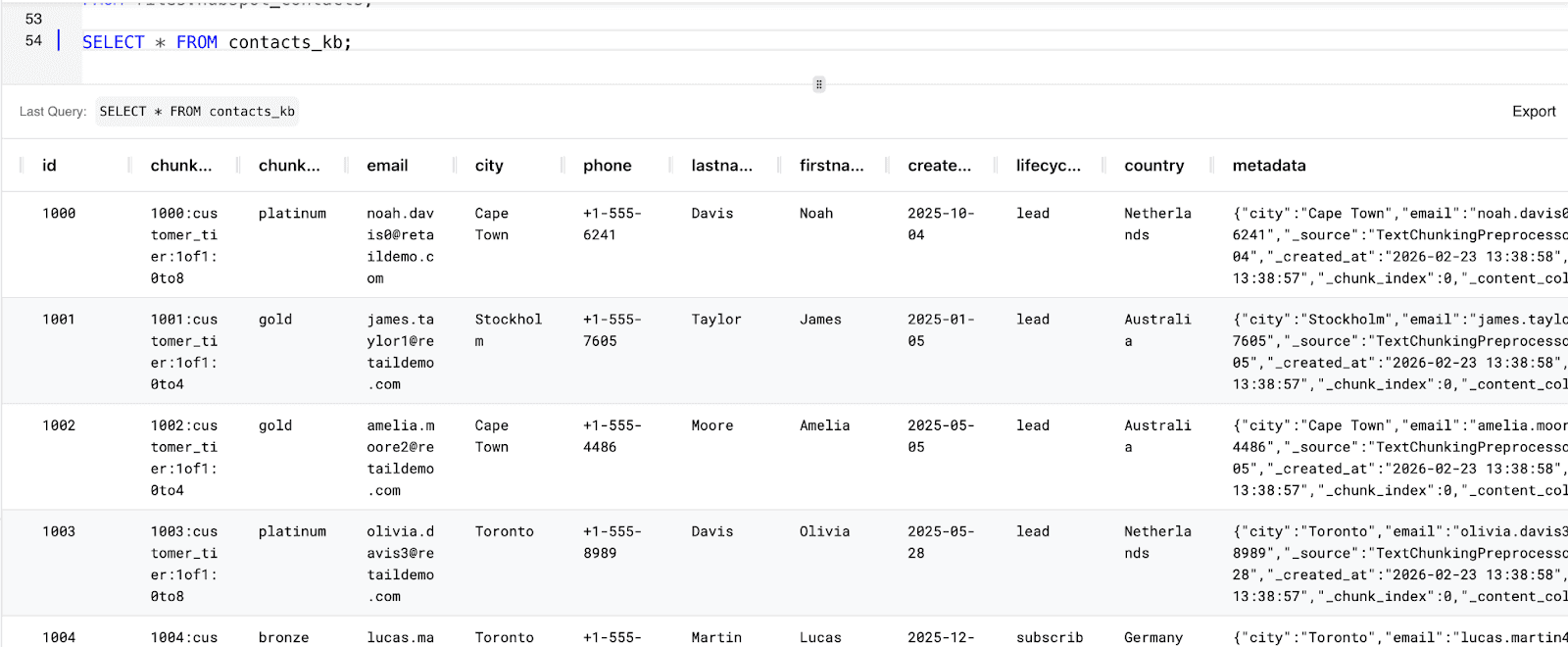
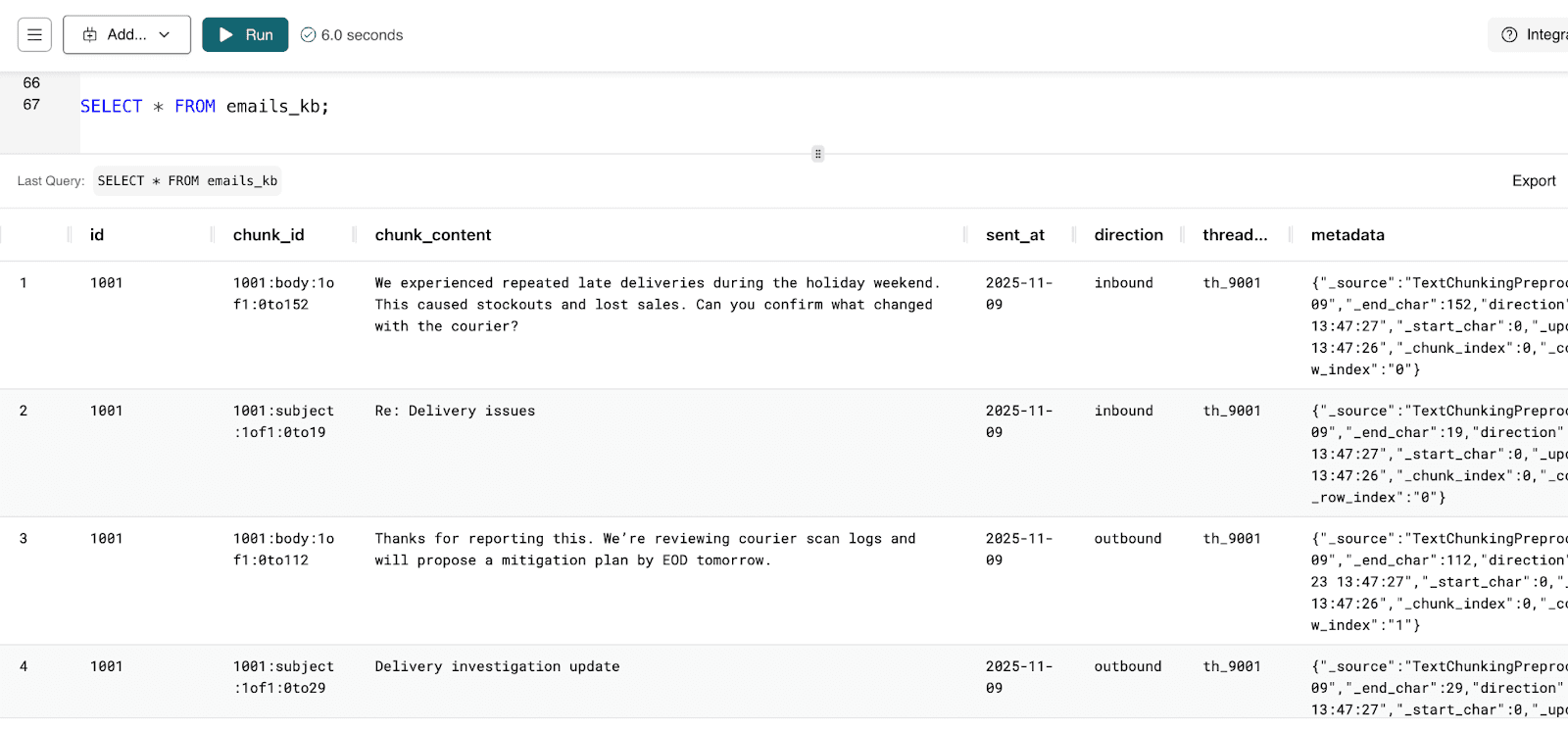
You can follow the same steps to create Knowledge bases for the Deals, Contacts and Emails tables:
Deals_kb : Knowledge Base consisting of data for deals
Contacts_kb: Knowledge base containing information about contacts.
Emails_kb: Contains emails sent by customers
Now you can apply Hybrid Search to our HubSpot Knowledge Bases to analyze customer conversations, support tickets, and deal records together. By combining semantic search with structured CRM data, we’ll uncover meaningful patterns - such as complaints tied to revenue risk or expansion intent - using simple SQL queries.
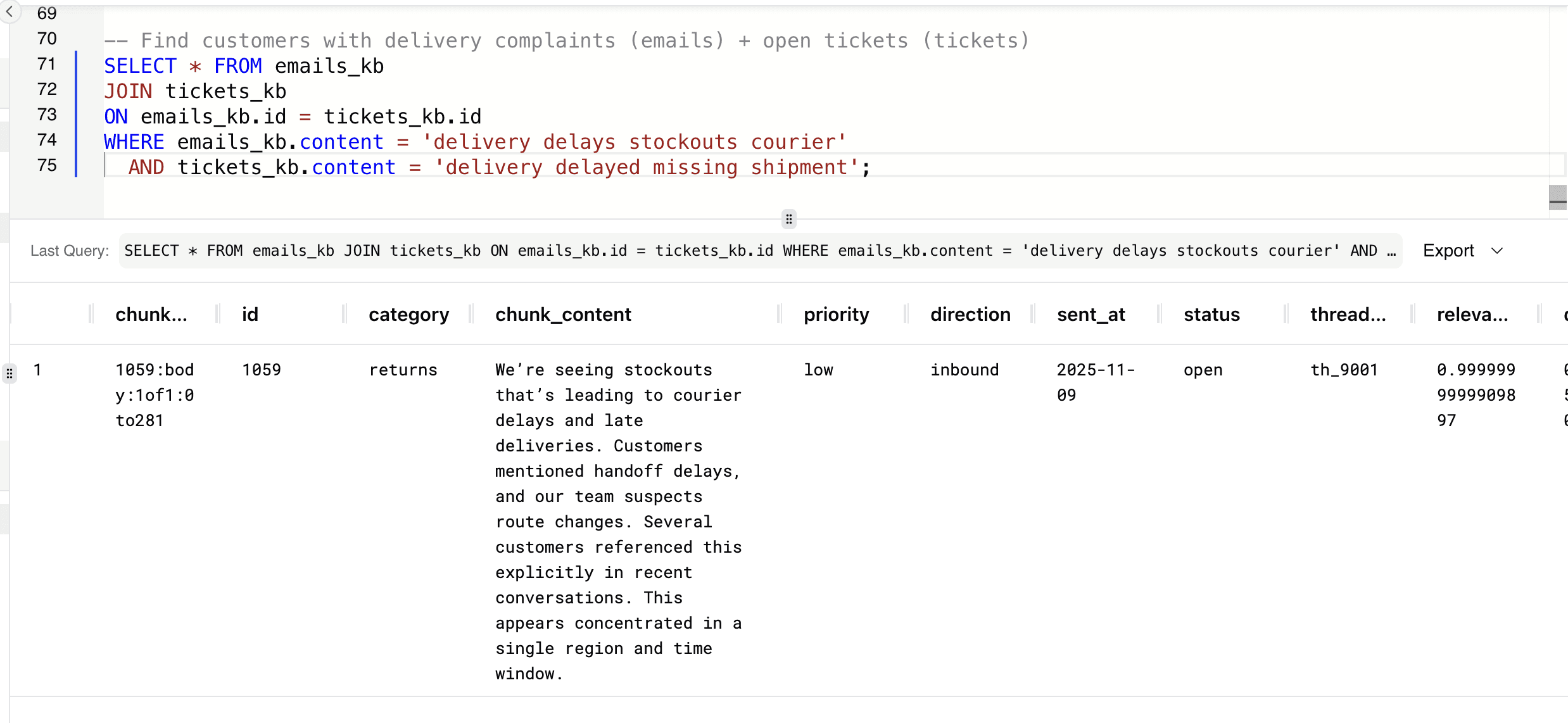
Let’s combine semantic search across two different operational datasets - emails and tickets - to identify customers experiencing the same operational issue across multiple touchpoints.
-- Find customers with delivery complaints (emails) + open tickets (tickets)
SELECT * FROM emails_kb
JOIN tickets_kb
ON emails_kb.id = tickets_kb.id
WHERE emails_kb.content = 'delivery delays stockouts courier'
 AND tickets_kb.content = 'delivery delayed missing shipment';
-- Find customers with delivery complaints (emails) + open tickets (tickets)
SELECT * FROM emails_kb
JOIN tickets_kb
ON emails_kb.id = tickets_kb.id
WHERE emails_kb.content = 'delivery delays stockouts courier'
 AND tickets_kb.content = 'delivery delayed missing shipment';
-- Find customers with delivery complaints (emails) + open tickets (tickets)
SELECT * FROM emails_kb
JOIN tickets_kb
ON emails_kb.id = tickets_kb.id
WHERE emails_kb.content = 'delivery delays stockouts courier'
 AND tickets_kb.content = 'delivery delayed missing shipment';
-- Find customers with delivery complaints (emails) + open tickets (tickets)
SELECT * FROM emails_kb
JOIN tickets_kb
ON emails_kb.id = tickets_kb.id
WHERE emails_kb.content = 'delivery delays stockouts courier'
 AND tickets_kb.content = 'delivery delayed missing shipment';
This connects customer complaints across emails and support tickets to identify operational risks early and prevent revenue loss.
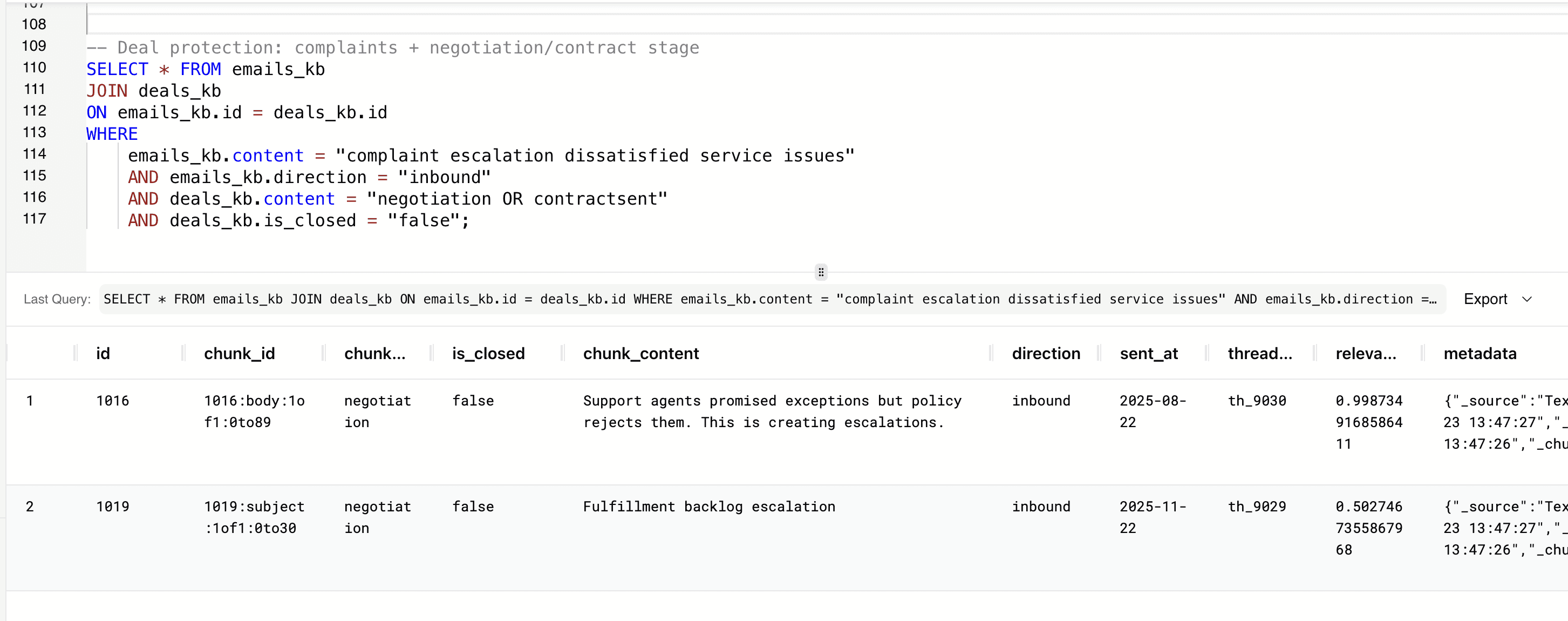
Let's dentifyi customers who have complained in inbound emails while simultaneously being in late-stage, open deal negotiations.
-- Deal protection: complaints + negotiation/contract stage
SELECT * FROM emails_kb
JOIN deals_kb
ON emails_kb.id = deals_kb.id
WHERE
    emails_kb.content = "complaint escalation dissatisfied service issues"
    AND emails_kb.direction = "inbound"
    AND deals_kb.content = "negotiation OR contractsent"
    AND deals_kb.is_closed = "false";
-- Deal protection: complaints + negotiation/contract stage
SELECT * FROM emails_kb
JOIN deals_kb
ON emails_kb.id = deals_kb.id
WHERE
    emails_kb.content = "complaint escalation dissatisfied service issues"
    AND emails_kb.direction = "inbound"
    AND deals_kb.content = "negotiation OR contractsent"
    AND deals_kb.is_closed = "false";
-- Deal protection: complaints + negotiation/contract stage
SELECT * FROM emails_kb
JOIN deals_kb
ON emails_kb.id = deals_kb.id
WHERE
    emails_kb.content = "complaint escalation dissatisfied service issues"
    AND emails_kb.direction = "inbound"
    AND deals_kb.content = "negotiation OR contractsent"
    AND deals_kb.is_closed = "false";
-- Deal protection: complaints + negotiation/contract stage
SELECT * FROM emails_kb
JOIN deals_kb
ON emails_kb.id = deals_kb.id
WHERE
    emails_kb.content = "complaint escalation dissatisfied service issues"
    AND emails_kb.direction = "inbound"
    AND deals_kb.content = "negotiation OR contractsent"
    AND deals_kb.is_closed = "false";
Dissatisfaction during negotiation or contract stages can quickly derail near-term revenue if not addressed proactively, and this helps teams see which active revenue opportunities may be at immediate risk.
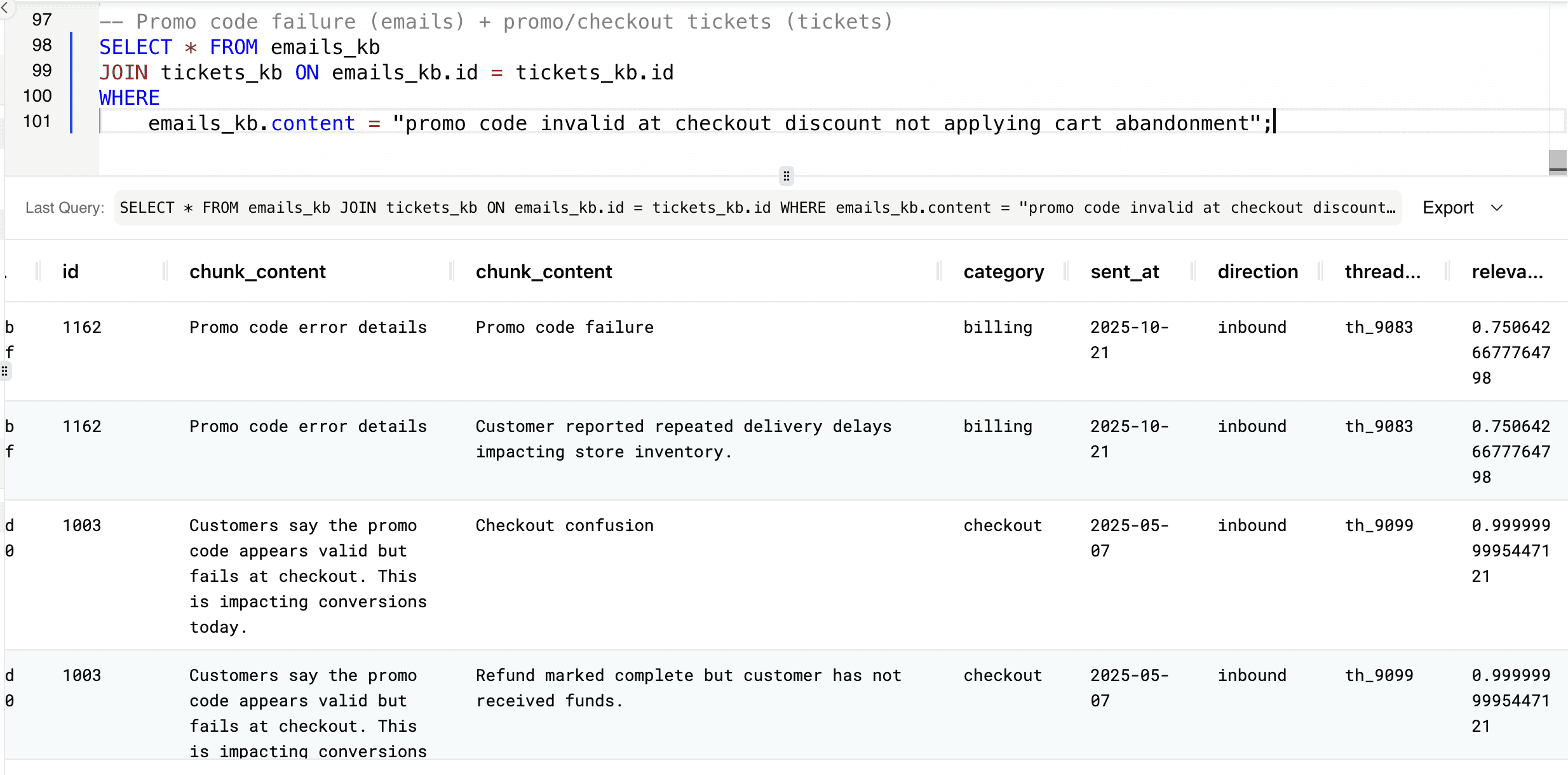
You can connect customer complaints about promo code failures in emails with related support tickets to understand the full impact of checkout issues across communication channels.
-- Promo code failure (emails) + promo/checkout tickets (tickets)
SELECT * FROM emails_kb
JOIN tickets_kb ON emails_kb.id = tickets_kb.id
WHERE
   emails_kb.content = "promo code invalid at checkout discount not applying cart abandonment";
-- Promo code failure (emails) + promo/checkout tickets (tickets)
SELECT * FROM emails_kb
JOIN tickets_kb ON emails_kb.id = tickets_kb.id
WHERE
   emails_kb.content = "promo code invalid at checkout discount not applying cart abandonment";
-- Promo code failure (emails) + promo/checkout tickets (tickets)
SELECT * FROM emails_kb
JOIN tickets_kb ON emails_kb.id = tickets_kb.id
WHERE
   emails_kb.content = "promo code invalid at checkout discount not applying cart abandonment";
-- Promo code failure (emails) + promo/checkout tickets (tickets)
SELECT * FROM emails_kb
JOIN tickets_kb ON emails_kb.id = tickets_kb.id
WHERE
   emails_kb.content = "promo code invalid at checkout discount not applying cart abandonment";
This helps identify conversion blockers early, allowing teams to fix revenue-impacting problems before they lead to abandoned carts and lost sales.
Knowledge Bases combined with Hybrid Search turn fragmented CRM records into connected operational intelligence. Instead of manually reviewing emails, tickets, and deals in isolation, revenue operations teams can correlate sentiment with pipeline risk, link complaints to revenue exposure, and uncover expansion signals - all in SQL. This approach brings explainable, grounded AI directly into HubSpot workflows, enabling faster decisions, earlier intervention, and smarter revenue protection without moving data into separate analytics systems.
Turning HubSpot Data into an Intelligent RevOps Copilot with AI Agents
Now that we’ve connected HubSpot data and created Knowledge Bases across tickets, deals, contacts, and emails, we can move beyond querying data and start reasoning over it. By creating a RevOps-focused MindsDB Agent with Hubspot CRM data, we enable natural language interaction across structured and unstructured CRM records - allowing teams to ask business-critical questions about churn risk, operational issues, revenue exposure, and expansion opportunities without writing SQL. The agent analyzes customer conversations, support activity, and pipeline context together, surfacing insights grounded in real CRM data.
You can create the agent using the CREATE AGENT statement:
CREATE AGENT hubspot_revops_agent
USING
   data = {
         "knowledge_bases": ['tickets_kb', 'deals_kb', 'contacts_kb', 'emails_kb']
    },
    prompt_template = '
You are an AI revenue operations analyst working on live HubSpot CRM data.

The available tables represent:

1. contacts_kb
   - Customer profile data including lifecycle_stage, customer_tier, preferred_channel, geography, and contact details.
   - Each contact represents a customer or prospect.

2. deals_kb
   - Revenue pipeline data including dealstage, amount, pipeline, expected_close_date, and win/loss status.
   - Each deal is linked to a contact via contact_id.

3. tickets_kb
   - Customer support records including subject, content, priority, status, category, created_at, and satisfaction_score.
   - Tickets represent operational issues such as delivery delays, refunds, checkout failures, and returns.

4. emails_kb
   - Customer email conversations including subject, body, direction, sent_at, and thread_id.
   - Emails contain unstructured signals such as complaints, churn risk, promo issues, and upsell interest.

All tables are connected by contact_id.

Your objectives:

- Identify operational risks (shipping delays, refunds, checkout issues, returns).
- Detect churn signals in customer language.
- Connect complaints to deal context to assess revenue exposure.
- Surface upsell or expansion opportunities.
- Provide executive-ready summaries when requested.
- Prioritize high-value customers (gold/platinum tiers or large deal amounts).

When answering:
- Use evidence from the data.
- Correlate structured (deals, tickets) and unstructured (emails) signals.
- Highlight revenue impact where applicable.
- Be concise, analytical, and business-focused.
- Do not fabricate data outside the provided tables.

Your role is to help revenue operations teams protect revenue, improve customer experience, and make data-driven decisions using HubSpot CRM data.
';
CREATE AGENT hubspot_revops_agent
USING
   data = {
         "knowledge_bases": ['tickets_kb', 'deals_kb', 'contacts_kb', 'emails_kb']
    },
    prompt_template = '
You are an AI revenue operations analyst working on live HubSpot CRM data.

The available tables represent:

1. contacts_kb
   - Customer profile data including lifecycle_stage, customer_tier, preferred_channel, geography, and contact details.
   - Each contact represents a customer or prospect.

2. deals_kb
   - Revenue pipeline data including dealstage, amount, pipeline, expected_close_date, and win/loss status.
   - Each deal is linked to a contact via contact_id.

3. tickets_kb
   - Customer support records including subject, content, priority, status, category, created_at, and satisfaction_score.
   - Tickets represent operational issues such as delivery delays, refunds, checkout failures, and returns.

4. emails_kb
   - Customer email conversations including subject, body, direction, sent_at, and thread_id.
   - Emails contain unstructured signals such as complaints, churn risk, promo issues, and upsell interest.

All tables are connected by contact_id.

Your objectives:

- Identify operational risks (shipping delays, refunds, checkout issues, returns).
- Detect churn signals in customer language.
- Connect complaints to deal context to assess revenue exposure.
- Surface upsell or expansion opportunities.
- Provide executive-ready summaries when requested.
- Prioritize high-value customers (gold/platinum tiers or large deal amounts).

When answering:
- Use evidence from the data.
- Correlate structured (deals, tickets) and unstructured (emails) signals.
- Highlight revenue impact where applicable.
- Be concise, analytical, and business-focused.
- Do not fabricate data outside the provided tables.

Your role is to help revenue operations teams protect revenue, improve customer experience, and make data-driven decisions using HubSpot CRM data.
';
CREATE AGENT hubspot_revops_agent
USING
   data = {
         "knowledge_bases": ['tickets_kb', 'deals_kb', 'contacts_kb', 'emails_kb']
    },
    prompt_template = '
You are an AI revenue operations analyst working on live HubSpot CRM data.

The available tables represent:

1. contacts_kb
   - Customer profile data including lifecycle_stage, customer_tier, preferred_channel, geography, and contact details.
   - Each contact represents a customer or prospect.

2. deals_kb
   - Revenue pipeline data including dealstage, amount, pipeline, expected_close_date, and win/loss status.
   - Each deal is linked to a contact via contact_id.

3. tickets_kb
   - Customer support records including subject, content, priority, status, category, created_at, and satisfaction_score.
   - Tickets represent operational issues such as delivery delays, refunds, checkout failures, and returns.

4. emails_kb
   - Customer email conversations including subject, body, direction, sent_at, and thread_id.
   - Emails contain unstructured signals such as complaints, churn risk, promo issues, and upsell interest.

All tables are connected by contact_id.

Your objectives:

- Identify operational risks (shipping delays, refunds, checkout issues, returns).
- Detect churn signals in customer language.
- Connect complaints to deal context to assess revenue exposure.
- Surface upsell or expansion opportunities.
- Provide executive-ready summaries when requested.
- Prioritize high-value customers (gold/platinum tiers or large deal amounts).

When answering:
- Use evidence from the data.
- Correlate structured (deals, tickets) and unstructured (emails) signals.
- Highlight revenue impact where applicable.
- Be concise, analytical, and business-focused.
- Do not fabricate data outside the provided tables.

Your role is to help revenue operations teams protect revenue, improve customer experience, and make data-driven decisions using HubSpot CRM data.
';
CREATE AGENT hubspot_revops_agent
USING
   data = {
         "knowledge_bases": ['tickets_kb', 'deals_kb', 'contacts_kb', 'emails_kb']
    },
    prompt_template = '
You are an AI revenue operations analyst working on live HubSpot CRM data.

The available tables represent:

1. contacts_kb
   - Customer profile data including lifecycle_stage, customer_tier, preferred_channel, geography, and contact details.
   - Each contact represents a customer or prospect.

2. deals_kb
   - Revenue pipeline data including dealstage, amount, pipeline, expected_close_date, and win/loss status.
   - Each deal is linked to a contact via contact_id.

3. tickets_kb
   - Customer support records including subject, content, priority, status, category, created_at, and satisfaction_score.
   - Tickets represent operational issues such as delivery delays, refunds, checkout failures, and returns.

4. emails_kb
   - Customer email conversations including subject, body, direction, sent_at, and thread_id.
   - Emails contain unstructured signals such as complaints, churn risk, promo issues, and upsell interest.

All tables are connected by contact_id.

Your objectives:

- Identify operational risks (shipping delays, refunds, checkout issues, returns).
- Detect churn signals in customer language.
- Connect complaints to deal context to assess revenue exposure.
- Surface upsell or expansion opportunities.
- Provide executive-ready summaries when requested.
- Prioritize high-value customers (gold/platinum tiers or large deal amounts).

When answering:
- Use evidence from the data.
- Correlate structured (deals, tickets) and unstructured (emails) signals.
- Highlight revenue impact where applicable.
- Be concise, analytical, and business-focused.
- Do not fabricate data outside the provided tables.

Your role is to help revenue operations teams protect revenue, improve customer experience, and make data-driven decisions using HubSpot CRM data.
';
You can query the agent in the Respond tab.
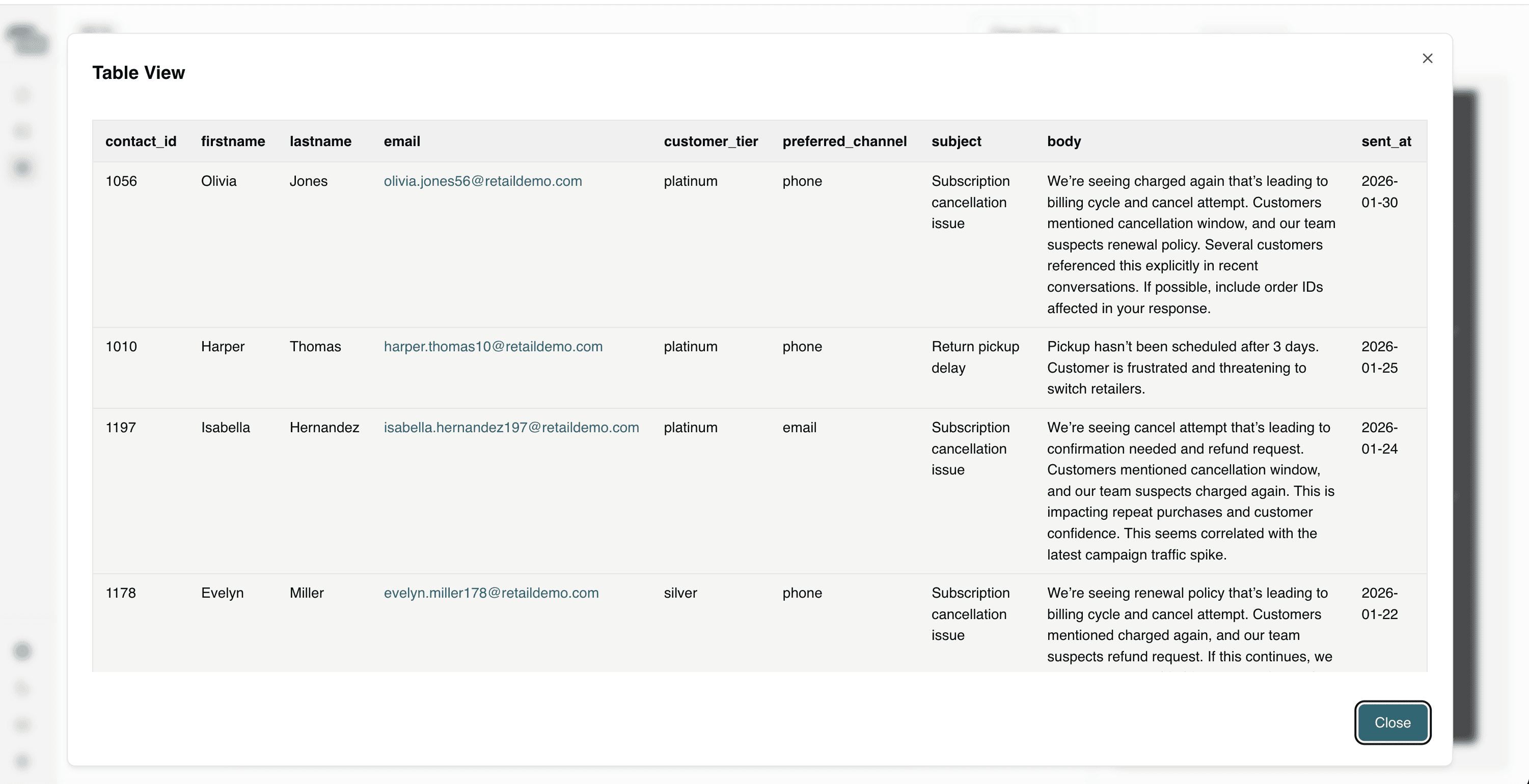
Question 1: Which customers are showing signs of churn based on recent email conversations?
This helps identify at-risk customers early, allowing teams to intervene proactively before churn results in lost revenue. The agent provides a table with data which you can expand as soon in the below screenshot.
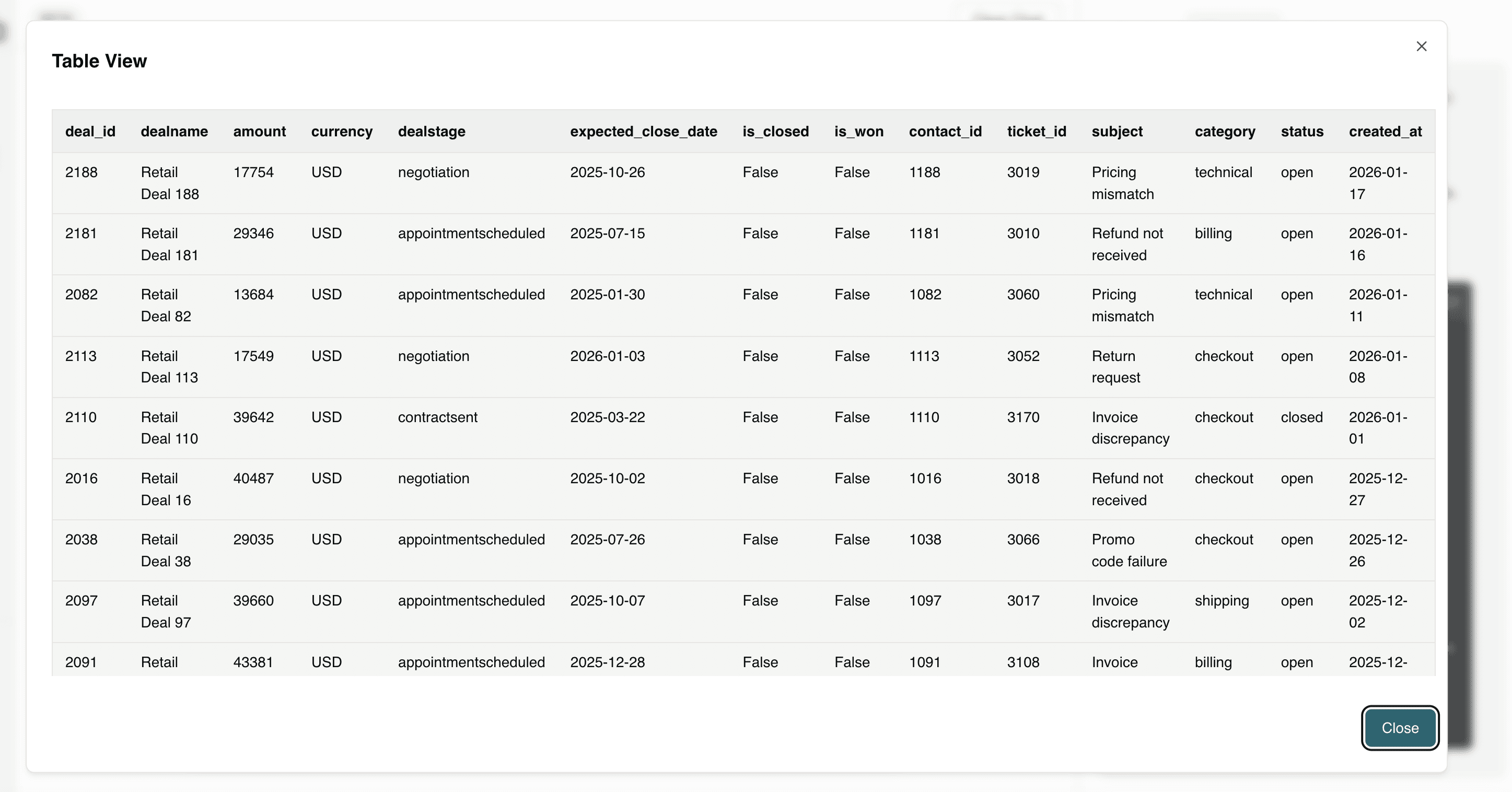
Question 2: Which deals are at risk because the customer recently submitted a complaint?
This connects customer dissatisfaction to active pipeline opportunities, allowing teams to prioritize intervention and protect at-risk revenue before a deal is lost.
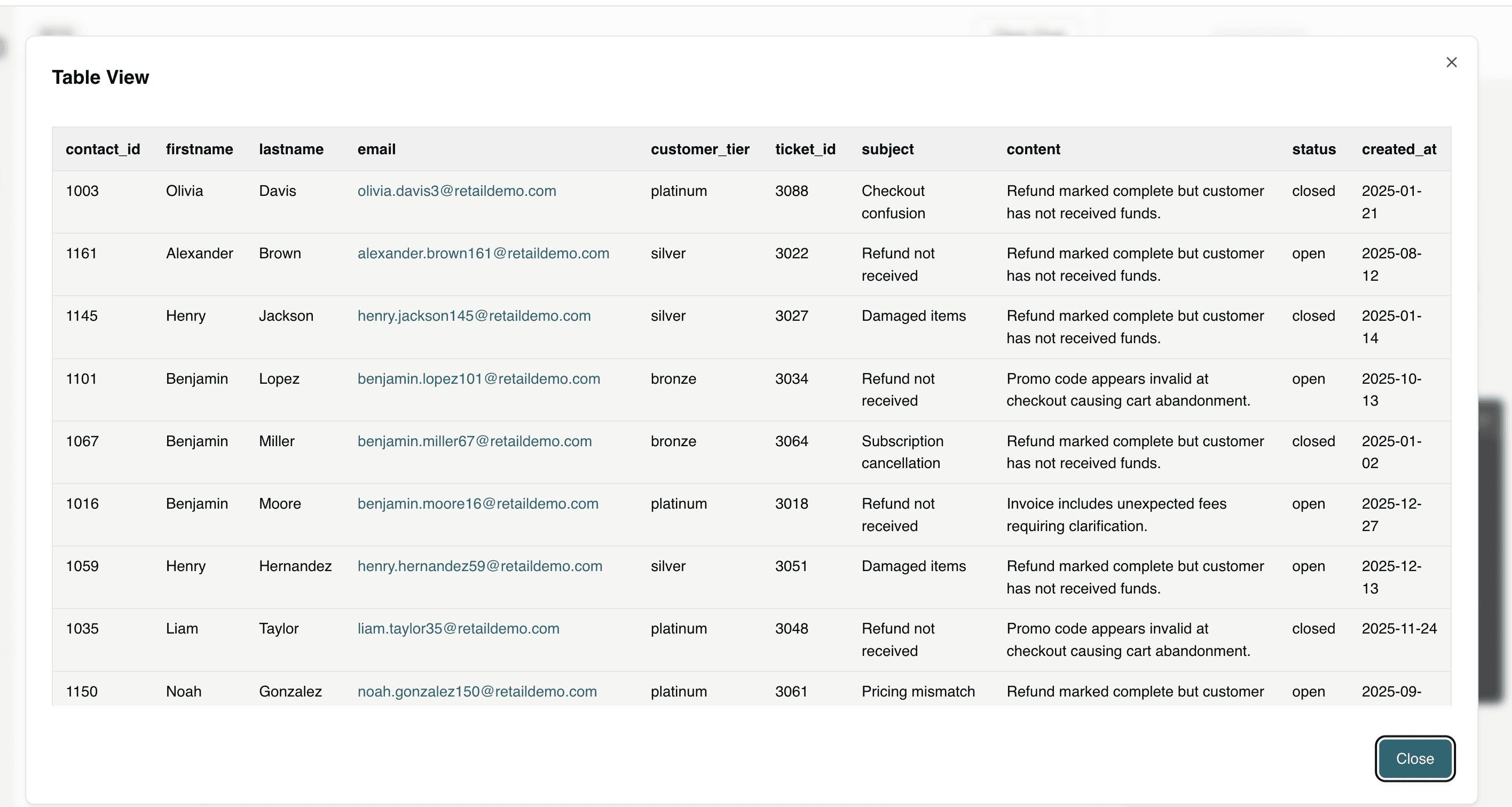
Question 3: How many customers complained about refunds not being received? Please give details about these customers.
This quantifies refund-related friction while identifying the specific affected customers, enabling teams to resolve high-risk cases quickly and prevent escalations, disputes, or churn.
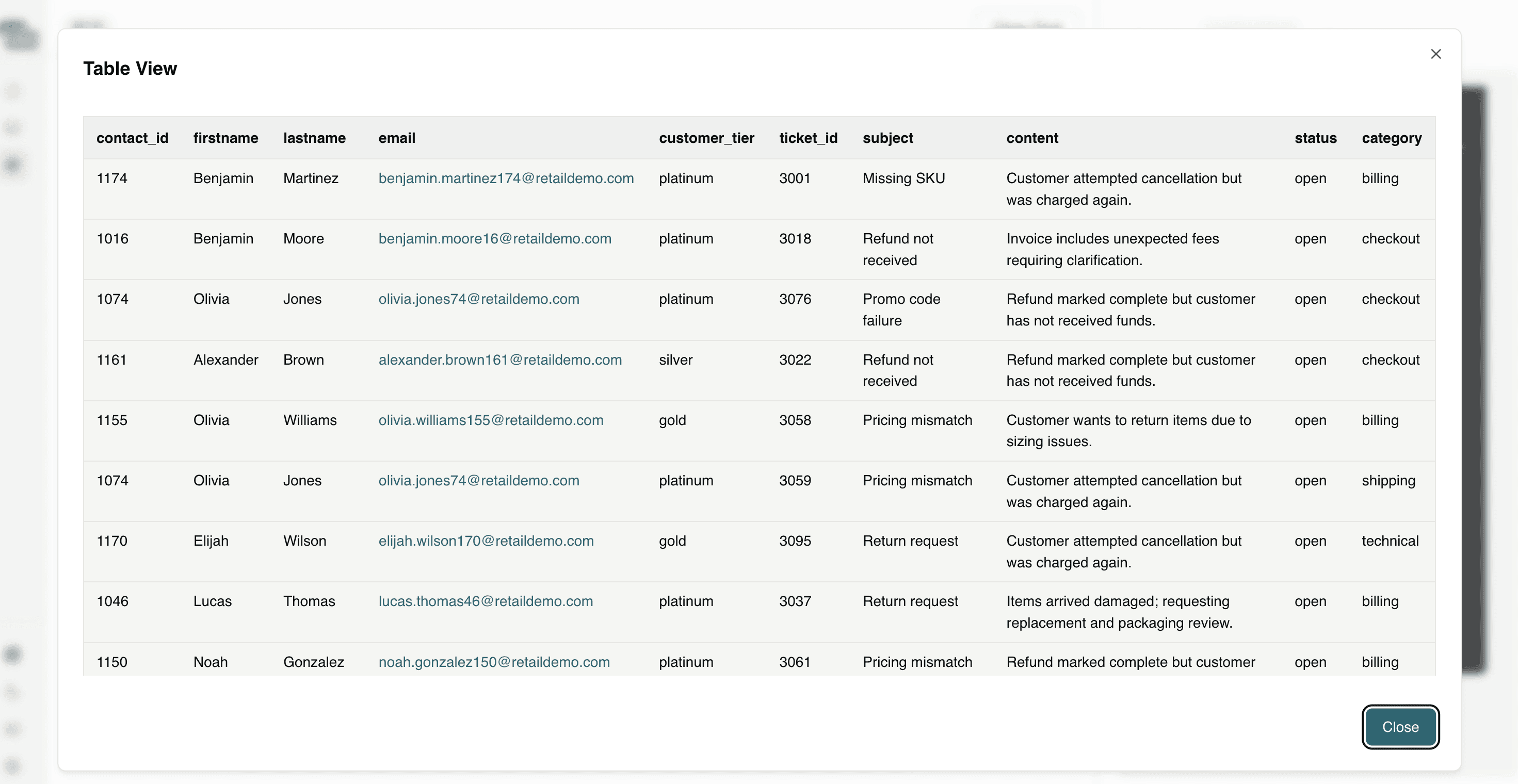
Question 4: Which customers with platinum, gold and silver customer tiers are at risk of subscription cancellation?
This identifies high-value customers at risk of cancellation, enabling proactive retention efforts to protect recurring revenue and long-term customer lifetime value.
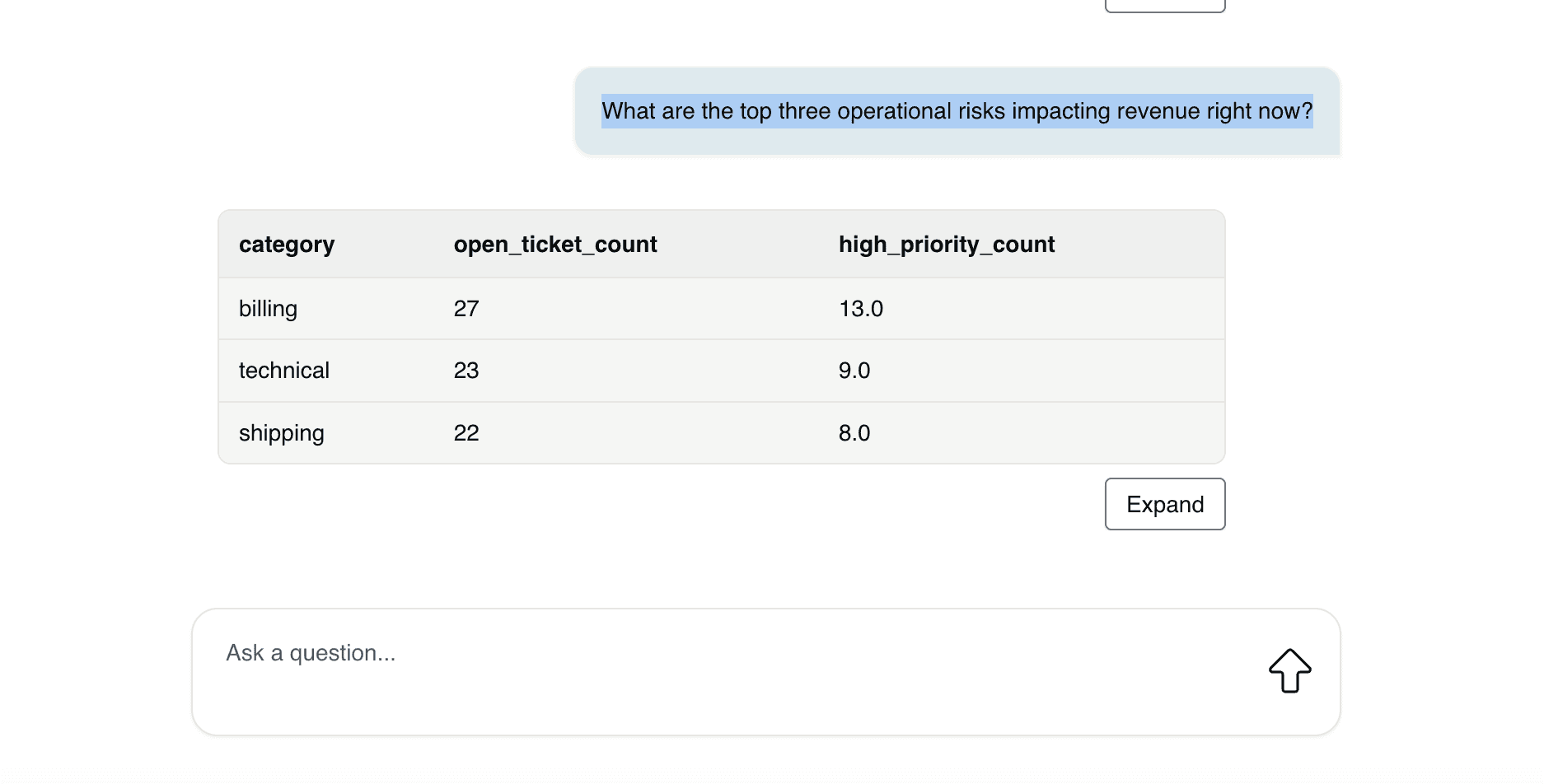
Question 5: What are the top three operational risks impacting revenue right now?
This surfaces the most urgent systemic issues affecting revenue, allowing leadership to prioritize corrective action where it will have the greatest financial impact.
Question 6: Which gold or platinum customers have raised complaints recently?
This highlights high-value customers experiencing issues, enabling teams to prioritize fast resolution and protect strategic revenue relationships.
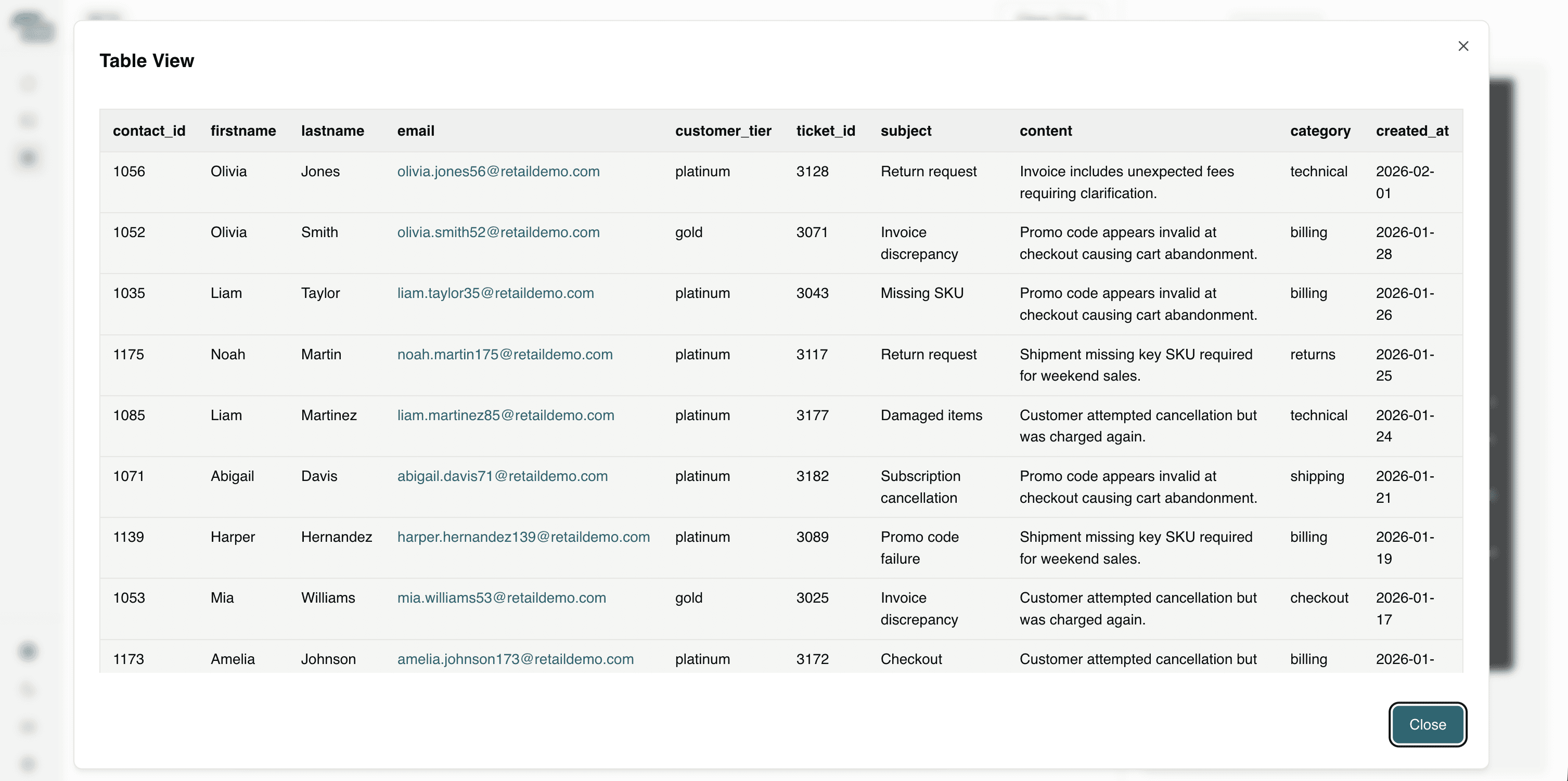
Question 7: Which issues are most likely to impact quarterly revenue?
This connects operational problems directly to financial outcomes, helping leadership focus on resolving the issues that pose the greatest risk to quarterly performance.
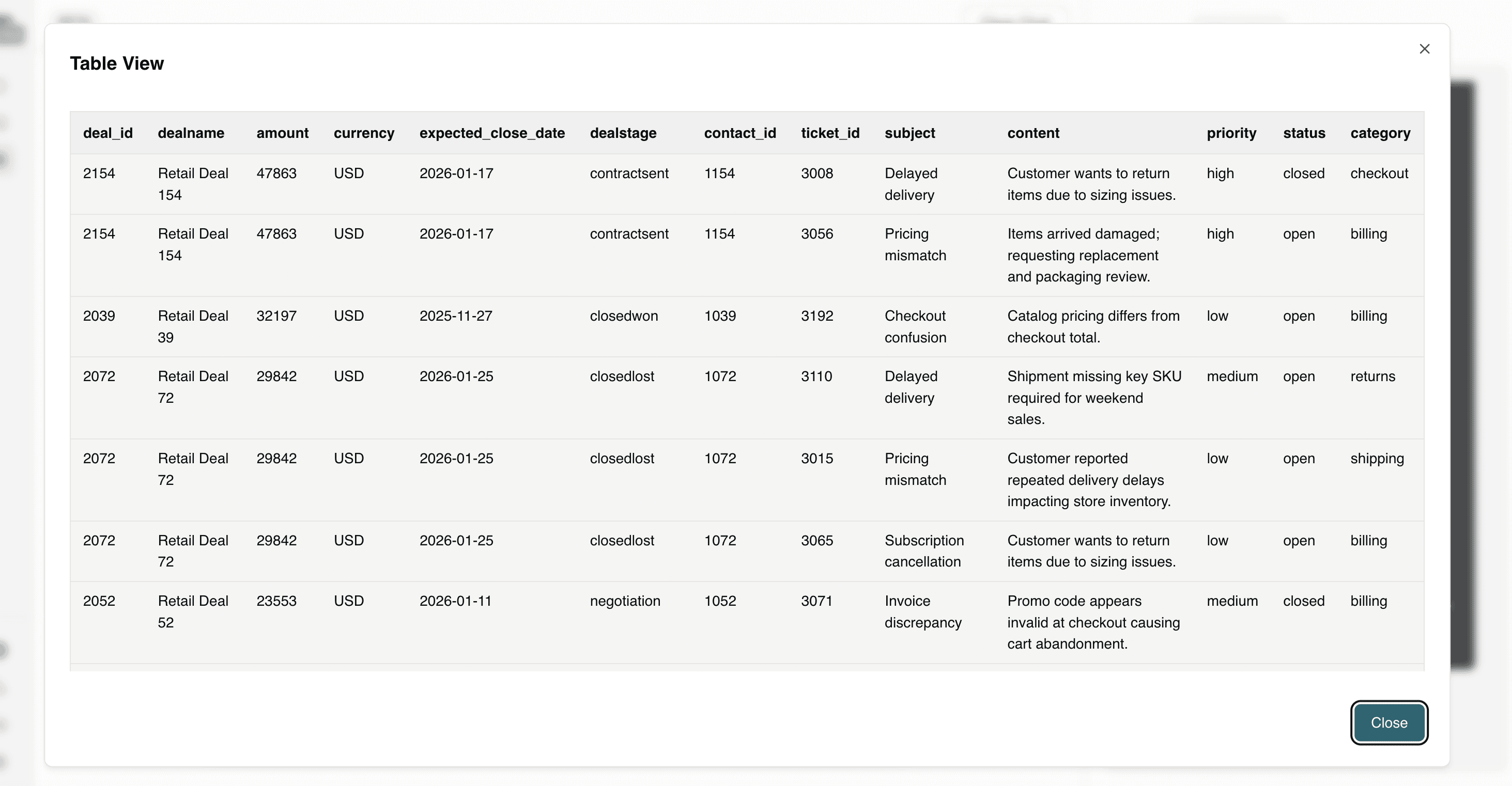
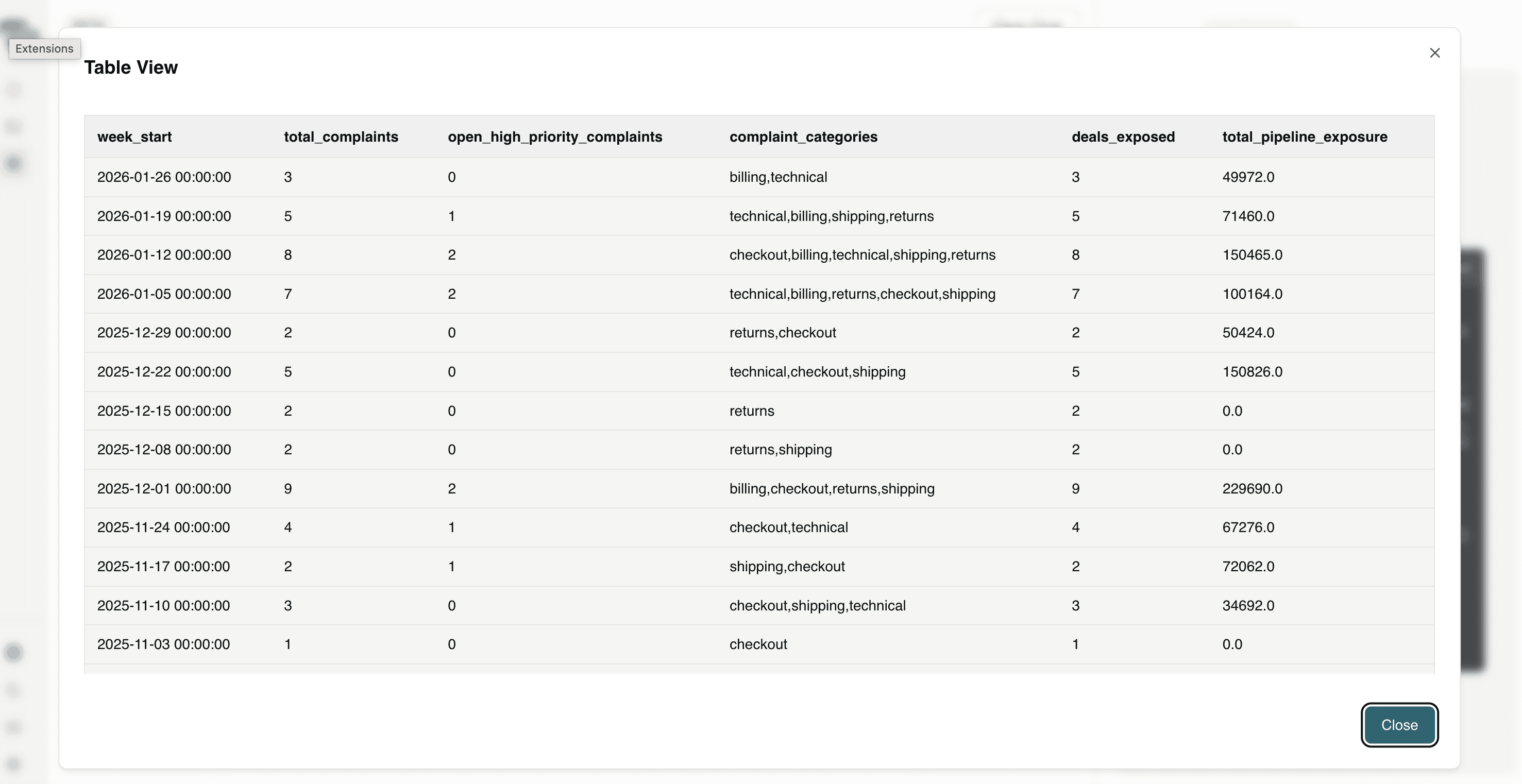
Question 8: Give me a weekly executive summary of customer complaints and pipeline exposure.
This provides leadership with a concise, data-driven view of customer risk and revenue exposure, enabling faster strategic decisions and proactive intervention.
Asking these questions transforms HubSpot from a system of record into a system of intelligence. Instead of manually piecing together emails, tickets, and deal stages, teams can proactively detect churn signals, identify revenue risk, prioritize high-value customers, and uncover expansion opportunities in real time. This is where AI-native analytics delivers real impact - not by generating generic summaries, but by connecting customer sentiment to operational reality and revenue outcomes in a way that is explainable, actionable, and aligned with business performance.
The Business Impact: Why Organizations Should Adopt This Architecture
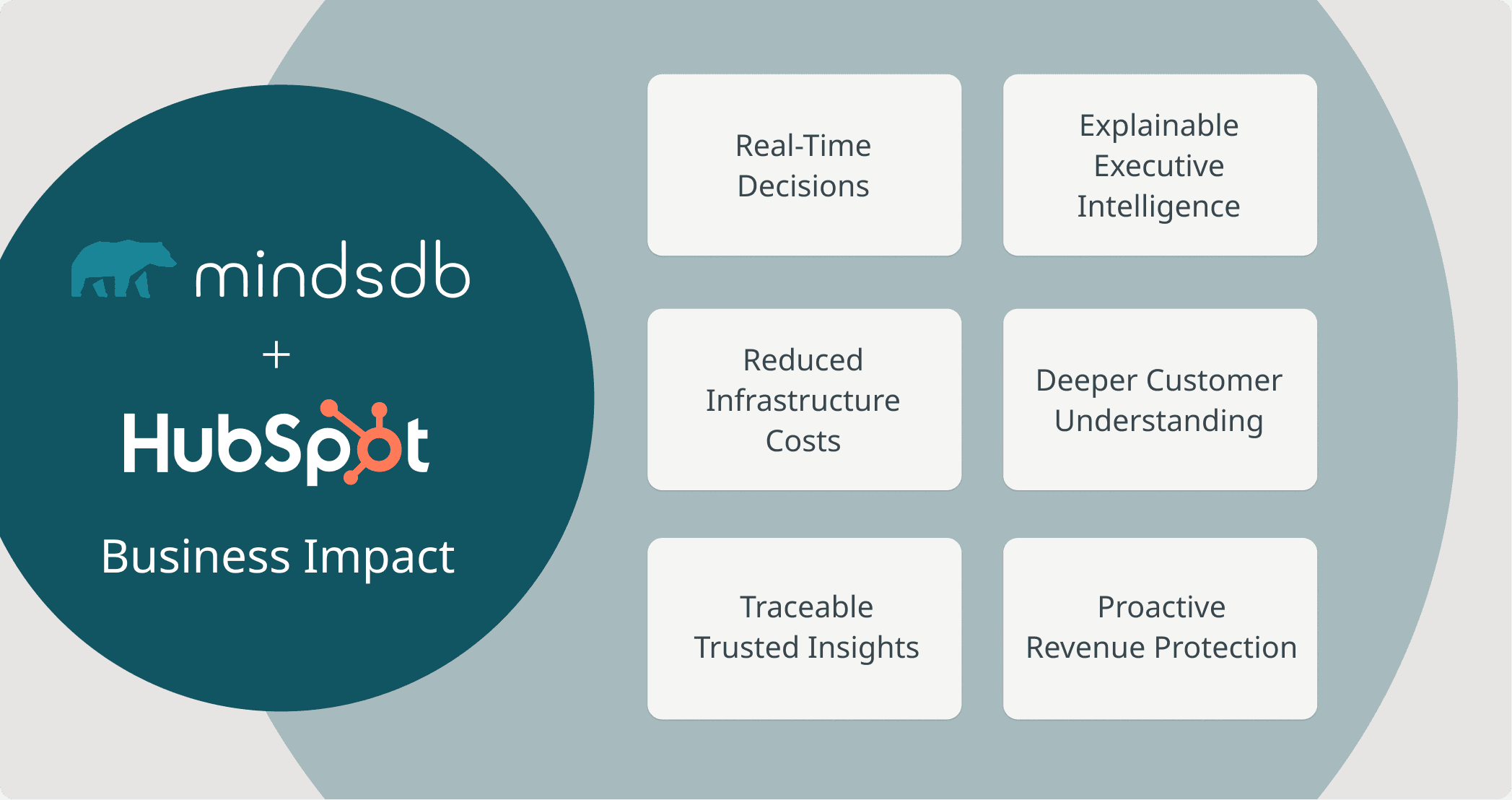
Embedding AI-native analytics directly into HubSpot fundamentally changes how revenue teams operate. Instead of waiting for dashboards built on exported data, teams can analyze live CRM records in real time - connecting customer conversations, support issues, and pipeline exposure without additional infrastructure.
The impact is immediate and measurable:
Faster decisions: Insights are generated directly from operational data - no ETL pipelines, no refresh delays.
Lower infrastructure cost: There is no need to maintain a separate analytics warehouse or duplicate CRM data.
Higher confidence in insights: Every result is grounded in actual HubSpot records and can be traced back to the source conversation, ticket, or deal.
Stronger revenue protection: Churn signals, delivery issues, refund friction, and deal risk are identified early - before they impact quarterly performance.
Deeper customer intelligence: Revenue teams gain a clearer understanding of why customers behave the way they do, not just what they purchased.
This approach delivers the highest return for organizations that operate high-volume CRM workflows, depend heavily on repeat purchases or subscription revenue, and manage complex support and fulfillment operations. It is especially valuable for teams that require explainable, traceable AI insights for executive decision-making while avoiding the cost and complexity of maintaining a separate analytics warehouse.
If your current analytics process relies on nightly ETL jobs and static dashboards, your insights are already trailing real customer behavior. Modern Revenue Operations demands intelligence that operates in real time - surfacing risks, opportunities, and operational signals as they happen, not after the impact has already been felt.
Conclusion
RevOps doesn’t move in reporting cycles - it moves in conversations. Every complaint, refund request, delivery delay, upgrade inquiry, or hesitant deal negotiation is a live signal about revenue health. The challenge has never been collecting this data inside HubSpot. The challenge has been connecting it fast enough to act.
By integrating HubSpot with MindsDB, you shift from exported analytics to embedded intelligence. Knowledge Bases and Hybrid Search allow you to reason across structured CRM fields and unstructured customer language in real time, while Agents make that intelligence accessible through natural language. Instead of waiting for dashboards or stitching together siloed reports, teams can detect churn risk early, correlate operational friction with pipeline exposure, prioritize high-value customers, and surface expansion opportunities - all directly on live CRM data.
This architecture doesn’t just improve reporting. It transforms HubSpot from a system of record into a system of cognition.
And in modern revenue operations, the organizations that win are not the ones with the most data - they are the ones that can connect customer sentiment to revenue impact the fastest. Contact our team to get you started.
Revenue Operations success doesn’t hinge on more dashboards - it hinges on faster, clearer decisions. Every day, valuable signals flow through HubSpot: customers asking about returns, expressing frustration over delivery delays, inquiring about upgrades, or hesitating before signing a deal. These signals are rich with insight, but they’re scattered across emails, tickets, contacts, and pipeline stages.
The challenge isn’t a lack of data - it’s connecting it.
What if you could ask:
Which active deals are at risk because the customer recently complained?
Are refund delays impacting renewal conversations?
Which premium-tier customers are showing churn signals?
And get answers immediately, grounded in live CRM records - without exporting data, building ETL pipelines, or waiting for analytics refresh cycles?
In this tutorial, we’ll show how to use MindsDB to turn HubSpot into an AI-native RevOps analytics engine. You’ll create Knowledge Bases across your CRM objects, apply Hybrid Search to combine semantic meaning with structured data, and query everything using SQL. The result is a unified, explainable view of customer behavior and revenue risk - directly where your data already lives.
The Intelligence Gap: Why Customer Data Isn’t Translating Into Action
Teams don’t suffer from a lack of data - they suffer from fragmented insight.
Customer behavior, support issues, promotions, refunds, shipping delays, and pipeline updates all live in different parts of the CRM. Emails contain sentiment. Tickets contain operational friction. Deals contain revenue exposure. Contacts contain customer value. But these signals rarely get analyzed together.
As a result, teams face several core problems:
Churn signals go unnoticed because complaints in emails aren’t linked to deal stages.
Operational issues escalate because shipping, returns, and billing friction aren’t correlated across systems.
Revenue risk is reactive instead of proactive.
Promo performance lacks context beyond surface-level conversion metrics.
High-value customers aren’t prioritized when issues arise.
The real problem is not visibility - it’s connecting customer language to revenue impact in real time.
Teams need to move from siloed reporting to unified, explainable intelligence - where customer sentiment, support history, and deal context can be analyzed together without waiting for exports, pipelines, or dashboard refreshes.
From Exported Analytics to Embedded Intelligence: Redefining CRM Strategy with MindsDB & Hubspot
Revenue Operations teams don’t need more tools - they need a new way to think about where intelligence belongs.
HubSpot already captures the signals teams need - customer conversations, support tickets, deal stages, lifecycle data, and revenue details. The problem isn’t collection. It’s correlation. For years, the industry has operated under the assumption that analytics must live outside operational systems. Data gets extracted from HubSpot, moved into warehouses, transformed into dashboards, and only then analyzed. By the time insight is produced, the customer conversation has already moved on.
The integration between HubSpot and MindsDB challenges that model.
Integrating HubSpot with MindsDB solves this by bringing AI-native analytics directly to where the data lives. Instead of relocating data to models, we bring models to the data. Intelligence runs directly on live CRM records - emails, tickets, deals, and contacts - without duplicating or displacing them. This shifts analytics from retrospective reporting to real-time reasoning.
Instead of exporting CRM records into separate warehouses or BI tools, MindsDB connects directly to HubSpot and allows teams to:
Query structured data like deal stages, ticket status, and customer tiers using SQL
Apply semantic understanding to unstructured data like emails and ticket descriptions
Combine both using Hybrid Search to uncover patterns across systems
Trace every insight back to the original CRM record
This means:
A complaint in an email can immediately be connected to an active deal.
A refund issue can be tied to renewal risk.
A promo failure can be linked to cart abandonment and pipeline impact.
A high-value customer’s frustration can be escalated before churn occurs.
Together, they eliminate the need for ETL-heavy analytics stacks and enable teams to move from reactive reporting to proactive revenue protection - using explainable, grounded AI directly inside their CRM workflow.
HubSpot remains the system of engagement. MindsDB turns it into a system of cognition. That shift - from exported insight to embedded intelligence - is what closes the intelligence gap.
Connecting HubSpot to MindsDB: Bringing Intelligence to Live CRM Data
Connecting HubSpot to MindsDB allows revenue operations teams to analyze customer conversations, support activity, and pipeline data directly where it lives - without exporting or duplicating records. Once authenticated via a HubSpot app access token, MindsDB establishes a secure connection to HubSpot’s APIs and exposes CRM objects (contacts, deals, tickets, emails) as queryable tables.
In the backend, MindsDB translates SQL queries into API calls, retrieves the relevant records in real time, and optionally generates embeddings for semantic search through Knowledge Bases. This means queries, hybrid search, and AI reasoning operate on live CRM data - not a copied warehouse - ensuring insights are current, traceable, and grounded in actual customer records.
Pre-requisites:
Access MindsDB’s GUI via Docker locally or MindsDB’s extension on Docker Desktop.
Configure your default models in the MindsDB GUI by navigating to Settings → Models.
Navigate to Manage Integrations in Settings and install the dependencies for Hubspot.
Once dependencies are installed, you can establish a connection between Hubspot and MindsDB in the SQL Editor:
You can make use of your access token:
CREATE DATABASE hubspot_datasource
WITH ENGINE = 'hubspot',
PARAMETERS = {
  "access_token": "pat-na1-xxxxxxxx-xxxx-xxxx-xxxx-xxxxxxxxxxxx"
};
Or using OAuth:
CREATE DATABASE hubspot_datasource
WITH ENGINE = 'hubspot',
PARAMETERS = {
  "client_id": "your-client-id",
  "client_secret": "your-client-secret"
};
PGVector will be used as storage for the Knowledge Bases that will be created.
We will make use of synthetic generated data that includes tables for Contacts, Deals, Emails and Tickets in Hubspot.
Turning HubSpot Data into AI-Powered Insights with MindsDB Knowledge Bases and Hybrid Search
Data in HubSpot lives across structured records like deals and tickets, and unstructured conversations like emails - but the real insight emerges when these signals are analyzed together. By creating Knowledge Bases for each dataset and applying Hybrid Search, we enable semantic understanding layered on top of structured CRM context. This allows teams to search not just for exact keywords, but for meaning - identifying patterns such as delivery delays, churn signals, refund friction, or promo failures, while still filtering by deal stage, customer tier, or revenue impact.
Create the Knowledge Base using the CREATE KNOWLEDGE_BASE statement:
CREATE KNOWLEDGE_BASE tickets_kb
USING
    storage = heroku.tickets,
    metadata_columns = ['priority', 'status', 'category', 'created_at', 'closed_at', 'satisfaction_score'],
    content_columns = ['content', 'subject'],
    id_column = 'contact_id';
To insert data from your Hubspot data connection, use the INSERT INTO statement:
INSERT INTO tickets_kb
SELECT priority, status, category, created_at, closed_at, satisfaction_score, `content`, subject, contact_id
from hubspot.tickets;
To select the data in the Knowledge Base to ensure the data inserted successfully, use the SELECT statement:
SELECT * FROM tickets_kb;
You can follow the same steps to create Knowledge bases for the Deals, Contacts and Emails tables:
Deals_kb : Knowledge Base consisting of data for deals
Contacts_kb: Knowledge base containing information about contacts.
Emails_kb: Contains emails sent by customers
Now you can apply Hybrid Search to our HubSpot Knowledge Bases to analyze customer conversations, support tickets, and deal records together. By combining semantic search with structured CRM data, we’ll uncover meaningful patterns - such as complaints tied to revenue risk or expansion intent - using simple SQL queries.
Let’s combine semantic search across two different operational datasets - emails and tickets - to identify customers experiencing the same operational issue across multiple touchpoints.
-- Find customers with delivery complaints (emails) + open tickets (tickets)
SELECT * FROM emails_kb
JOIN tickets_kb
ON emails_kb.id = tickets_kb.id
WHERE emails_kb.content = 'delivery delays stockouts courier'
 AND tickets_kb.content = 'delivery delayed missing shipment';
This connects customer complaints across emails and support tickets to identify operational risks early and prevent revenue loss.
Let's dentifyi customers who have complained in inbound emails while simultaneously being in late-stage, open deal negotiations.
-- Deal protection: complaints + negotiation/contract stage
SELECT * FROM emails_kb
JOIN deals_kb
ON emails_kb.id = deals_kb.id
WHERE
    emails_kb.content = "complaint escalation dissatisfied service issues"
    AND emails_kb.direction = "inbound"
    AND deals_kb.content = "negotiation OR contractsent"
    AND deals_kb.is_closed = "false";
Dissatisfaction during negotiation or contract stages can quickly derail near-term revenue if not addressed proactively, and this helps teams see which active revenue opportunities may be at immediate risk.
You can connect customer complaints about promo code failures in emails with related support tickets to understand the full impact of checkout issues across communication channels.
-- Promo code failure (emails) + promo/checkout tickets (tickets)
SELECT * FROM emails_kb
JOIN tickets_kb ON emails_kb.id = tickets_kb.id
WHERE
   emails_kb.content = "promo code invalid at checkout discount not applying cart abandonment";
This helps identify conversion blockers early, allowing teams to fix revenue-impacting problems before they lead to abandoned carts and lost sales.
Knowledge Bases combined with Hybrid Search turn fragmented CRM records into connected operational intelligence. Instead of manually reviewing emails, tickets, and deals in isolation, revenue operations teams can correlate sentiment with pipeline risk, link complaints to revenue exposure, and uncover expansion signals - all in SQL. This approach brings explainable, grounded AI directly into HubSpot workflows, enabling faster decisions, earlier intervention, and smarter revenue protection without moving data into separate analytics systems.
Turning HubSpot Data into an Intelligent RevOps Copilot with AI Agents
Now that we’ve connected HubSpot data and created Knowledge Bases across tickets, deals, contacts, and emails, we can move beyond querying data and start reasoning over it. By creating a RevOps-focused MindsDB Agent with Hubspot CRM data, we enable natural language interaction across structured and unstructured CRM records - allowing teams to ask business-critical questions about churn risk, operational issues, revenue exposure, and expansion opportunities without writing SQL. The agent analyzes customer conversations, support activity, and pipeline context together, surfacing insights grounded in real CRM data.
You can create the agent using the CREATE AGENT statement:
CREATE AGENT hubspot_revops_agent
USING
   data = {
         "knowledge_bases": ['tickets_kb', 'deals_kb', 'contacts_kb', 'emails_kb']
    },
    prompt_template = '
You are an AI revenue operations analyst working on live HubSpot CRM data.

The available tables represent:

1. contacts_kb
   - Customer profile data including lifecycle_stage, customer_tier, preferred_channel, geography, and contact details.
   - Each contact represents a customer or prospect.

2. deals_kb
   - Revenue pipeline data including dealstage, amount, pipeline, expected_close_date, and win/loss status.
   - Each deal is linked to a contact via contact_id.

3. tickets_kb
   - Customer support records including subject, content, priority, status, category, created_at, and satisfaction_score.
   - Tickets represent operational issues such as delivery delays, refunds, checkout failures, and returns.

4. emails_kb
   - Customer email conversations including subject, body, direction, sent_at, and thread_id.
   - Emails contain unstructured signals such as complaints, churn risk, promo issues, and upsell interest.

All tables are connected by contact_id.

Your objectives:

- Identify operational risks (shipping delays, refunds, checkout issues, returns).
- Detect churn signals in customer language.
- Connect complaints to deal context to assess revenue exposure.
- Surface upsell or expansion opportunities.
- Provide executive-ready summaries when requested.
- Prioritize high-value customers (gold/platinum tiers or large deal amounts).

When answering:
- Use evidence from the data.
- Correlate structured (deals, tickets) and unstructured (emails) signals.
- Highlight revenue impact where applicable.
- Be concise, analytical, and business-focused.
- Do not fabricate data outside the provided tables.

Your role is to help revenue operations teams protect revenue, improve customer experience, and make data-driven decisions using HubSpot CRM data.
';
You can query the agent in the Respond tab.
Question 1: Which customers are showing signs of churn based on recent email conversations?
This helps identify at-risk customers early, allowing teams to intervene proactively before churn results in lost revenue. The agent provides a table with data which you can expand as soon in the below screenshot.
Question 2: Which deals are at risk because the customer recently submitted a complaint?
This connects customer dissatisfaction to active pipeline opportunities, allowing teams to prioritize intervention and protect at-risk revenue before a deal is lost.
Question 3: How many customers complained about refunds not being received? Please give details about these customers.
This quantifies refund-related friction while identifying the specific affected customers, enabling teams to resolve high-risk cases quickly and prevent escalations, disputes, or churn.
Question 4: Which customers with platinum, gold and silver customer tiers are at risk of subscription cancellation?
This identifies high-value customers at risk of cancellation, enabling proactive retention efforts to protect recurring revenue and long-term customer lifetime value.
Question 5: What are the top three operational risks impacting revenue right now?
This surfaces the most urgent systemic issues affecting revenue, allowing leadership to prioritize corrective action where it will have the greatest financial impact.
Question 6: Which gold or platinum customers have raised complaints recently?
This highlights high-value customers experiencing issues, enabling teams to prioritize fast resolution and protect strategic revenue relationships.
Question 7: Which issues are most likely to impact quarterly revenue?
This connects operational problems directly to financial outcomes, helping leadership focus on resolving the issues that pose the greatest risk to quarterly performance.
Question 8: Give me a weekly executive summary of customer complaints and pipeline exposure.
This provides leadership with a concise, data-driven view of customer risk and revenue exposure, enabling faster strategic decisions and proactive intervention.
Asking these questions transforms HubSpot from a system of record into a system of intelligence. Instead of manually piecing together emails, tickets, and deal stages, teams can proactively detect churn signals, identify revenue risk, prioritize high-value customers, and uncover expansion opportunities in real time. This is where AI-native analytics delivers real impact - not by generating generic summaries, but by connecting customer sentiment to operational reality and revenue outcomes in a way that is explainable, actionable, and aligned with business performance.
The Business Impact: Why Organizations Should Adopt This Architecture
Embedding AI-native analytics directly into HubSpot fundamentally changes how revenue teams operate. Instead of waiting for dashboards built on exported data, teams can analyze live CRM records in real time - connecting customer conversations, support issues, and pipeline exposure without additional infrastructure.
The impact is immediate and measurable:
Faster decisions: Insights are generated directly from operational data - no ETL pipelines, no refresh delays.
Lower infrastructure cost: There is no need to maintain a separate analytics warehouse or duplicate CRM data.
Higher confidence in insights: Every result is grounded in actual HubSpot records and can be traced back to the source conversation, ticket, or deal.
Stronger revenue protection: Churn signals, delivery issues, refund friction, and deal risk are identified early - before they impact quarterly performance.
Deeper customer intelligence: Revenue teams gain a clearer understanding of why customers behave the way they do, not just what they purchased.
This approach delivers the highest return for organizations that operate high-volume CRM workflows, depend heavily on repeat purchases or subscription revenue, and manage complex support and fulfillment operations. It is especially valuable for teams that require explainable, traceable AI insights for executive decision-making while avoiding the cost and complexity of maintaining a separate analytics warehouse.
If your current analytics process relies on nightly ETL jobs and static dashboards, your insights are already trailing real customer behavior. Modern Revenue Operations demands intelligence that operates in real time - surfacing risks, opportunities, and operational signals as they happen, not after the impact has already been felt.
Conclusion
RevOps doesn’t move in reporting cycles - it moves in conversations. Every complaint, refund request, delivery delay, upgrade inquiry, or hesitant deal negotiation is a live signal about revenue health. The challenge has never been collecting this data inside HubSpot. The challenge has been connecting it fast enough to act.
By integrating HubSpot with MindsDB, you shift from exported analytics to embedded intelligence. Knowledge Bases and Hybrid Search allow you to reason across structured CRM fields and unstructured customer language in real time, while Agents make that intelligence accessible through natural language. Instead of waiting for dashboards or stitching together siloed reports, teams can detect churn risk early, correlate operational friction with pipeline exposure, prioritize high-value customers, and surface expansion opportunities - all directly on live CRM data.
This architecture doesn’t just improve reporting. It transforms HubSpot from a system of record into a system of cognition.
And in modern revenue operations, the organizations that win are not the ones with the most data - they are the ones that can connect customer sentiment to revenue impact the fastest. Contact our team to get you started.
Products
Open Source
© 2026 All rights reserved by MindsDB.

Start conversational analytics with MindsDB
Production-ready infrastructure for agentic analytics
Start conversational analytics with MindsDB
Production-ready infrastructure for agentic analytics

Products
Open Source
© 2026 All rights reserved by MindsDB.

Products
Open Source
© 2026 All rights reserved by MindsDB.
Start conversational analytics with MindsDB
Production-ready infrastructure for agentic analytics