Introducing Anton: What Business Intelligence Is Supposed To Be

Jorge Torres, Co-founder & CEO at MindsDB

MindsDB is excited to introduce MindsDB Anton- a collaborative AI agent for conversational analytics and self-service BI, meant to fix business intelligence for good, built for teams that need answers now, not later.
Download Anton via Github. First 1000 signups to use our Promo code "MDBCOMMUNITY100" to get one month free!
Up until now, business intelligence has promised faster, smarter decisions. In reality, it’s slowed teams down. A question gets asked, added to a backlog, and answered days later—often too late to matter. By the time insights arrive, decisions have already been made, leaving teams relying on outdated data instead of real-time understanding.
Anton solves this by closing the gap between questions and actionable insights. It turns natural language into instant, data-driven answers—analyzing live data, explaining results, and delivering decision-ready intelligence in seconds. With Anton, teams move from waiting on reports to acting on insights immediately, transforming analytics from a bottleneck into a competitive advantage.
What is MindsDB Anton?
Anton is an autonomous business intelligence agent that analyzes data like a human analyst, but operates at machine speed. You ask a question in plain language. Anton takes ownership of the entire analytical process: planning the analysis, writing and executing Python code and SQL to pull and aggregate information from your data sources, and delivering complete outputs including tables, charts, dashboards, and clear explanations.
What makes Anton unique is that it doesn’t just generate answers. It produces reproducible, auditable results, showing exactly how each conclusion was reached. Every step is captured in a transparent reasoning scratchpad, giving teams full visibility into the logic behind their insights.
This is not just another BI tool. It’s a system that thinks, acts, learns, and self-improves.
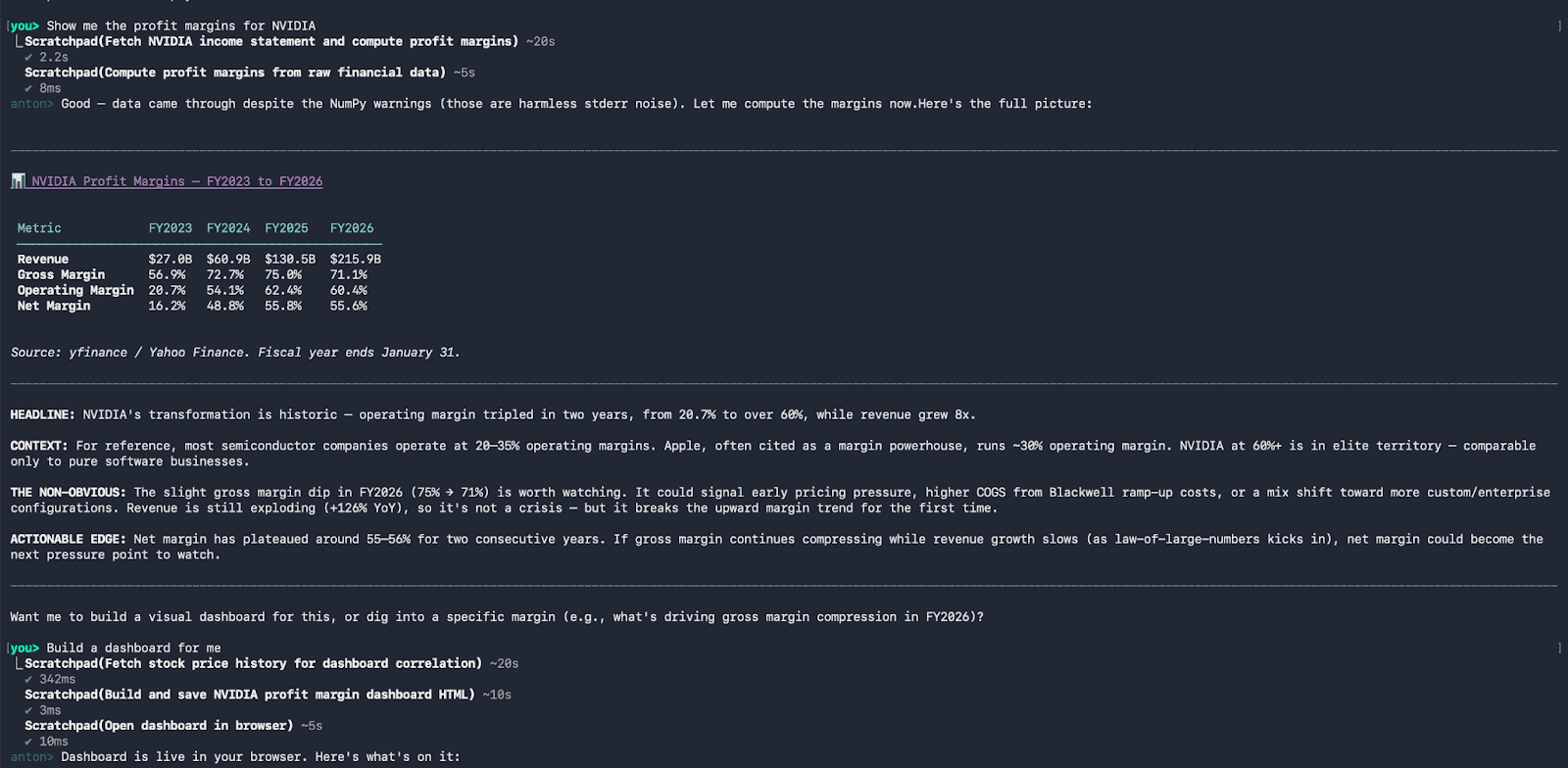
Ask MindsDB Anton a question: “Show me the profit margins of NVIDIA” an “Build a dashboard”
And it will also seamlessly generate a dashboard for you:
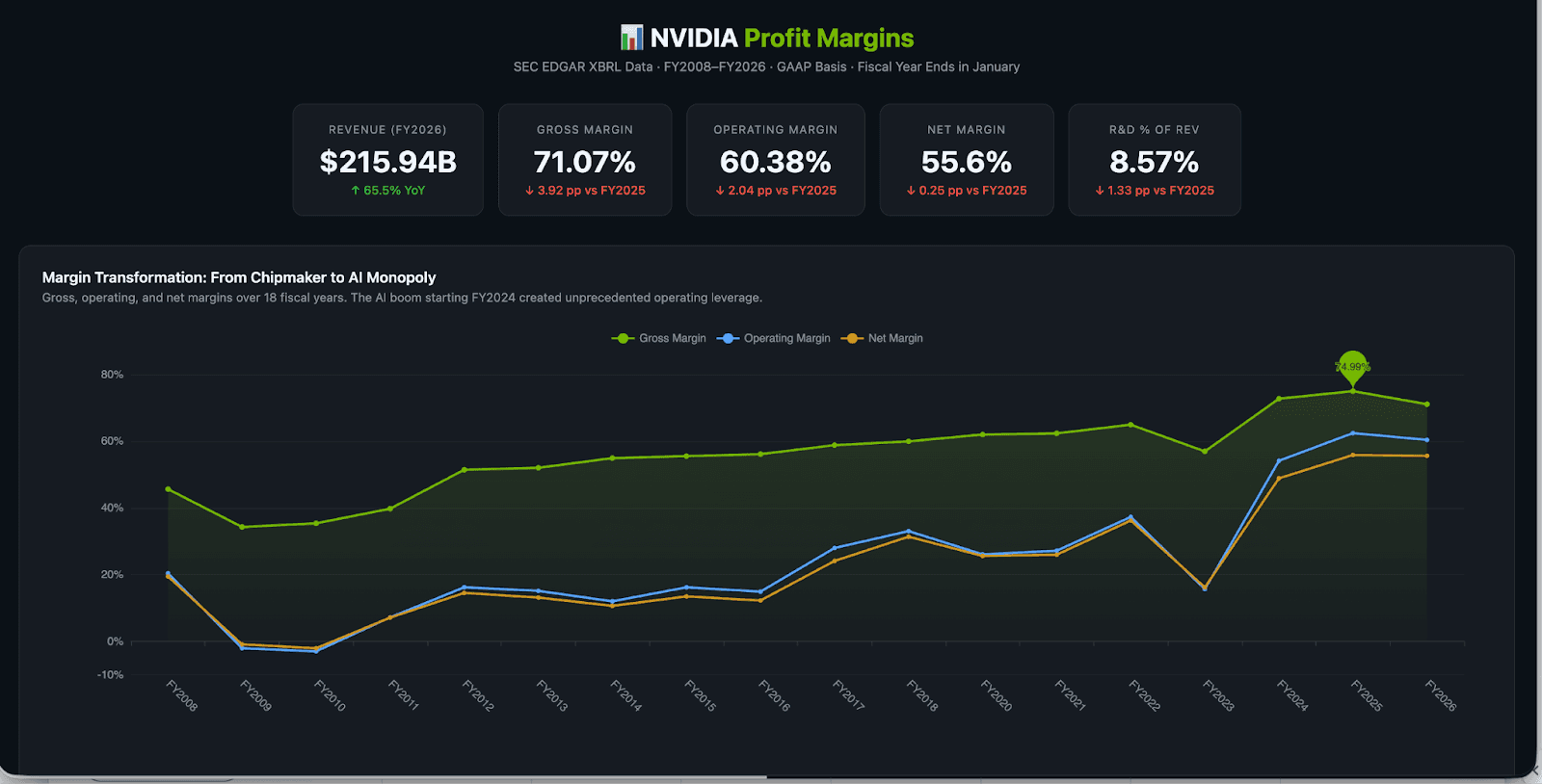
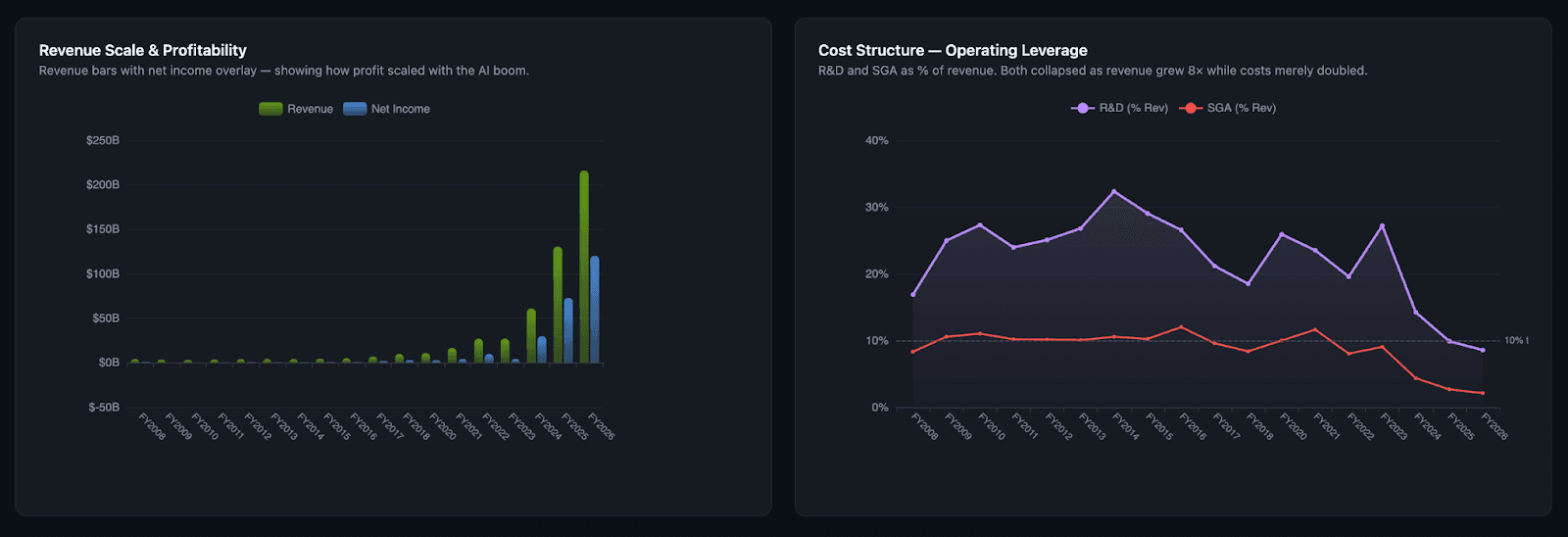
Anton does not have a pre-built “profit margins analysis” skill. It does not ask which datasource to use. It figures it out. Anton pulls the latest financial data, writes the code to calculate the margins, and structures the results. Then it generates a dashboard with clear breakdowns and explanations- all in one flow. In one conversation.
That’s the difference. Most tools give you the pieces. Anton gives you the answer.
How Will This Redefine Your Daily Workflow?
Anton turns every question into instant, decision-ready insights. Finance teams detect cash flow anomalies in real time with full audit trails, sales leaders get clear pipeline insights without dashboard confusion, operations teams catch inefficiencies early, and marketing analyzes performance across channels in one place—no spreadsheets required.
We built Anton to solve a problem that almost every organization faces: the gap between asking a question and getting an answer that matters.
Anton brings speed, depth, and trust together in a single system. You and your team get answers instantly, understand how they were produced. Your organization can finally move away from delayed reporting to real-time, decision-ready intelligence.
MindsDB’s internal team has already experienced how Anton improves their day-to-day tasks:
Ron Zieglier, Sales Director, turns everyday workflows into real-time analytics and insights- providing a better understanding of customer behavior, uncover trends, and act on live data instantly without manual effort.
Sidney Rabsatt, Chief Product Officer, turns raw product data into clear, continuous insights- helping track usage patterns, spot performance risks early, and connect signals across tools to understand what’s really happening. Instead of relying on dashboards, the outcome is a contextual view of product health and momentum that can be acted on.
From Question to Decision: How Anton Thinks, Plans, and Executes
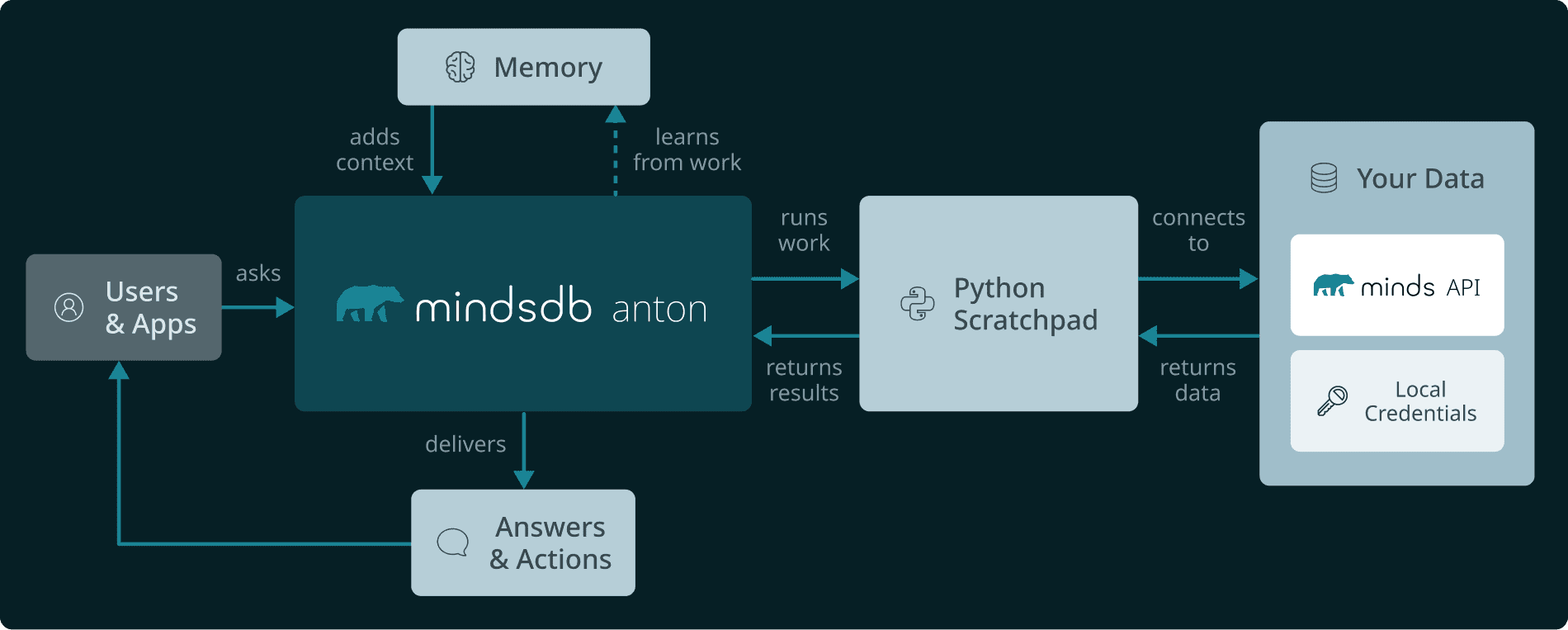
When you ask Anton a question, it starts by loading context — who you are, how you work, and what it has learned before. It uses that to decide how to approach the problem, either applying an existing skill or creating a new path. From there, Anton opens a scratchpad and gets to work. It writes and runs code, pulls data, performs analysis, and adjusts if anything fails — all in one continuous flow.
Once complete, it delivers a full answer with structured outputs, visualizations, and clear explanations. Then it learns. Anton captures what worked and improves for next time.
A continuous loop: context, execution, learning — getting smarter with every question.
The Tool System: Extensible Reasoning
Anton comes with three built-in tools:
scratchpad - Run Python code with auto-install, persistent state, and built-in AI support
memorize - Save key learnings or preferences
recall - Retrieve past conversations when you explicitly ask for them
Tools in Anton are simple to create and easy to use—you just define a function with clear inputs, and Anton handles the rest. Behind the scenes, it automatically validates inputs, runs the right tool, and returns results in real time, even streaming outputs for longer tasks like code execution.
Multi-LLM Support: Provider Abstraction
Anton works seamlessly with both Anthropic Claude (default) and OpenAI through a simple, unified setup. No matter which provider you choose, the experience stays the same—Anton automatically handles the configuration behind the scenes, so you can focus on getting insights without worrying about the underlying model or SDK.
Anton’s Local Vault
The Local Vault is Anton's secure credential store built into the workspace. When you connect a data source — like a PostgreSQL database, an API, or a cloud service — Anton saves the connection details (host, port, credentials, etc.) encrypted in the local vault under a named alias. These credentials are then automatically injected as environment variables at runtime, so Anton can access them in scratchpad code without needing to paste passwords or connection strings manually. It's essentially a one-time setup: you register the connection once, and Anton can use it silently in every future session.
Here’s how Anton gives you flexibility in how you access and manage models, whether you prefer full control or a managed setup:
Feature / Capability | BYOK Direct | mdb.ai Managed |
Setup | Use your MindsDB API key or paste your own OpenAI / Anthropic key. | Sign up, add a payment method, and get started instantly. |
Credential storage | Stored locally on your machine using Anton’s local vault. | Stored securely in the cloud - encrypted and never exposed. |
Model access | Access a single provider using your own key. | Access multiple models across different providers. |
The Execution Engine: Scratchpads
At the core of Anton is the scratchpad- an isolated, sandboxed Python environment that's the equivalent of having a second brain dedicated purely to computation.
Here's how it works: When you give Anton a problem, it opens a scratchpad. That scratchpad is its own isolated virtual environment. It has its own Python runtime. It can install packages on demand. It can write code, run it, see the output, and adjust based on what it learns.
The scratchpad works as a chain-of-thought engine, where each step is a cell of code(Let’s take the Nvidia profit margins example):
Fetch data – Pull the latest financial data for Nvidia. Anton figures out the right source and writes the code to retrieve it.
Parse and transform – Clean and structure the data into a usable format, like a pandas DataFrame.
Calculate metrics – Compute profit margins and related financial metrics directly from the data.
Visualize – Turn the results into a clear dashboard using charts and visualizations.
Deliver – Present the final answer and dashboard, ready to explore.
The output is complete: structured data, visualizations, dashboards, and a clear written explanation of what the numbers show and why it matters. You don't get just an answer. You get something you can act on and defend. A seamless process where questions become explainable, decision-ready insights in seconds.
Getting Started with Anton: Turning Questions into Insights
Getting started with Anton is simple, yet powerful from the first question. Instead of building dashboards or writing queries, you just ask what you want to understand—Anton handles the analysis, execution, and delivers clear, decision-ready insights with explanations and visuals. In this section, we’ll walk through how to use the Open Source version of Anton in practice and how quickly it turns everyday questions into meaningful, decision-ready insights.
Pre-requisites
Visit Anton Github Repository, and follow the instructions to install Anton where you will be able to provide your own Anthropic or OpenAI API Key or be directed to mdb.ai to get a Minds Cloud API Key.
Sign up for a Minds-Enterprise-Cloud Account to obtain an API Key, where you will be instructed on getting an API Key and then directed to Anton Github Repository to set it up.
Step 1: Set up an LLM Provider
You can make use of an Anthropic or OpenAI API Key. For this example we will be using a Minds Cloud API key. Sign up for an account on Minds-Enterprise-Cloud and obtain an API Key.
Step 2: Accessing Anton
To access the Open Source version of Anton, open a terminal window and run the following command:
For MacOS/Linux:
curl -sSf https://raw.githubusercontent.com/mindsdb/anton/main/install.sh | sh && export PATH="$HOME/.local/bin:$PATH"
curl -sSf https://raw.githubusercontent.com/mindsdb/anton/main/install.sh | sh && export PATH="$HOME/.local/bin:$PATH"
curl -sSf https://raw.githubusercontent.com/mindsdb/anton/main/install.sh | sh && export PATH="$HOME/.local/bin:$PATH"
curl -sSf https://raw.githubusercontent.com/mindsdb/anton/main/install.sh | sh && export PATH="$HOME/.local/bin:$PATH"
For Windows:
irm https://raw.githubusercontent.com/mindsdb/anton/main/install.ps1 | iex
irm https://raw.githubusercontent.com/mindsdb/anton/main/install.ps1 | iex
irm https://raw.githubusercontent.com/mindsdb/anton/main/install.ps1 | iex
irm https://raw.githubusercontent.com/mindsdb/anton/main/install.ps1 | iex
Once it is installed, you will see the following:
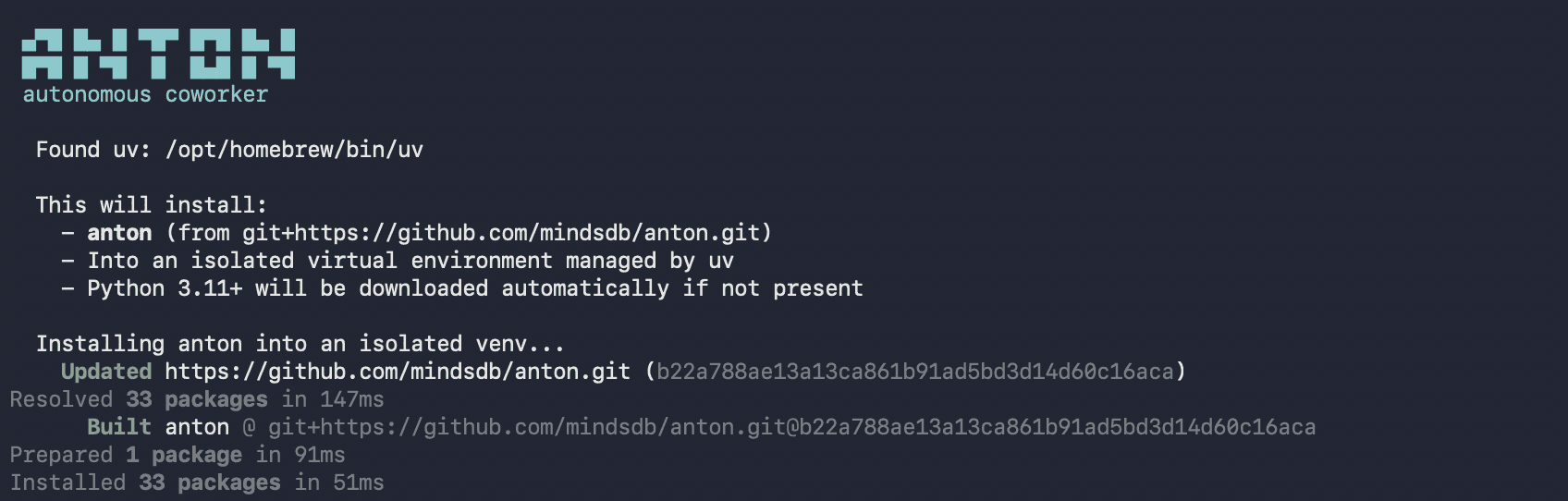
Now you can start Anton by running the command anton:
antonantonantonantonOnce you have executed this, you will be prompted to review and accept Anton's policy. You can choose to read the policies by selecting y(yes) or n(no) and then select if you accept the Terms and Privacy Policy. Once you have made a selection, Anton's start up screen will appear.
Step 3: Provide Anton an API Key
Anton will prompt you to choose an LLM Provider, you can select between option 1 and 2. For this example we will make use of a Minds Cloud API Key and select 1.
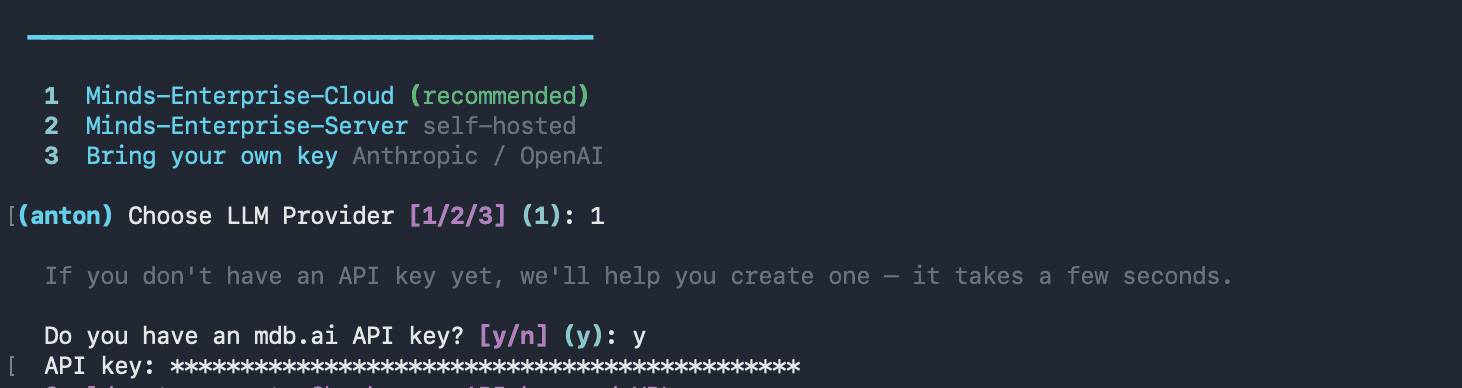
If you have an API Key already, you can enter `y` and provide your API Key.
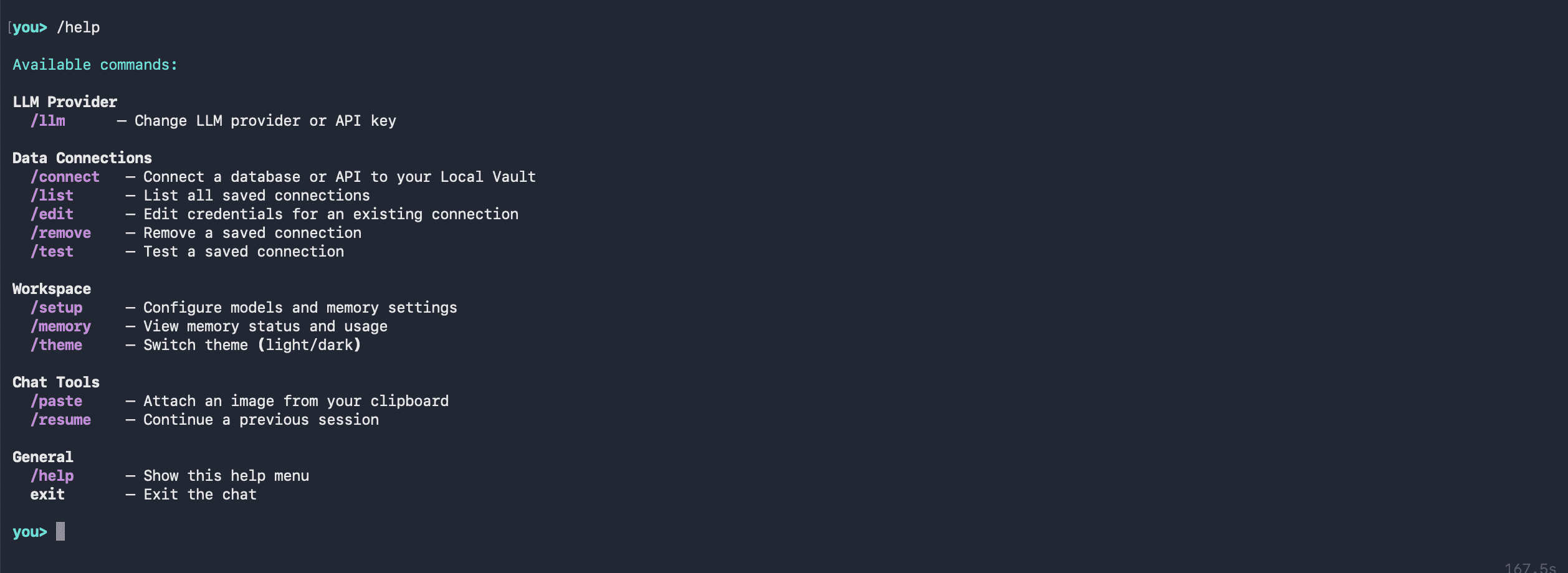
You can execute `/help’ to see all the commands available to you.
Adding a Datasource
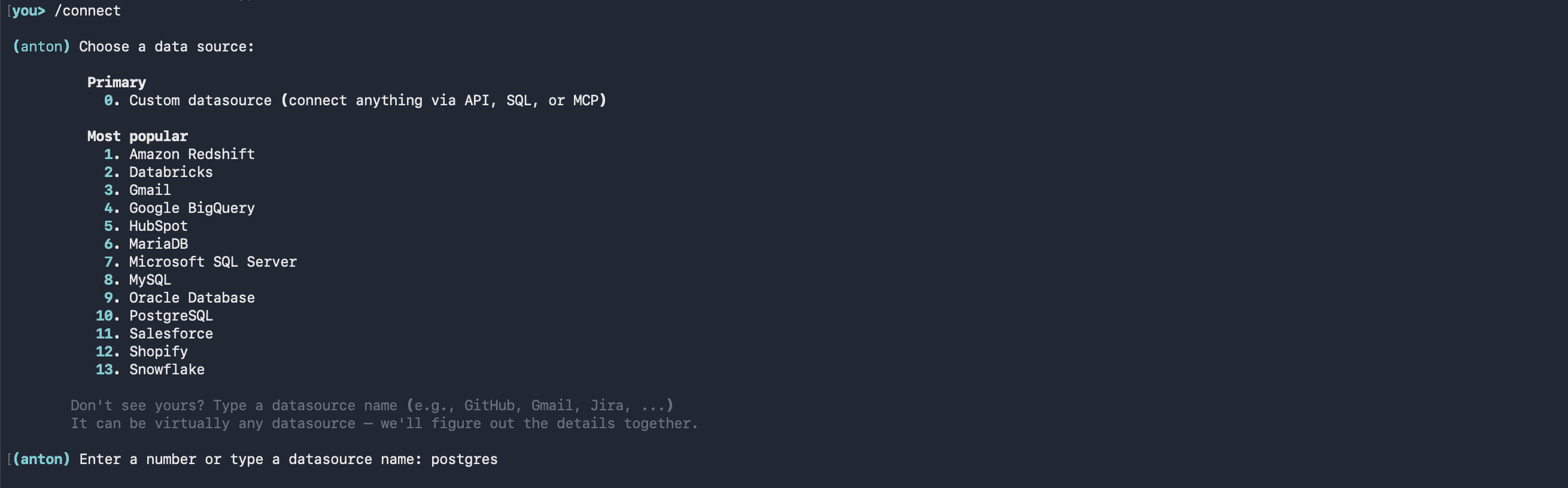
You can connect to a datasource using the /connect command. You will be prompted to choose a datasource by the represented number or type the datasource name. As Postgres will be used in this example, the name or corresponding number, which is 9, can be entered:
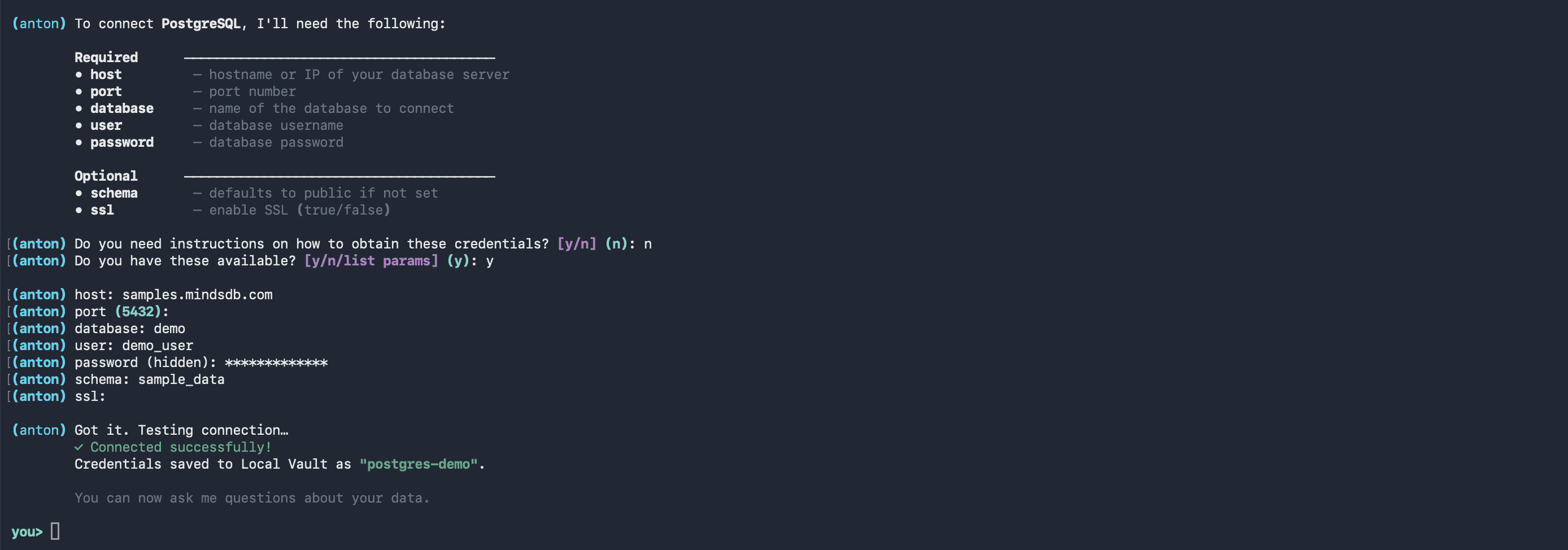
Anton will instruct which credentials/parameters it requires. It will prompt you one-by-one the host, port, database, user, password, schema and SSL(which you can opt to skip). Provide it with your database’s details:
Anton will access any data you have previously connected and created. You can ask anton any question in natural language:
Analyze our supply chain performance over the last quarter- identify
top bottlenecks in delivery times, highlight underperforming suppliers,
and build a dashboard showing on-time delivery, inventory levels, and
order fulfillment trends
Analyze our supply chain performance over the last quarter- identify
top bottlenecks in delivery times, highlight underperforming suppliers,
and build a dashboard showing on-time delivery, inventory levels, and
order fulfillment trends
Analyze our supply chain performance over the last quarter- identify
top bottlenecks in delivery times, highlight underperforming suppliers,
and build a dashboard showing on-time delivery, inventory levels, and
order fulfillment trends
Analyze our supply chain performance over the last quarter- identify
top bottlenecks in delivery times, highlight underperforming suppliers,
and build a dashboard showing on-time delivery, inventory levels, and
order fulfillment trends
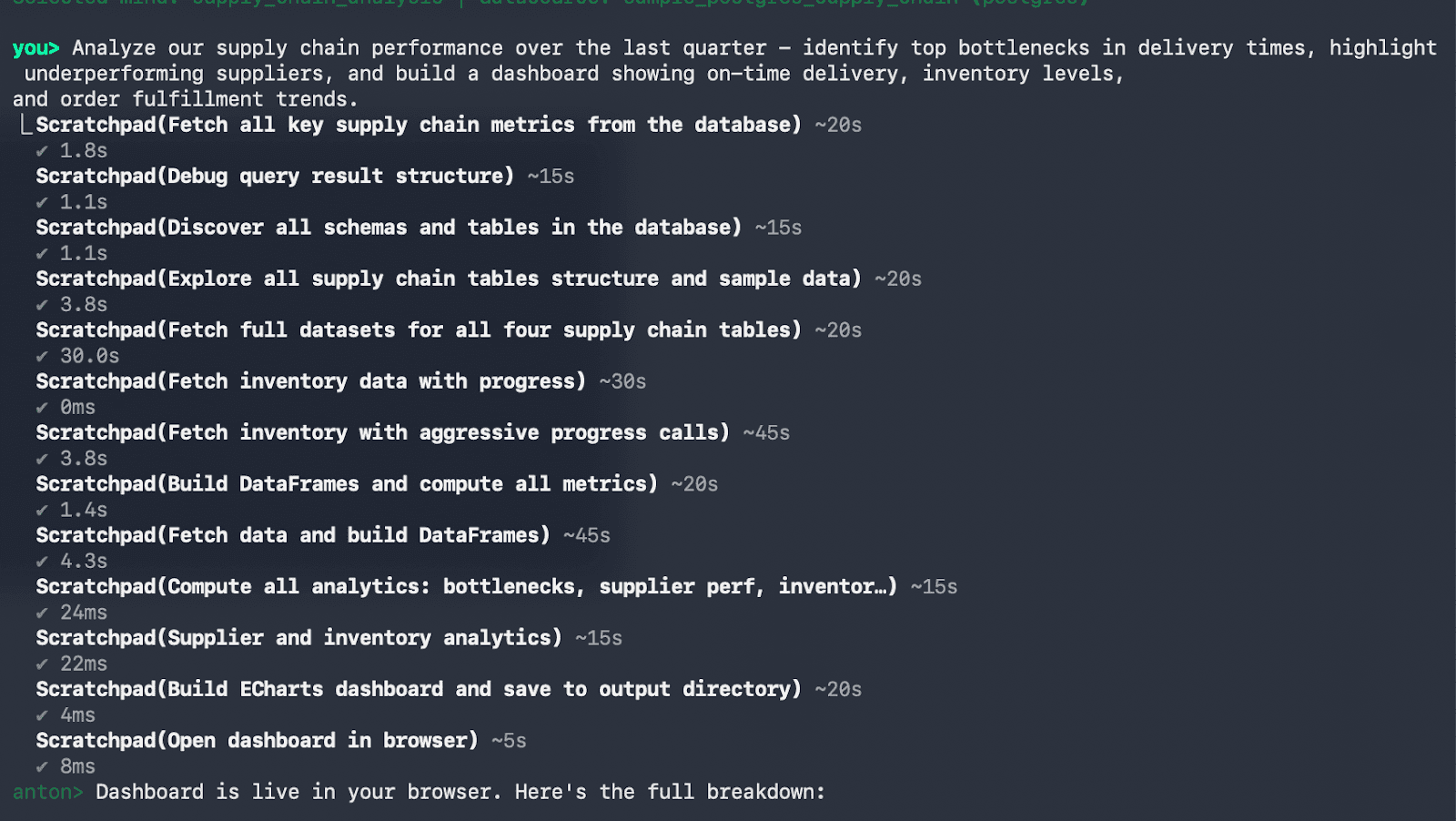
Anton will automatically open a browser tab with the results of the dashboard, however it will also showcase the information in the terminal:
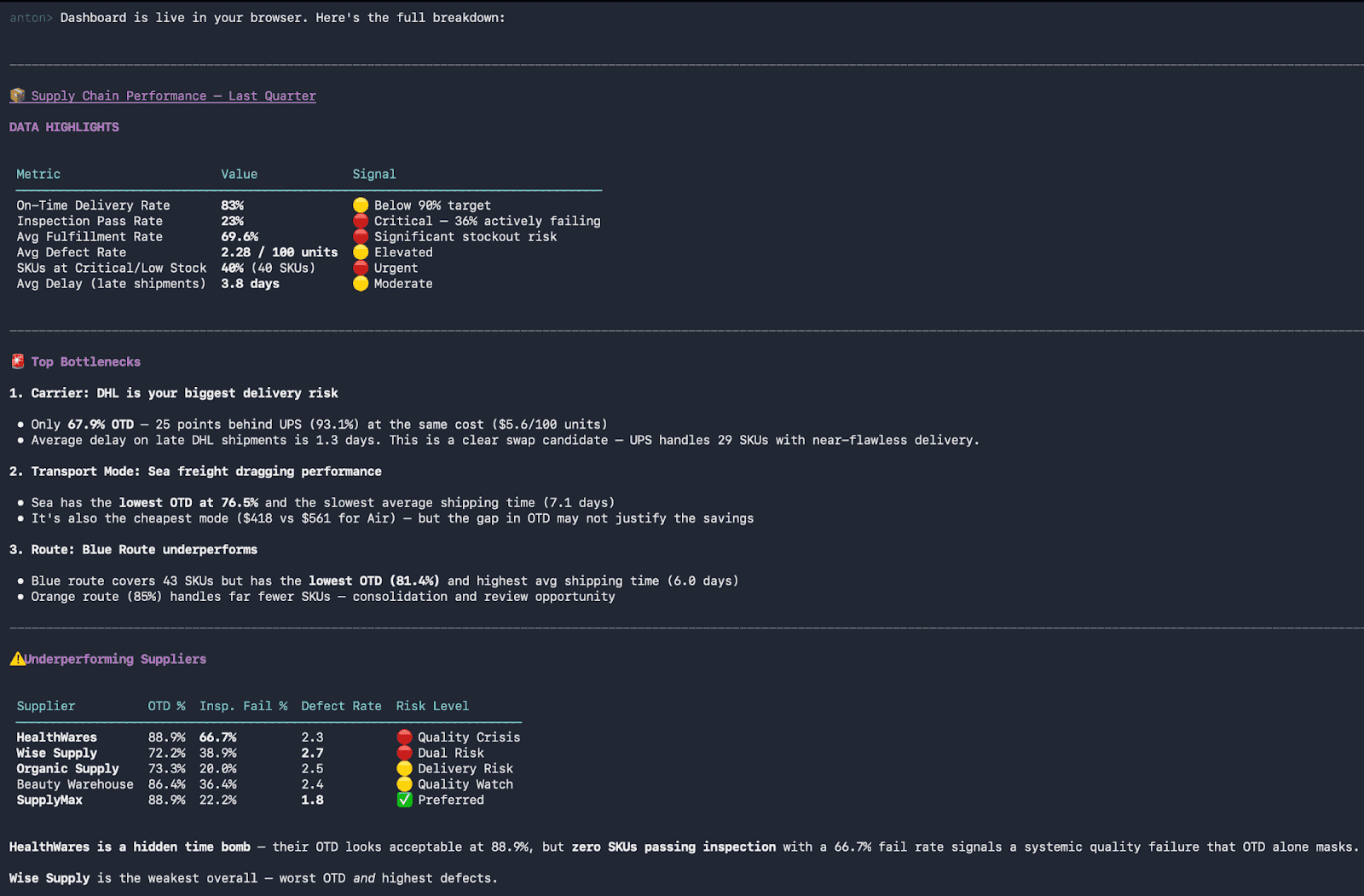
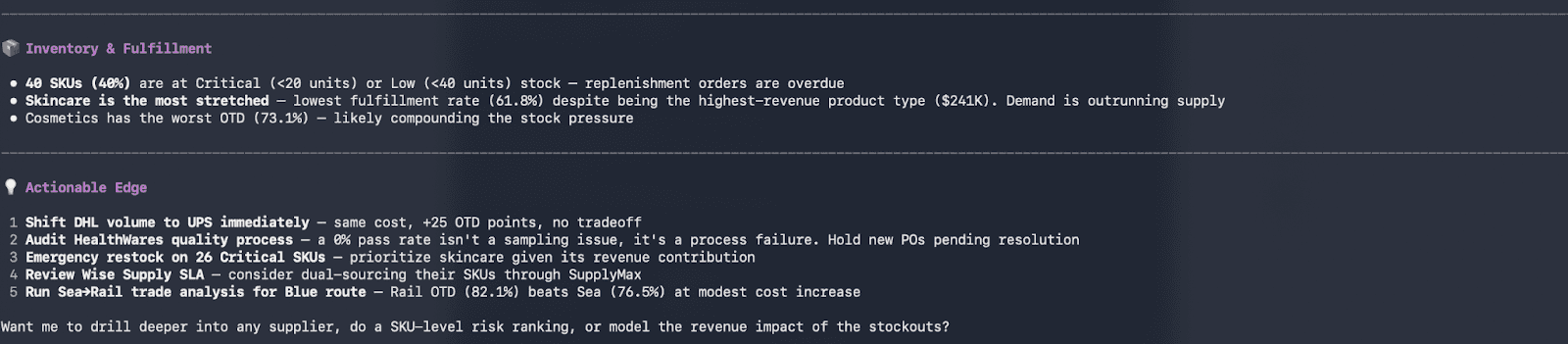
Here is a look at the dashboard Anton created:
How Anton Learns and Remembers: A Brain-Inspired Memory System
Here's where Anton gets interesting. Anton doesn't start from scratch every session. It has a memory system inspired by how the brain works - and it's designed to be as human-readable as possible.
Anton's brain has three key components:
The Hippocampus | The Cortex (Executive Control) | The Episodic Archive |
After Anton completes a scratchpad session, it records what happened. This is episodic memory - a searchable archive of every conversation, timestamped and indexed. When you ask Anton "What did we work on last time?", it uses the recall tool to search through past sessions and find relevant context. But episodic memory is raw. It's the full transcript. That's useful for questions like "How did we fix that bug three weeks ago?" But it's not how you actually learn from experience. | This is where Anton's real learning happens. After a scratchpad session ends, Anton replays what it did - in compressed form - and asks itself: What should I remember from this? This process is called consolidation. It's inspired by sleep in the brain: humans consolidate memories while they sleep, converting raw experiences into structured knowledge. Anton does this offline, after each session, extracting reusable lessons. | Every conversation is logged in JSONL format in Memory operates at two scopes: global (across all your projects) and project-specific (within a single workspace). Your identity and global lessons are shared everywhere. Project-specific rules and domain expertise live locally. |
How Anton Monitors and Consolidates: The Schedule
Here's the system that ties it together:
After each session, Anton runs a consolidation pass. This isn't just logging. It's active learning:
Replay - Take the scratchpad trace and compress it. What actually happened?
Extract lessons - What should be remembered? If Anton ran into an error and fixed it, that's a lesson. If Anton discovered a new API endpoint or rate limit, that's a lesson. If Anton found a more efficient way to do something, that's a lesson.
Persist - Write these lessons to
rules.md,lessons.md, or topic-specific markdown files.Index - Make the memories searchable via embedding, so when Anton encounters a similar problem next time, it can find them.
This is self-evolution. Anton doesn't just solve your problem and forget about it. Every problem teaches it something. Every error is an opportunity to encode a rule. Every success is an opportunity to abstract a lesson.
Over time, Anton becomes your Anton. It learns your preferences. It learns your codebase conventions. It learns which APIs work and which are slow. It learns your domain expertise.
How Anton Builds Skills and Adapts.
Anton has a skill library. These aren't pre-baked plugins. They're learned patterns.
When Anton encounters a new problem type, it builds a solution from scratch in the scratchpad. If it's similar to something it's done before, it retrieves memories and adapts them. If it's novel, it figures it out and learns from the process.
Over time, commonly used patterns become templates - quick scratchpad setups that Anton can deploy when it recognizes a similar problem. Want to fetch and analyze stock prices? Anton learns the pattern. Next time you ask, it's faster. Next time after that, even faster.
But these aren't rigid. They adapt. If Anton discovers a better API, it updates its knowledge. If a rate limit changes, it learns the new constraint. If you teach it a preference, it remembers.
This is different from traditional AI agents that come with a fixed skill set. Anton's skills emerge from doing work. They're organic. They improve.
Use Cases: Where Anton Delivers Value
Anton is designed to solve real business problems where speed, clarity, and depth of insight matter. Instead of relying on manual analysis or pre-built dashboards, teams can ask questions and immediately understand what’s happening and why.
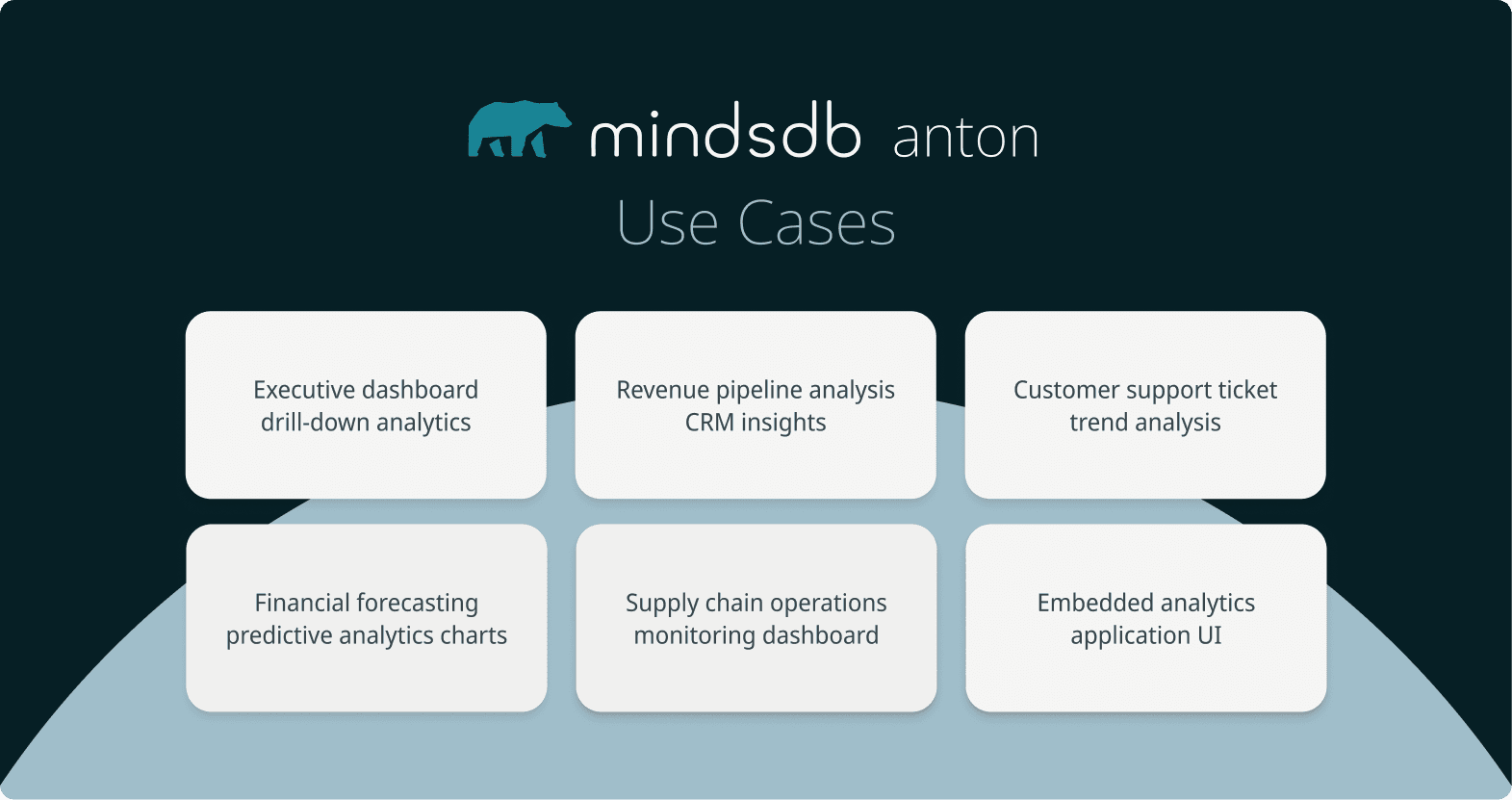
Here are some of the key ways Anton is used across organizations:
Executive reporting and decision-making: Leaders often rely on static dashboards that lack context. Anton enables instant drill-downs into metrics like revenue or growth, explaining what changed and why, so decisions can be made with confidence.
Revenue and RevOps analysis: Pipeline gaps, deal risk, and conversion issues are often hidden across systems. Anton connects the dots, identifying at-risk deals, stalled stages, and revenue drivers in real time.
Financial analysis and forecasting: Finance teams need accurate, explainable insights. Anton provides breakdowns of financial performance and can build predictive models to forecast revenue, expenses, or risk.
Operational and supply chain insights: Operational data is often distributed and difficult to analyze quickly. Anton identifies inefficiencies, delays, or anomalies, helping teams respond before issues escalate.
Embedded analytics for applications: For teams building products, Anton can generate ready-to-share dashboards and visual outputs, making it easy to embed analytics directly into user experiences.
Across all of these use cases, the common thread is simple: Anton removes the friction between asking a question and getting a clear, explainable answer, allowing teams to move faster and make better decisions.
The Value of Anton: From Insight to Action
Anton removes the friction between asking a question and getting a trusted answer.
Today, teams face slow analytics workflows, unclear insights, and heavy reliance on data teams. Anton solves this by delivering fast, explainable, and complete analyses from a single question- no dashboards, no manual queries, no delays.
What this means in practice:
Faster decisions- go from question to insight in seconds, not days
Clear understanding- know not just what happened, but why
Less dependency on data teams- anyone can explore and analyze data
Trusted results- every answer is transparent, auditable, and reproducible
From insight to action- trigger workflows and act immediately
In fast-moving businesses, delayed or unclear insights lead to missed opportunities and poor decisions. Anton ensures teams always have access to real-time, decision-ready intelligence they can trust.
Anton isn’t just another BI tool. It’s a system that thinks, analyzes, and delivers outcomes- helping teams move faster, work smarter, and make better decisions with their data.
Now it’s your turn.
Try Anton today and experience what autonomous business intelligence looks like in practice. The first 1000 signups that use the code “MDBCOMMUNITY100” get their first month for free!
MindsDB is excited to introduce MindsDB Anton- a collaborative AI agent for conversational analytics and self-service BI, meant to fix business intelligence for good, built for teams that need answers now, not later.
Download Anton via Github. First 1000 signups to use our Promo code "MDBCOMMUNITY100" to get one month free!
Up until now, business intelligence has promised faster, smarter decisions. In reality, it’s slowed teams down. A question gets asked, added to a backlog, and answered days later—often too late to matter. By the time insights arrive, decisions have already been made, leaving teams relying on outdated data instead of real-time understanding.
Anton solves this by closing the gap between questions and actionable insights. It turns natural language into instant, data-driven answers—analyzing live data, explaining results, and delivering decision-ready intelligence in seconds. With Anton, teams move from waiting on reports to acting on insights immediately, transforming analytics from a bottleneck into a competitive advantage.
What is MindsDB Anton?
Anton is an autonomous business intelligence agent that analyzes data like a human analyst, but operates at machine speed. You ask a question in plain language. Anton takes ownership of the entire analytical process: planning the analysis, writing and executing Python code and SQL to pull and aggregate information from your data sources, and delivering complete outputs including tables, charts, dashboards, and clear explanations.
What makes Anton unique is that it doesn’t just generate answers. It produces reproducible, auditable results, showing exactly how each conclusion was reached. Every step is captured in a transparent reasoning scratchpad, giving teams full visibility into the logic behind their insights.
This is not just another BI tool. It’s a system that thinks, acts, learns, and self-improves.
Ask MindsDB Anton a question: “Show me the profit margins of NVIDIA” an “Build a dashboard”
And it will also seamlessly generate a dashboard for you:
Anton does not have a pre-built “profit margins analysis” skill. It does not ask which datasource to use. It figures it out. Anton pulls the latest financial data, writes the code to calculate the margins, and structures the results. Then it generates a dashboard with clear breakdowns and explanations- all in one flow. In one conversation.
That’s the difference. Most tools give you the pieces. Anton gives you the answer.
How Will This Redefine Your Daily Workflow?
Anton turns every question into instant, decision-ready insights. Finance teams detect cash flow anomalies in real time with full audit trails, sales leaders get clear pipeline insights without dashboard confusion, operations teams catch inefficiencies early, and marketing analyzes performance across channels in one place—no spreadsheets required.
We built Anton to solve a problem that almost every organization faces: the gap between asking a question and getting an answer that matters.
Anton brings speed, depth, and trust together in a single system. You and your team get answers instantly, understand how they were produced. Your organization can finally move away from delayed reporting to real-time, decision-ready intelligence.
MindsDB’s internal team has already experienced how Anton improves their day-to-day tasks:
Ron Zieglier, Sales Director, turns everyday workflows into real-time analytics and insights- providing a better understanding of customer behavior, uncover trends, and act on live data instantly without manual effort.
Sidney Rabsatt, Chief Product Officer, turns raw product data into clear, continuous insights- helping track usage patterns, spot performance risks early, and connect signals across tools to understand what’s really happening. Instead of relying on dashboards, the outcome is a contextual view of product health and momentum that can be acted on.
From Question to Decision: How Anton Thinks, Plans, and Executes
When you ask Anton a question, it starts by loading context — who you are, how you work, and what it has learned before. It uses that to decide how to approach the problem, either applying an existing skill or creating a new path. From there, Anton opens a scratchpad and gets to work. It writes and runs code, pulls data, performs analysis, and adjusts if anything fails — all in one continuous flow.
Once complete, it delivers a full answer with structured outputs, visualizations, and clear explanations. Then it learns. Anton captures what worked and improves for next time.
A continuous loop: context, execution, learning — getting smarter with every question.
The Tool System: Extensible Reasoning
Anton comes with three built-in tools:
scratchpad - Run Python code with auto-install, persistent state, and built-in AI support
memorize - Save key learnings or preferences
recall - Retrieve past conversations when you explicitly ask for them
Tools in Anton are simple to create and easy to use—you just define a function with clear inputs, and Anton handles the rest. Behind the scenes, it automatically validates inputs, runs the right tool, and returns results in real time, even streaming outputs for longer tasks like code execution.
Multi-LLM Support: Provider Abstraction
Anton works seamlessly with both Anthropic Claude (default) and OpenAI through a simple, unified setup. No matter which provider you choose, the experience stays the same—Anton automatically handles the configuration behind the scenes, so you can focus on getting insights without worrying about the underlying model or SDK.
Anton’s Local Vault
The Local Vault is Anton's secure credential store built into the workspace. When you connect a data source — like a PostgreSQL database, an API, or a cloud service — Anton saves the connection details (host, port, credentials, etc.) encrypted in the local vault under a named alias. These credentials are then automatically injected as environment variables at runtime, so Anton can access them in scratchpad code without needing to paste passwords or connection strings manually. It's essentially a one-time setup: you register the connection once, and Anton can use it silently in every future session.
Here’s how Anton gives you flexibility in how you access and manage models, whether you prefer full control or a managed setup:
Feature / Capability | BYOK Direct | mdb.ai Managed |
Setup | Use your MindsDB API key or paste your own OpenAI / Anthropic key. | Sign up, add a payment method, and get started instantly. |
Credential storage | Stored locally on your machine using Anton’s local vault. | Stored securely in the cloud - encrypted and never exposed. |
Model access | Access a single provider using your own key. | Access multiple models across different providers. |
The Execution Engine: Scratchpads
At the core of Anton is the scratchpad- an isolated, sandboxed Python environment that's the equivalent of having a second brain dedicated purely to computation.
Here's how it works: When you give Anton a problem, it opens a scratchpad. That scratchpad is its own isolated virtual environment. It has its own Python runtime. It can install packages on demand. It can write code, run it, see the output, and adjust based on what it learns.
The scratchpad works as a chain-of-thought engine, where each step is a cell of code(Let’s take the Nvidia profit margins example):
Fetch data – Pull the latest financial data for Nvidia. Anton figures out the right source and writes the code to retrieve it.
Parse and transform – Clean and structure the data into a usable format, like a pandas DataFrame.
Calculate metrics – Compute profit margins and related financial metrics directly from the data.
Visualize – Turn the results into a clear dashboard using charts and visualizations.
Deliver – Present the final answer and dashboard, ready to explore.
The output is complete: structured data, visualizations, dashboards, and a clear written explanation of what the numbers show and why it matters. You don't get just an answer. You get something you can act on and defend. A seamless process where questions become explainable, decision-ready insights in seconds.
Getting Started with Anton: Turning Questions into Insights
Getting started with Anton is simple, yet powerful from the first question. Instead of building dashboards or writing queries, you just ask what you want to understand—Anton handles the analysis, execution, and delivers clear, decision-ready insights with explanations and visuals. In this section, we’ll walk through how to use the Open Source version of Anton in practice and how quickly it turns everyday questions into meaningful, decision-ready insights.
Pre-requisites
Visit Anton Github Repository, and follow the instructions to install Anton where you will be able to provide your own Anthropic or OpenAI API Key or be directed to mdb.ai to get a Minds Cloud API Key.
Sign up for a Minds-Enterprise-Cloud Account to obtain an API Key, where you will be instructed on getting an API Key and then directed to Anton Github Repository to set it up.
Step 1: Set up an LLM Provider
You can make use of an Anthropic or OpenAI API Key. For this example we will be using a Minds Cloud API key. Sign up for an account on Minds-Enterprise-Cloud and obtain an API Key.
Step 2: Accessing Anton
To access the Open Source version of Anton, open a terminal window and run the following command:
For MacOS/Linux:
curl -sSf https://raw.githubusercontent.com/mindsdb/anton/main/install.sh | sh && export PATH="$HOME/.local/bin:$PATH"
For Windows:
irm https://raw.githubusercontent.com/mindsdb/anton/main/install.ps1 | iex
Once it is installed, you will see the following:
Now you can start Anton by running the command anton:
antonOnce you have executed this, you will be prompted to review and accept Anton's policy. You can choose to read the policies by selecting y(yes) or n(no) and then select if you accept the Terms and Privacy Policy. Once you have made a selection, Anton's start up screen will appear.
Step 3: Provide Anton an API Key
Anton will prompt you to choose an LLM Provider, you can select between option 1 and 2. For this example we will make use of a Minds Cloud API Key and select 1.
If you have an API Key already, you can enter `y` and provide your API Key.
You can execute `/help’ to see all the commands available to you.
Adding a Datasource
You can connect to a datasource using the /connect command. You will be prompted to choose a datasource by the represented number or type the datasource name. As Postgres will be used in this example, the name or corresponding number, which is 9, can be entered:
Anton will instruct which credentials/parameters it requires. It will prompt you one-by-one the host, port, database, user, password, schema and SSL(which you can opt to skip). Provide it with your database’s details:
Anton will access any data you have previously connected and created. You can ask anton any question in natural language:
Analyze our supply chain performance over the last quarter- identify
top bottlenecks in delivery times, highlight underperforming suppliers,
and build a dashboard showing on-time delivery, inventory levels, and
order fulfillment trends
Anton will automatically open a browser tab with the results of the dashboard, however it will also showcase the information in the terminal:
Here is a look at the dashboard Anton created:
How Anton Learns and Remembers: A Brain-Inspired Memory System
Here's where Anton gets interesting. Anton doesn't start from scratch every session. It has a memory system inspired by how the brain works - and it's designed to be as human-readable as possible.
Anton's brain has three key components:
The Hippocampus | The Cortex (Executive Control) | The Episodic Archive |
After Anton completes a scratchpad session, it records what happened. This is episodic memory - a searchable archive of every conversation, timestamped and indexed. When you ask Anton "What did we work on last time?", it uses the recall tool to search through past sessions and find relevant context. But episodic memory is raw. It's the full transcript. That's useful for questions like "How did we fix that bug three weeks ago?" But it's not how you actually learn from experience. | This is where Anton's real learning happens. After a scratchpad session ends, Anton replays what it did - in compressed form - and asks itself: What should I remember from this? This process is called consolidation. It's inspired by sleep in the brain: humans consolidate memories while they sleep, converting raw experiences into structured knowledge. Anton does this offline, after each session, extracting reusable lessons. | Every conversation is logged in JSONL format in Memory operates at two scopes: global (across all your projects) and project-specific (within a single workspace). Your identity and global lessons are shared everywhere. Project-specific rules and domain expertise live locally. |
How Anton Monitors and Consolidates: The Schedule
Here's the system that ties it together:
After each session, Anton runs a consolidation pass. This isn't just logging. It's active learning:
Replay - Take the scratchpad trace and compress it. What actually happened?
Extract lessons - What should be remembered? If Anton ran into an error and fixed it, that's a lesson. If Anton discovered a new API endpoint or rate limit, that's a lesson. If Anton found a more efficient way to do something, that's a lesson.
Persist - Write these lessons to
rules.md,lessons.md, or topic-specific markdown files.Index - Make the memories searchable via embedding, so when Anton encounters a similar problem next time, it can find them.
This is self-evolution. Anton doesn't just solve your problem and forget about it. Every problem teaches it something. Every error is an opportunity to encode a rule. Every success is an opportunity to abstract a lesson.
Over time, Anton becomes your Anton. It learns your preferences. It learns your codebase conventions. It learns which APIs work and which are slow. It learns your domain expertise.
How Anton Builds Skills and Adapts.
Anton has a skill library. These aren't pre-baked plugins. They're learned patterns.
When Anton encounters a new problem type, it builds a solution from scratch in the scratchpad. If it's similar to something it's done before, it retrieves memories and adapts them. If it's novel, it figures it out and learns from the process.
Over time, commonly used patterns become templates - quick scratchpad setups that Anton can deploy when it recognizes a similar problem. Want to fetch and analyze stock prices? Anton learns the pattern. Next time you ask, it's faster. Next time after that, even faster.
But these aren't rigid. They adapt. If Anton discovers a better API, it updates its knowledge. If a rate limit changes, it learns the new constraint. If you teach it a preference, it remembers.
This is different from traditional AI agents that come with a fixed skill set. Anton's skills emerge from doing work. They're organic. They improve.
Use Cases: Where Anton Delivers Value
Anton is designed to solve real business problems where speed, clarity, and depth of insight matter. Instead of relying on manual analysis or pre-built dashboards, teams can ask questions and immediately understand what’s happening and why.
Here are some of the key ways Anton is used across organizations:
Executive reporting and decision-making: Leaders often rely on static dashboards that lack context. Anton enables instant drill-downs into metrics like revenue or growth, explaining what changed and why, so decisions can be made with confidence.
Revenue and RevOps analysis: Pipeline gaps, deal risk, and conversion issues are often hidden across systems. Anton connects the dots, identifying at-risk deals, stalled stages, and revenue drivers in real time.
Financial analysis and forecasting: Finance teams need accurate, explainable insights. Anton provides breakdowns of financial performance and can build predictive models to forecast revenue, expenses, or risk.
Operational and supply chain insights: Operational data is often distributed and difficult to analyze quickly. Anton identifies inefficiencies, delays, or anomalies, helping teams respond before issues escalate.
Embedded analytics for applications: For teams building products, Anton can generate ready-to-share dashboards and visual outputs, making it easy to embed analytics directly into user experiences.
Across all of these use cases, the common thread is simple: Anton removes the friction between asking a question and getting a clear, explainable answer, allowing teams to move faster and make better decisions.
The Value of Anton: From Insight to Action
Anton removes the friction between asking a question and getting a trusted answer.
Today, teams face slow analytics workflows, unclear insights, and heavy reliance on data teams. Anton solves this by delivering fast, explainable, and complete analyses from a single question- no dashboards, no manual queries, no delays.
What this means in practice:
Faster decisions- go from question to insight in seconds, not days
Clear understanding- know not just what happened, but why
Less dependency on data teams- anyone can explore and analyze data
Trusted results- every answer is transparent, auditable, and reproducible
From insight to action- trigger workflows and act immediately
In fast-moving businesses, delayed or unclear insights lead to missed opportunities and poor decisions. Anton ensures teams always have access to real-time, decision-ready intelligence they can trust.
Anton isn’t just another BI tool. It’s a system that thinks, analyzes, and delivers outcomes- helping teams move faster, work smarter, and make better decisions with their data.
Now it’s your turn.
Try Anton today and experience what autonomous business intelligence looks like in practice. The first 1000 signups that use the code “MDBCOMMUNITY100” get their first month for free!
Products
Open Source
© 2026 All rights reserved by MindsDB.

Start conversational analytics with MindsDB
Production-ready infrastructure for agentic analytics
Start conversational analytics with MindsDB
Production-ready infrastructure for agentic analytics

Products
Open Source
© 2026 All rights reserved by MindsDB.

Products
Open Source
© 2026 All rights reserved by MindsDB.
Start conversational analytics with MindsDB
Production-ready infrastructure for agentic analytics