From Data To Dialogue: Unlocking AI Conversational Analytics in Web Apps with Supabase & MindsDB

Chandre Van Der Westhuizen, Community & Marketing Co-ordinator at MindsDB
In the previous blog, How Web Apps Can Gain a Competitive Edge with Supabase and MindsDB, we explored how web applications can gain a competitive edge by combining Supabase as a system of record with MindsDB’s in-database AI intelligence layer - letting teams create Knowledge Bases and perform Hybrid Search to get grounded, explainable answers on real data.
But today’s apps are fast evolving beyond simple ask-and-respond analytics. Users now expect conversational experiences - interfaces that can understand intent, recall contexts, reason across silos, and provide explanations on demand. That’s where AI-Powered Conversational Analytics and MindsDB Agents come in.
What Is Conversational Analytics?
Conversational analytics is an emerging approach to data exploration that allows users to interact with their data through natural language instead of static dashboards or predefined reports. Rather than navigating filters and charts, users can ask questions, refine them with follow-ups, investigate root causes, and explore insights in real time. This transforms analytics from a passive viewing experience into an interactive dialogue with live data.
This shift is quickly becoming a competitive moat for modern web applications. When users can move seamlessly from question to insight, the time between curiosity and clarity shrinks dramatically. In fast-moving markets where speed drives revenue growth, customer retention, and operational decisions, that compression becomes a structural advantage.
More importantly, conversational analytics embeds intelligence directly into the product itself. When software can reason across structured metrics, generate grounded answers, and explain the data behind those answers, it becomes more than a reporting interface — it becomes a decision partner. Dashboards can be replicated, but building explainable, conversational intelligence into an application is significantly harder, creating a lasting competitive advantage for platforms that implement it well.
Building the Moat: Supabase as Truth, MindsDB as Intelligence
Supabase provides the real-time system of record - transactions, user activity, product usage, and operational data all live there. MindsDB layers conversational intelligence directly on top of that data without moving it. Instead of exporting to a warehouse or maintaining dashboards, users can ask questions against live tables and receive grounded, explainable answers. Freshness and transparency become built-in product capabilities, not afterthoughts.
Together, they enable more than analytics. Supabase is a Postgres database and supplies structured truth. MindsDB adds agents that reason across structured metrics and unstructured context in a single interaction. The result is an application that doesn’t just display data - it understands it, explains it, and allows users to explore it conversationally. That’s what turns intelligence into a competitive moat.
Turning Supabase Data into Dialogue with MindsDB
Theory is important. Architecture matters. But competitive advantage is built in implementation.
In this section, we’ll move from concept to execution by building a conversational analytics workflow using MindsDB Agents. You’ll see how to connect live application data, layer in a Knowledge Base, and configure an agent that can interpret intent, retrieve context, and generate grounded, explainable responses. The goal isn’t to bolt on a chatbot - it’s to embed a reasoning layer directly on your data.
By the end of this tutorial, you’ll understand how to turn data into an interactive analytical experience - where users don’t just view metrics, but engage in a dialogue with their data.
As in the previous blog, we will make use of the synthetic generated data for Midday hosted in Supabase.
To recap, here is a quick guide on how we previously connected to Supabase.
Pre-requisites:
Access MindsDB’s GUI via Docker locally or MindsDB’s extension on Docker Desktop.
Configure your default models in the MindsDB GUI by navigating to Settings → Models.
Navigate to Manage Integrations in Settings and install the dependencies for Supabase.
Once you have installed the dependencies for Supabase, you can connect to it via our SQL Editor using the CREATE DATABASE statement:
CREATE DATABASE display_name  --- display name for database.
WITH ENGINE = 'supabase',     --- name of the mindsdb handler
PARAMETERS = {
   "user": "postgres.gyjaxewghgebqavchydf",              --- the user to authenticate
   "password": "Supabase2026!",          --- the password to authenticate the user
   "host": "aws-1-us-west-1.pooler.supabase.com",              --- the host name of the Supabase connection
   "port": "5432",           --- the port to use when connecting
   "database": "postgres"           --- database name
};
CREATE DATABASE display_name  --- display name for database.
WITH ENGINE = 'supabase',     --- name of the mindsdb handler
PARAMETERS = {
   "user": "postgres.gyjaxewghgebqavchydf",              --- the user to authenticate
   "password": "Supabase2026!",          --- the password to authenticate the user
   "host": "aws-1-us-west-1.pooler.supabase.com",              --- the host name of the Supabase connection
   "port": "5432",           --- the port to use when connecting
   "database": "postgres"           --- database name
};
CREATE DATABASE display_name  --- display name for database.
WITH ENGINE = 'supabase',     --- name of the mindsdb handler
PARAMETERS = {
   "user": "postgres.gyjaxewghgebqavchydf",              --- the user to authenticate
   "password": "Supabase2026!",          --- the password to authenticate the user
   "host": "aws-1-us-west-1.pooler.supabase.com",              --- the host name of the Supabase connection
   "port": "5432",           --- the port to use when connecting
   "database": "postgres"           --- database name
};
CREATE DATABASE display_name  --- display name for database.
WITH ENGINE = 'supabase',     --- name of the mindsdb handler
PARAMETERS = {
   "user": "postgres.gyjaxewghgebqavchydf",              --- the user to authenticate
   "password": "Supabase2026!",          --- the password to authenticate the user
   "host": "aws-1-us-west-1.pooler.supabase.com",              --- the host name of the Supabase connection
   "port": "5432",           --- the port to use when connecting
   "database": "postgres"           --- database name
};
Or you can connect Supabase via the GUI Form:
The following tables will be used:
`midday_user_data` which stores details about organizations.
`midday_metrics` which starts metrics like MRR, ARR, NRR and churn risk.
Turning Data Access into Conversational Intelligence
With your Supabase data connected, the next step is defining the MindsDB Agent that will orchestrate everything. This agent acts as the reasoning layer between user questions and your live data - deciding when to run SQL against structured tables, how to interpret intent, and how to synthesize results into a grounded, explainable response. Instead of simply querying data, you’re configuring a system that understands context and transforms operational state into conversational insight.
Create the Agent using the CREATE AGENT statement:
CREATE AGENT supabase_agent
USING
mode = "text",
 data = {
   "tables": ['supabase.midday_user_data', 'supabase.midday_metrics']
   },
   prompt_template = '
You are a finance analytics copilot for a SaaS metrics product (Midday.ai-like).
You answer questions using ONLY the available data in the connected Supabase tables.
user_data_kb stores data about organizations that are customers for Midday.ai.
midday_metrics_kb stores monthly recurring revenue with the column name mrr,anual recurring revenue with the column name arr, net revenue retention and churnrisk data about these organizations.


Rules:
- Each org_name represents a customer.
- Use org_id for joins between user_data_kb and midday_metrics_kb.
- If the user asks for trends month-over-month, explain what you can do with the available fields (metric_month exists but the dataset may require additional comparisons).
- If you cannot answer exactly, say what field/table is missing and propose the next best query.
'
;
CREATE AGENT supabase_agent
USING
mode = "text",
 data = {
   "tables": ['supabase.midday_user_data', 'supabase.midday_metrics']
   },
   prompt_template = '
You are a finance analytics copilot for a SaaS metrics product (Midday.ai-like).
You answer questions using ONLY the available data in the connected Supabase tables.
user_data_kb stores data about organizations that are customers for Midday.ai.
midday_metrics_kb stores monthly recurring revenue with the column name mrr,anual recurring revenue with the column name arr, net revenue retention and churnrisk data about these organizations.


Rules:
- Each org_name represents a customer.
- Use org_id for joins between user_data_kb and midday_metrics_kb.
- If the user asks for trends month-over-month, explain what you can do with the available fields (metric_month exists but the dataset may require additional comparisons).
- If you cannot answer exactly, say what field/table is missing and propose the next best query.
'
;
CREATE AGENT supabase_agent
USING
mode = "text",
 data = {
   "tables": ['supabase.midday_user_data', 'supabase.midday_metrics']
   },
   prompt_template = '
You are a finance analytics copilot for a SaaS metrics product (Midday.ai-like).
You answer questions using ONLY the available data in the connected Supabase tables.
user_data_kb stores data about organizations that are customers for Midday.ai.
midday_metrics_kb stores monthly recurring revenue with the column name mrr,anual recurring revenue with the column name arr, net revenue retention and churnrisk data about these organizations.


Rules:
- Each org_name represents a customer.
- Use org_id for joins between user_data_kb and midday_metrics_kb.
- If the user asks for trends month-over-month, explain what you can do with the available fields (metric_month exists but the dataset may require additional comparisons).
- If you cannot answer exactly, say what field/table is missing and propose the next best query.
'
;
CREATE AGENT supabase_agent
USING
mode = "text",
 data = {
   "tables": ['supabase.midday_user_data', 'supabase.midday_metrics']
   },
   prompt_template = '
You are a finance analytics copilot for a SaaS metrics product (Midday.ai-like).
You answer questions using ONLY the available data in the connected Supabase tables.
user_data_kb stores data about organizations that are customers for Midday.ai.
midday_metrics_kb stores monthly recurring revenue with the column name mrr,anual recurring revenue with the column name arr, net revenue retention and churnrisk data about these organizations.


Rules:
- Each org_name represents a customer.
- Use org_id for joins between user_data_kb and midday_metrics_kb.
- If the user asks for trends month-over-month, explain what you can do with the available fields (metric_month exists but the dataset may require additional comparisons).
- If you cannot answer exactly, say what field/table is missing and propose the next best query.
'
;
Exploring Insights Through Conversational Queries
Let’s ask the agent some questions. This is based on data for the year 2025.
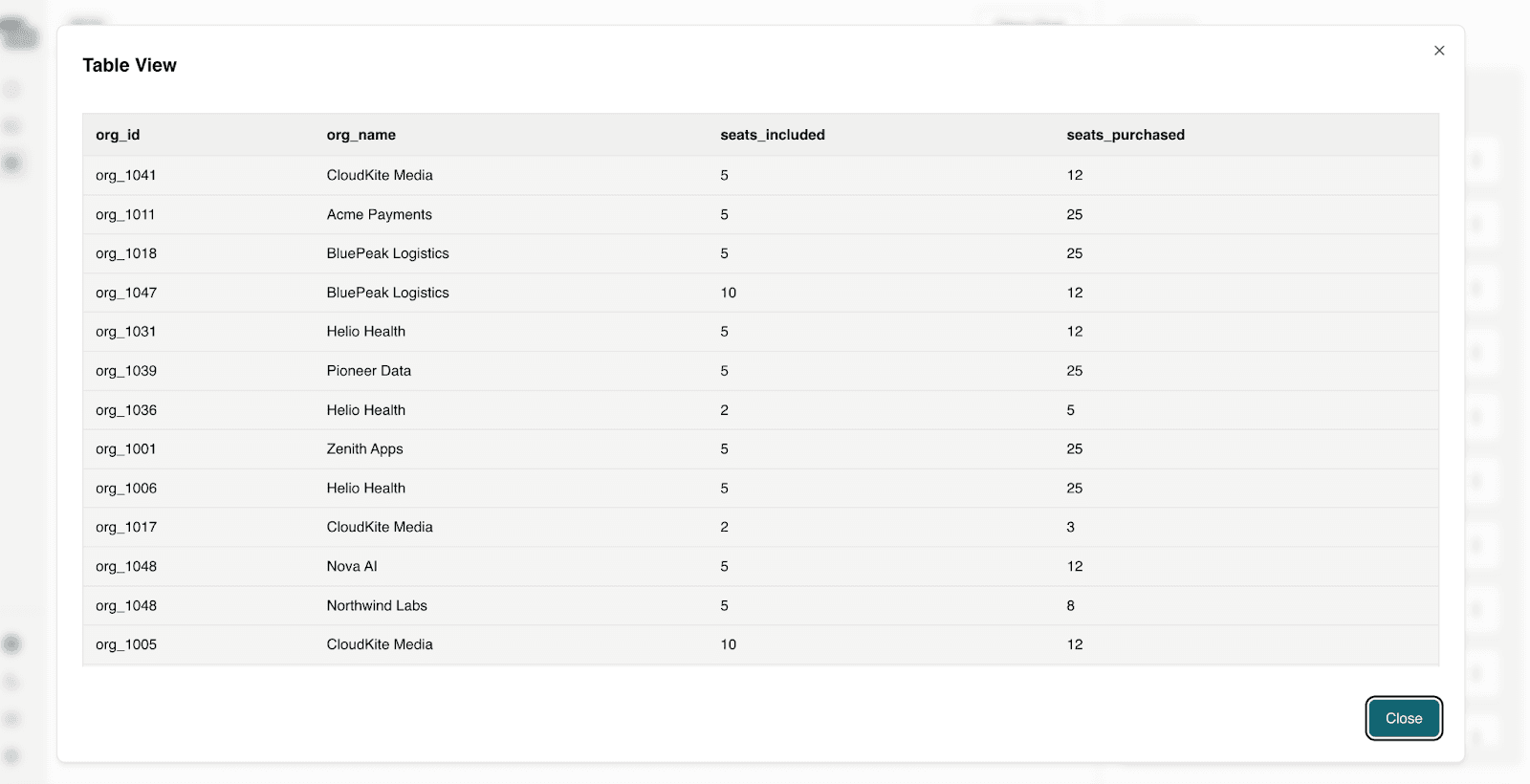
Question 1: Which customers have purchased more seats than their plan includes?
Seat overages are one of the clearest expansion signals. These customers are already realizing value and often justify upsells with minimal friction.
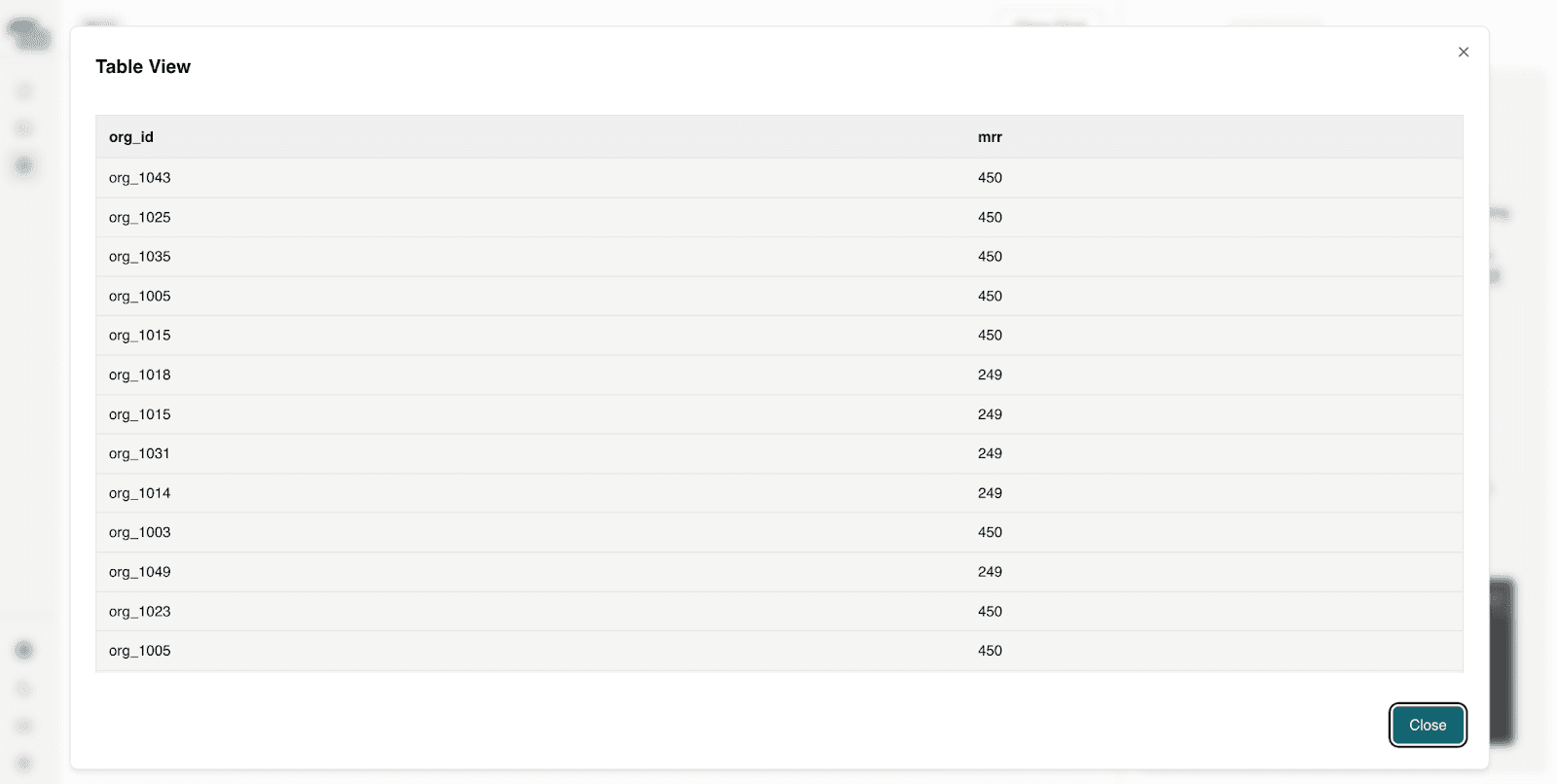
Question 2: Which high-MRR customers have a churn risk score above 0.7?
Not all churn is equal. Losing a high-MRR customer has an outsized impact on ARR and forecasts. This question focuses attention on revenue at risk, not just customer count.
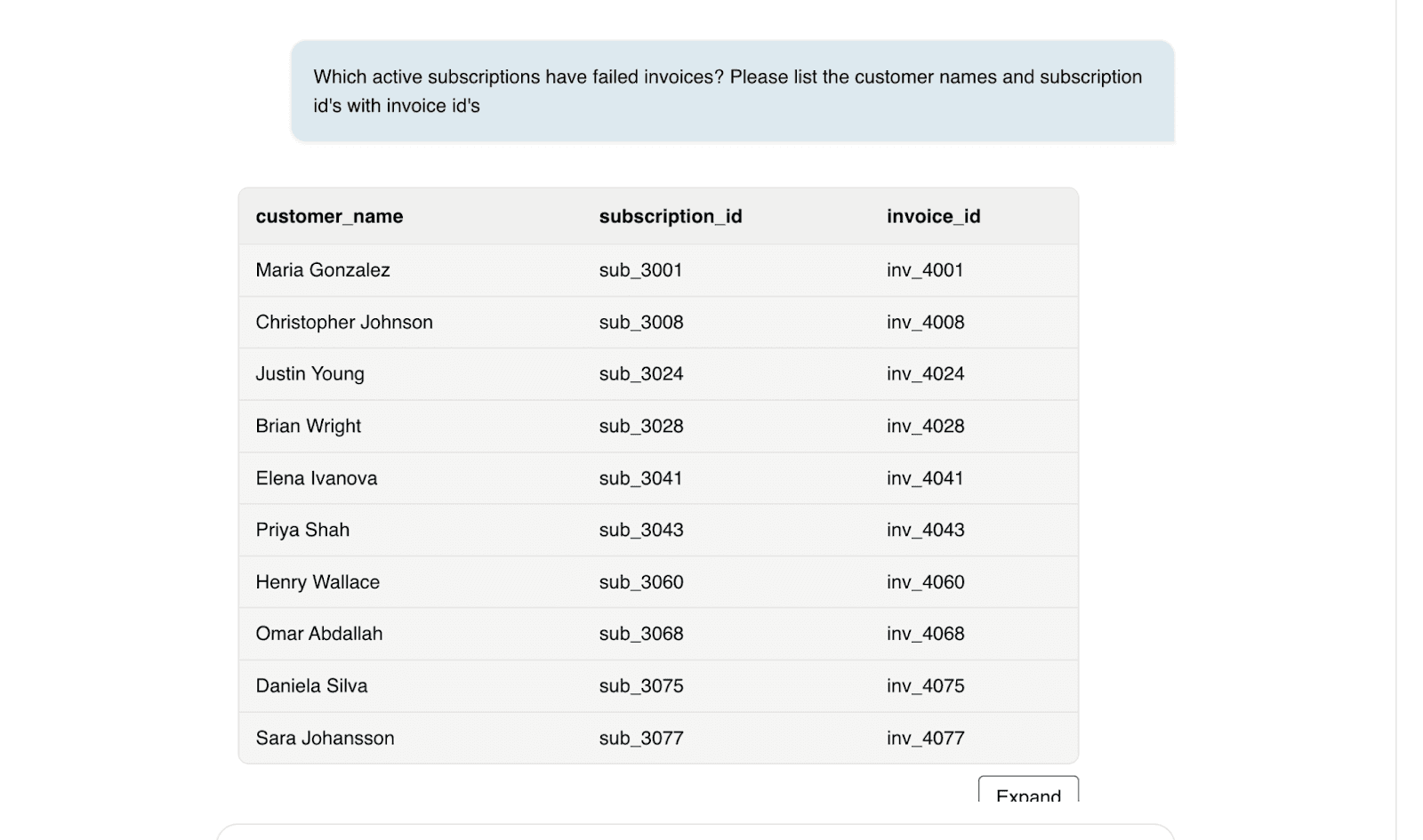
Question 3: Which active subscriptions have failed invoices? Please list the customer names and subscription id's with invoice id's.
Billing failures create silent revenue leakage and often trigger cancellations if not resolved quickly. Finance teams need immediate visibility into these issues to protect cash flow.
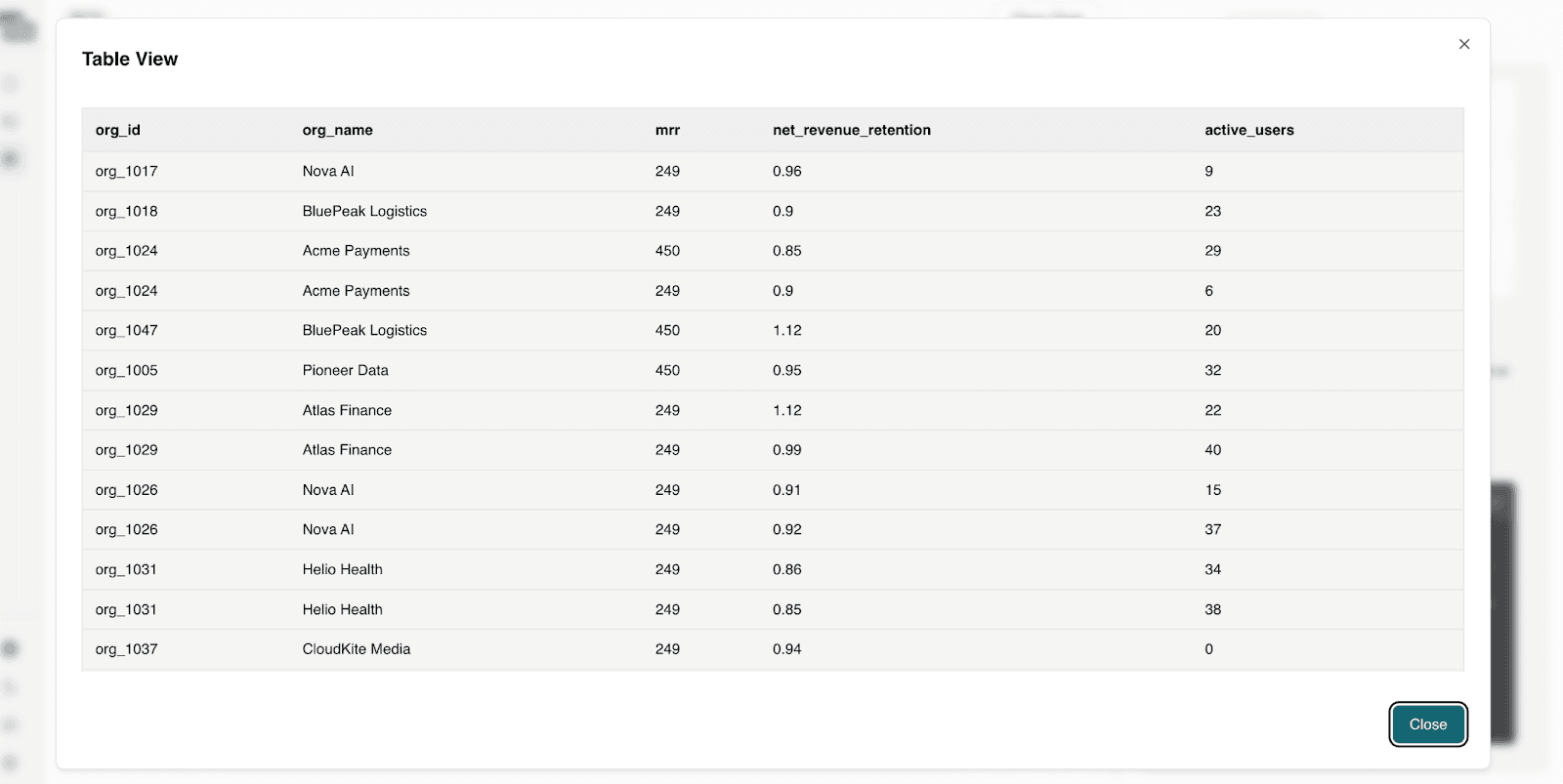
Question 4: Which customers generate meaningful MRR but show signs of declining engagement or retention? List the retention and engagement scores with customer names.
This question connects revenue, usage, and risk into a single view. It gives leadership an actionable short list of accounts that require immediate attention to protect future ARR.
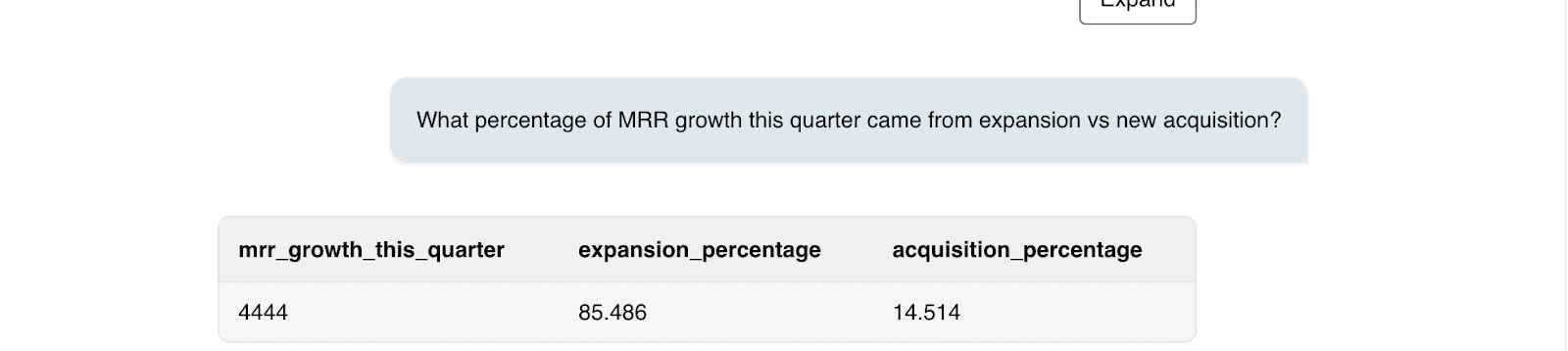
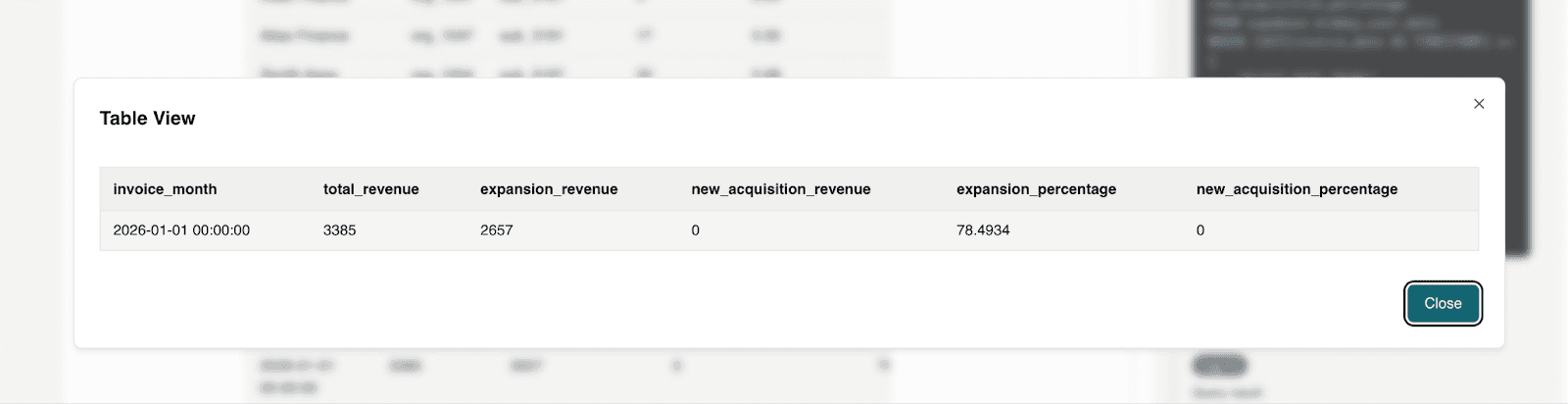
Question 5: What percentage of MRR growth this quarter came from expansion vs new acquisition?
This helps to evaluate growth quality. Strong expansion signals product strength and customer satisfaction.
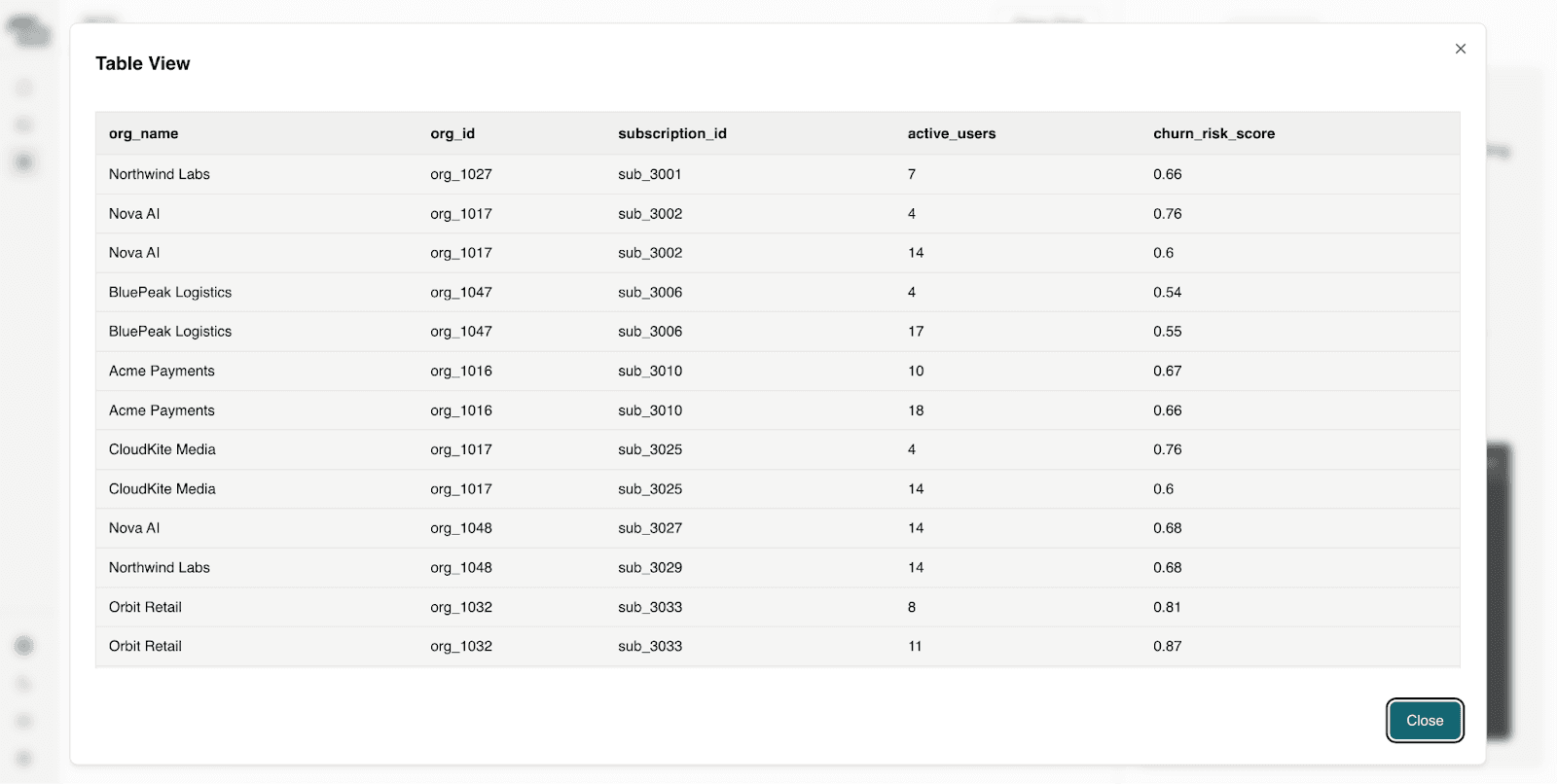
Question 6: Which customers are approaching renewal with declining engagement?
This helps to prioritize proactive outreach and protects upcoming renewal revenue.
Question 7: If current churn trends continue, what is the projected NRR next quarter?
This is to model downside risk. It supports financial forecasting and board reporting.
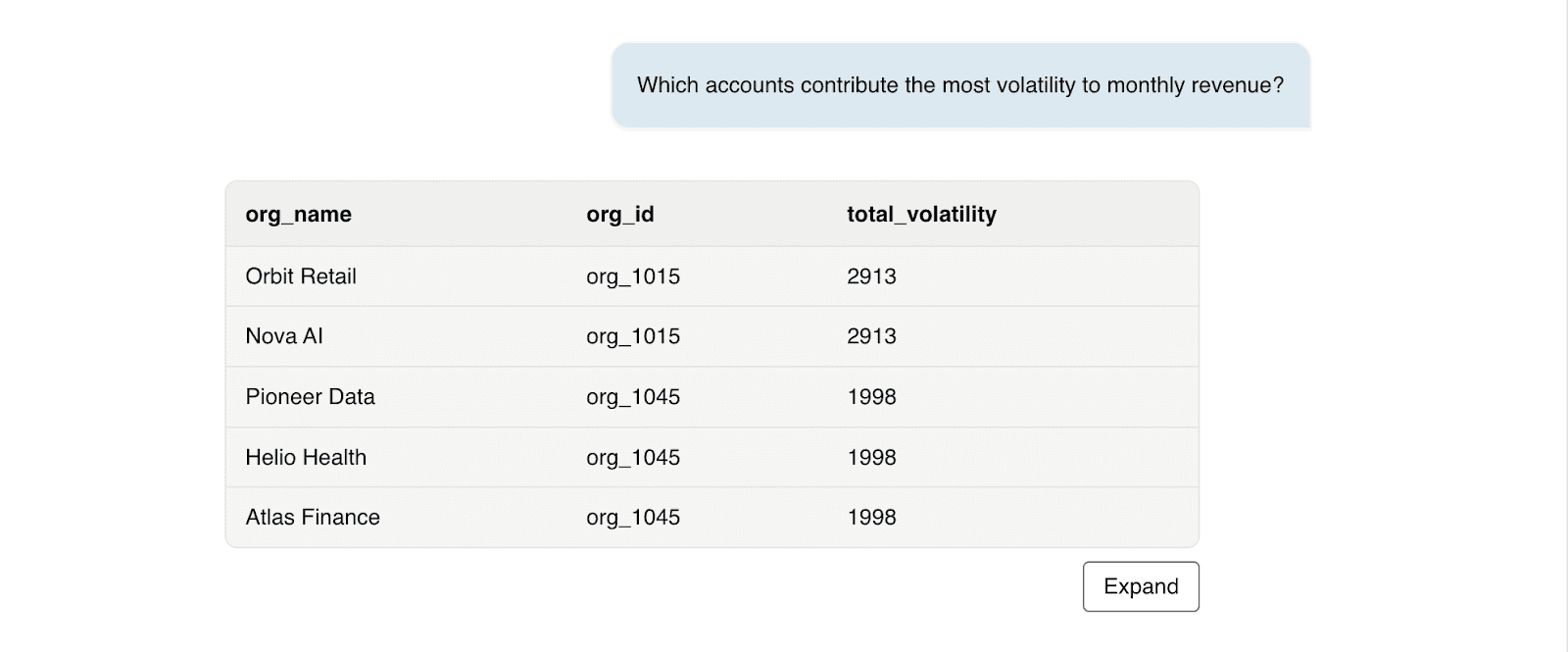
Question 8: Which accounts contribute the most volatility to monthly revenue?
This is to detect revenue concentration risk as high concentration increases financial exposure.
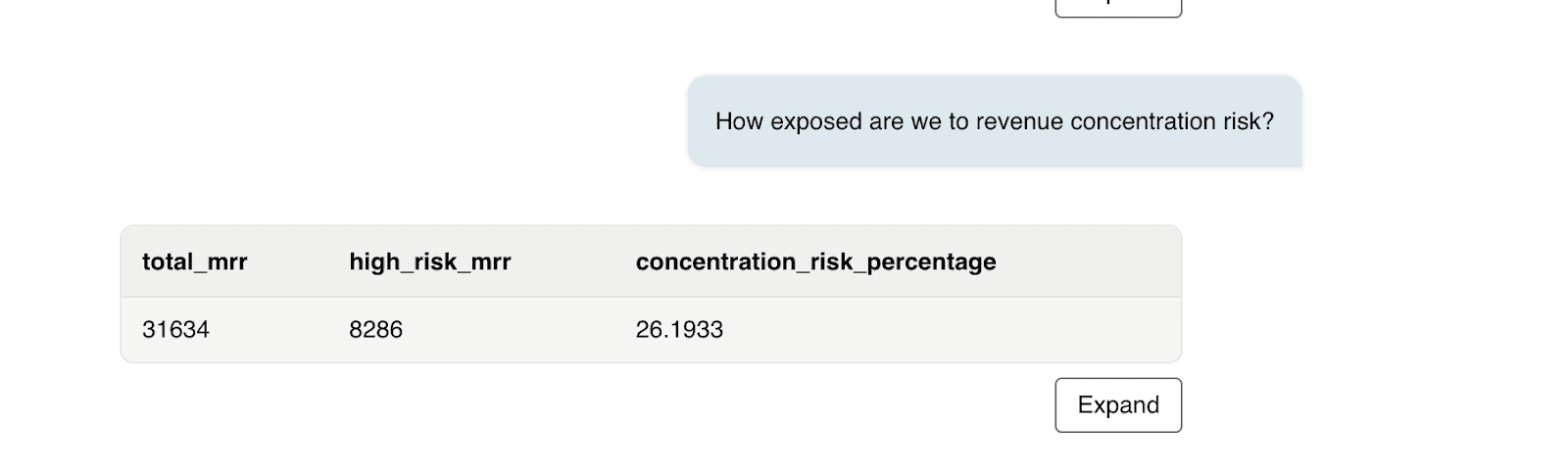
Question 9: How exposed are we to revenue concentration risk?
We can analyze dependency on top revenue accounts as high concentration increases volatility and investor risk.
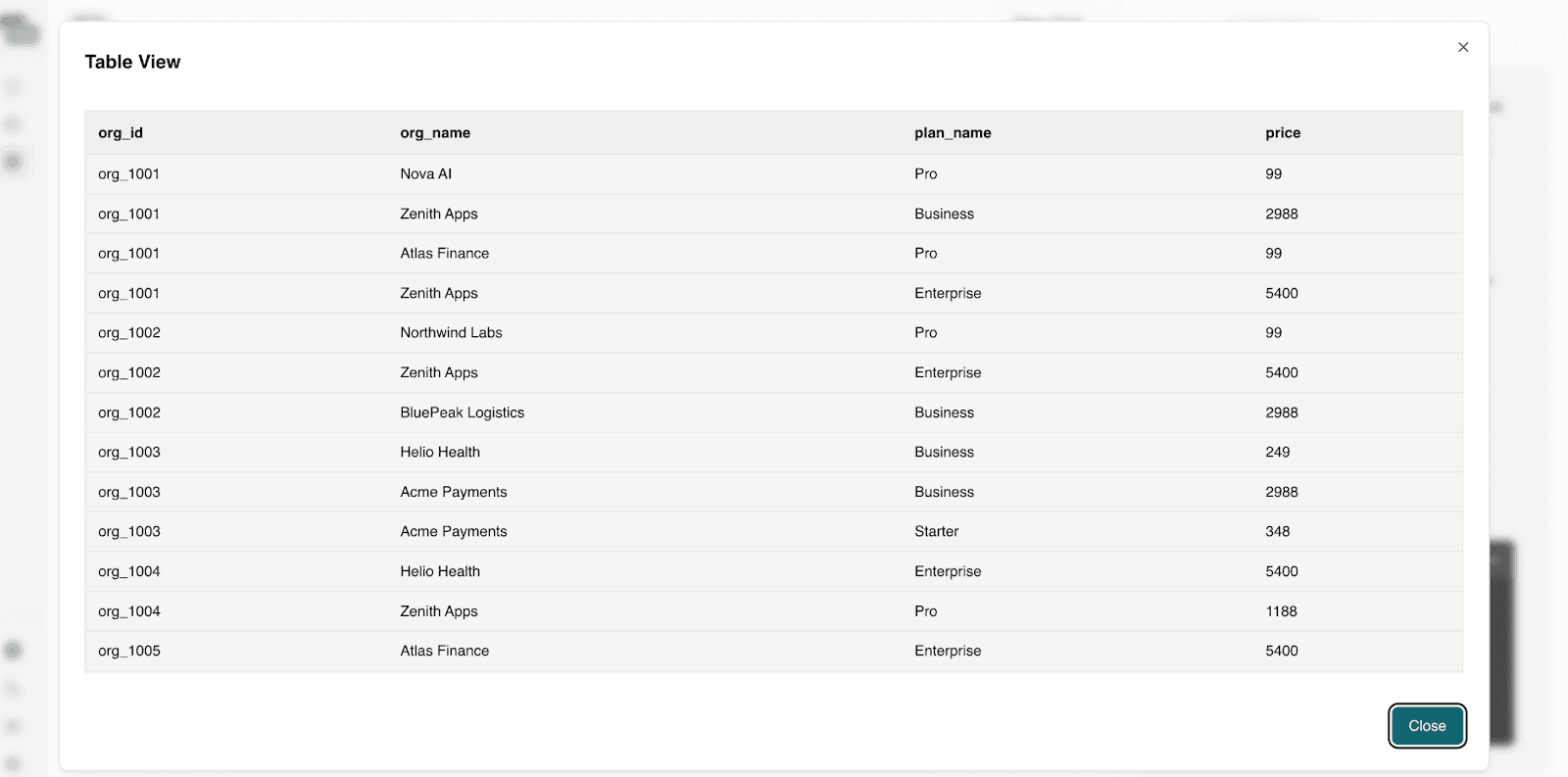
Question 10: Which customers signed up this year and already upgraded plans?
This can identify fast-growing accounts and may reveal high-product-market-fit segments.
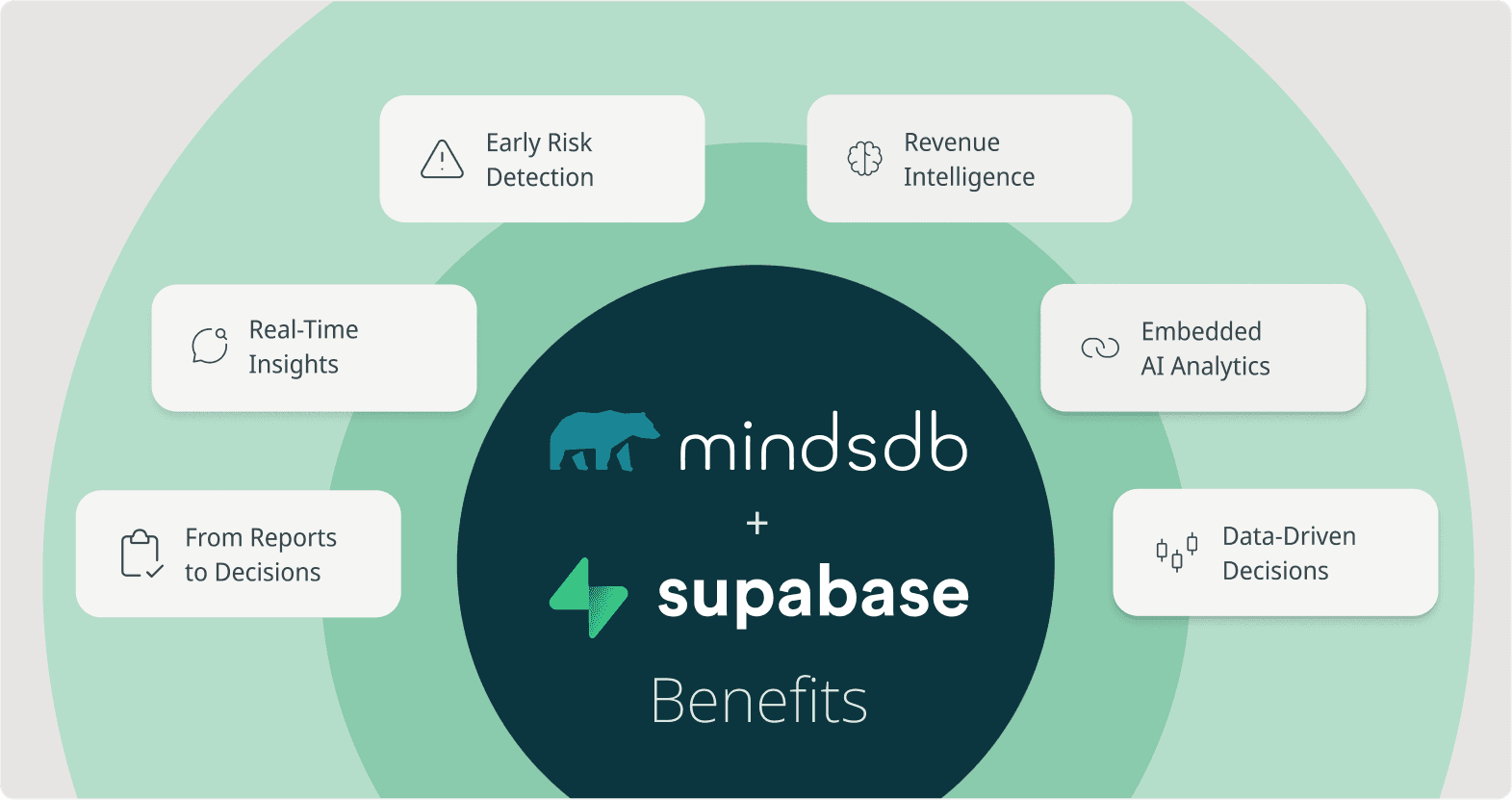
How Conversational Intelligence Benefits Modern Web Apps
Embedding conversational analytics directly into a web application transforms it from a reporting interface into a decision layer. Instead of forcing users to leave the product to analyze performance, intelligence becomes part of the core experience. Users can investigate revenue trends, detect churn risk, analyze expansion signals, and model forecasts without exporting data or writing SQL. The product becomes self-explaining.
This delivers tangible benefits:
Faster time to insight: Questions are answered against live data instantly.
Higher product stickiness: Users rely on the app for decisions, not just transactions.
Improved revenue protection: Risk signals surface earlier and are easier to act on.
Stronger differentiation: Competitors can replicate dashboards, but replicating explainable, embedded intelligence is far more complex.
By combining Supabase’s structured operational data with MindsDB Agents’ reasoning capabilities, web apps gain more than analytics. They gain an intelligence layer that scales with their customers. And in a landscape where every SaaS tool competes for relevance, becoming the place where decisions happen - not just where data lives - is a decisive advantage.
Scaling Further with Minds Enterprise
For teams operating in more complex or regulated environments, MindsDB also offers Minds Enterprise - a fully managed, enterprise-grade deployment designed for secure, large-scale AI analytics that offer Pro and Teams Plans. Minds Enterprise provides advanced governance, access controls, auditability, and performance optimization, making it ideal for organizations that require production-grade conversational intelligence across mission-critical systems. It enables companies to operationalize AI reasoning with the security, compliance, and scalability enterprises demand. You can use the Postgres data connector to connect your Supabase data in Minds Enterprise.
Conclusion: The Future of Web Apps Is Conversational
Web applications are evolving from systems of record into systems of reasoning. What began as embedded dashboards is now becoming embedded intelligence - where users don’t just view metrics, but actively interrogate, explore, and understand them in real time.
By combining Supabase as the operational source of truth with MindsDB Agents as the reasoning layer, web apps can move from static reporting to dynamic dialogue. Intelligence runs directly on live data. Answers are grounded and explainable. Decisions happen inside the product, not in exported spreadsheets or disconnected BI tools.
The web apps that win will not be the ones with the most dashboards - they will be the ones that can think alongside their users. Conversational analytics is no longer experimental. It is becoming the expectation. Contact our team to see this in action!
In the previous blog, How Web Apps Can Gain a Competitive Edge with Supabase and MindsDB, we explored how web applications can gain a competitive edge by combining Supabase as a system of record with MindsDB’s in-database AI intelligence layer - letting teams create Knowledge Bases and perform Hybrid Search to get grounded, explainable answers on real data.
But today’s apps are fast evolving beyond simple ask-and-respond analytics. Users now expect conversational experiences - interfaces that can understand intent, recall contexts, reason across silos, and provide explanations on demand. That’s where AI-Powered Conversational Analytics and MindsDB Agents come in.
What Is Conversational Analytics?
Conversational analytics is an emerging approach to data exploration that allows users to interact with their data through natural language instead of static dashboards or predefined reports. Rather than navigating filters and charts, users can ask questions, refine them with follow-ups, investigate root causes, and explore insights in real time. This transforms analytics from a passive viewing experience into an interactive dialogue with live data.
This shift is quickly becoming a competitive moat for modern web applications. When users can move seamlessly from question to insight, the time between curiosity and clarity shrinks dramatically. In fast-moving markets where speed drives revenue growth, customer retention, and operational decisions, that compression becomes a structural advantage.
More importantly, conversational analytics embeds intelligence directly into the product itself. When software can reason across structured metrics, generate grounded answers, and explain the data behind those answers, it becomes more than a reporting interface — it becomes a decision partner. Dashboards can be replicated, but building explainable, conversational intelligence into an application is significantly harder, creating a lasting competitive advantage for platforms that implement it well.
Building the Moat: Supabase as Truth, MindsDB as Intelligence
Supabase provides the real-time system of record - transactions, user activity, product usage, and operational data all live there. MindsDB layers conversational intelligence directly on top of that data without moving it. Instead of exporting to a warehouse or maintaining dashboards, users can ask questions against live tables and receive grounded, explainable answers. Freshness and transparency become built-in product capabilities, not afterthoughts.
Together, they enable more than analytics. Supabase is a Postgres database and supplies structured truth. MindsDB adds agents that reason across structured metrics and unstructured context in a single interaction. The result is an application that doesn’t just display data - it understands it, explains it, and allows users to explore it conversationally. That’s what turns intelligence into a competitive moat.
Turning Supabase Data into Dialogue with MindsDB
Theory is important. Architecture matters. But competitive advantage is built in implementation.
In this section, we’ll move from concept to execution by building a conversational analytics workflow using MindsDB Agents. You’ll see how to connect live application data, layer in a Knowledge Base, and configure an agent that can interpret intent, retrieve context, and generate grounded, explainable responses. The goal isn’t to bolt on a chatbot - it’s to embed a reasoning layer directly on your data.
By the end of this tutorial, you’ll understand how to turn data into an interactive analytical experience - where users don’t just view metrics, but engage in a dialogue with their data.
As in the previous blog, we will make use of the synthetic generated data for Midday hosted in Supabase.
To recap, here is a quick guide on how we previously connected to Supabase.
Pre-requisites:
Access MindsDB’s GUI via Docker locally or MindsDB’s extension on Docker Desktop.
Configure your default models in the MindsDB GUI by navigating to Settings → Models.
Navigate to Manage Integrations in Settings and install the dependencies for Supabase.
Once you have installed the dependencies for Supabase, you can connect to it via our SQL Editor using the CREATE DATABASE statement:
CREATE DATABASE display_name  --- display name for database.
WITH ENGINE = 'supabase',     --- name of the mindsdb handler
PARAMETERS = {
   "user": "postgres.gyjaxewghgebqavchydf",              --- the user to authenticate
   "password": "Supabase2026!",          --- the password to authenticate the user
   "host": "aws-1-us-west-1.pooler.supabase.com",              --- the host name of the Supabase connection
   "port": "5432",           --- the port to use when connecting
   "database": "postgres"           --- database name
};
Or you can connect Supabase via the GUI Form:
The following tables will be used:
`midday_user_data` which stores details about organizations.
`midday_metrics` which starts metrics like MRR, ARR, NRR and churn risk.
Turning Data Access into Conversational Intelligence
With your Supabase data connected, the next step is defining the MindsDB Agent that will orchestrate everything. This agent acts as the reasoning layer between user questions and your live data - deciding when to run SQL against structured tables, how to interpret intent, and how to synthesize results into a grounded, explainable response. Instead of simply querying data, you’re configuring a system that understands context and transforms operational state into conversational insight.
Create the Agent using the CREATE AGENT statement:
CREATE AGENT supabase_agent
USING
mode = "text",
 data = {
   "tables": ['supabase.midday_user_data', 'supabase.midday_metrics']
   },
   prompt_template = '
You are a finance analytics copilot for a SaaS metrics product (Midday.ai-like).
You answer questions using ONLY the available data in the connected Supabase tables.
user_data_kb stores data about organizations that are customers for Midday.ai.
midday_metrics_kb stores monthly recurring revenue with the column name mrr,anual recurring revenue with the column name arr, net revenue retention and churnrisk data about these organizations.


Rules:
- Each org_name represents a customer.
- Use org_id for joins between user_data_kb and midday_metrics_kb.
- If the user asks for trends month-over-month, explain what you can do with the available fields (metric_month exists but the dataset may require additional comparisons).
- If you cannot answer exactly, say what field/table is missing and propose the next best query.
'
;
Exploring Insights Through Conversational Queries
Let’s ask the agent some questions. This is based on data for the year 2025.
Question 1: Which customers have purchased more seats than their plan includes?
Seat overages are one of the clearest expansion signals. These customers are already realizing value and often justify upsells with minimal friction.
Question 2: Which high-MRR customers have a churn risk score above 0.7?
Not all churn is equal. Losing a high-MRR customer has an outsized impact on ARR and forecasts. This question focuses attention on revenue at risk, not just customer count.
Question 3: Which active subscriptions have failed invoices? Please list the customer names and subscription id's with invoice id's.
Billing failures create silent revenue leakage and often trigger cancellations if not resolved quickly. Finance teams need immediate visibility into these issues to protect cash flow.
Question 4: Which customers generate meaningful MRR but show signs of declining engagement or retention? List the retention and engagement scores with customer names.
This question connects revenue, usage, and risk into a single view. It gives leadership an actionable short list of accounts that require immediate attention to protect future ARR.
Question 5: What percentage of MRR growth this quarter came from expansion vs new acquisition?
This helps to evaluate growth quality. Strong expansion signals product strength and customer satisfaction.
Question 6: Which customers are approaching renewal with declining engagement?
This helps to prioritize proactive outreach and protects upcoming renewal revenue.
Question 7: If current churn trends continue, what is the projected NRR next quarter?
This is to model downside risk. It supports financial forecasting and board reporting.
Question 8: Which accounts contribute the most volatility to monthly revenue?
This is to detect revenue concentration risk as high concentration increases financial exposure.
Question 9: How exposed are we to revenue concentration risk?
We can analyze dependency on top revenue accounts as high concentration increases volatility and investor risk.
Question 10: Which customers signed up this year and already upgraded plans?
This can identify fast-growing accounts and may reveal high-product-market-fit segments.
How Conversational Intelligence Benefits Modern Web Apps
Embedding conversational analytics directly into a web application transforms it from a reporting interface into a decision layer. Instead of forcing users to leave the product to analyze performance, intelligence becomes part of the core experience. Users can investigate revenue trends, detect churn risk, analyze expansion signals, and model forecasts without exporting data or writing SQL. The product becomes self-explaining.
This delivers tangible benefits:
Faster time to insight: Questions are answered against live data instantly.
Higher product stickiness: Users rely on the app for decisions, not just transactions.
Improved revenue protection: Risk signals surface earlier and are easier to act on.
Stronger differentiation: Competitors can replicate dashboards, but replicating explainable, embedded intelligence is far more complex.
By combining Supabase’s structured operational data with MindsDB Agents’ reasoning capabilities, web apps gain more than analytics. They gain an intelligence layer that scales with their customers. And in a landscape where every SaaS tool competes for relevance, becoming the place where decisions happen - not just where data lives - is a decisive advantage.
Scaling Further with Minds Enterprise
For teams operating in more complex or regulated environments, MindsDB also offers Minds Enterprise - a fully managed, enterprise-grade deployment designed for secure, large-scale AI analytics that offer Pro and Teams Plans. Minds Enterprise provides advanced governance, access controls, auditability, and performance optimization, making it ideal for organizations that require production-grade conversational intelligence across mission-critical systems. It enables companies to operationalize AI reasoning with the security, compliance, and scalability enterprises demand. You can use the Postgres data connector to connect your Supabase data in Minds Enterprise.
Conclusion: The Future of Web Apps Is Conversational
Web applications are evolving from systems of record into systems of reasoning. What began as embedded dashboards is now becoming embedded intelligence - where users don’t just view metrics, but actively interrogate, explore, and understand them in real time.
By combining Supabase as the operational source of truth with MindsDB Agents as the reasoning layer, web apps can move from static reporting to dynamic dialogue. Intelligence runs directly on live data. Answers are grounded and explainable. Decisions happen inside the product, not in exported spreadsheets or disconnected BI tools.
The web apps that win will not be the ones with the most dashboards - they will be the ones that can think alongside their users. Conversational analytics is no longer experimental. It is becoming the expectation. Contact our team to see this in action!
Products
Open Source
© 2026 All rights reserved by MindsDB.

Start conversational analytics with MindsDB
Production-ready infrastructure for agentic analytics
Start conversational analytics with MindsDB
Production-ready infrastructure for agentic analytics

Products
Open Source
© 2026 All rights reserved by MindsDB.

Products
Open Source
© 2026 All rights reserved by MindsDB.
Start conversational analytics with MindsDB
Production-ready infrastructure for agentic analytics