
Building Janus: An AI Customer Support Helpdesk System Powered by MindsDB

K Om Senapati, Computer Science and Engineering Undergrad & MindsDB Open Source Contributor
Enterprise support teams face a constant drain on time and resources—triaging repetitive requests, classifying tickets, and responding to the same issues over and over. The result? Slow turnaround times, inconsistent responses, and support agents overloaded with manual work.
Janus was built to eliminate this bottleneck.
Powered by MindsDB AI Agents and a MindsDB-managed Knowledge Base, Janus transforms the traditional helpdesk into an automated, intelligent system. Users can submit tickets and chat with an AI agent in real time, while admins manage insights, classifications, and Knowledge Base updates from a unified dashboard.
The result is a fast, consistent, AI-first helpdesk workflow that automates classification, conversation, and analytics—reducing manual workload and accelerating resolution times.
The Use Case
The goal was to automate the helpdesk lifecycle.
Users submit tickets and chat with an AI support agent in real time
The system automatically classifies each ticket by intent, priority, and category
Admins get a single dashboard to track trends, promote solved tickets into the Knowledge Base, and search historical data
The outcome is faster response cycles, consistent answers, and actionable insights.
Key Features
1. AI-Driven Ticket Classification
Each ticket is processed by a dedicated MindsDB AI Agent that predicts its type, category, tags, and priority. The model learns from past tickets to improve accuracy over time.
Ticket metadata schema:
 {
     "type": "str",
     "category": "str",
     "priority": "str",
     "tag_1": "str",
     "tag_2": "str"
   }
 {
     "type": "str",
     "category": "str",
     "priority": "str",
     "tag_1": "str",
     "tag_2": "str"
   }
 {
     "type": "str",
     "category": "str",
     "priority": "str",
     "tag_1": "str",
     "tag_2": "str"
   }
 {
     "type": "str",
     "category": "str",
     "priority": "str",
     "tag_1": "str",
     "tag_2": "str"
   }
2. AI Chat Support
A second agent handles real-time conversations, providing instant solutions by leveraging the existing Knowledge Base for context.
3. Admin Dashboard
Admins can view analytics, approve solved cases into the Knowledge Base, and filter data by type, priority, or category.
4. Knowledge Base Management
The Knowledge Base (KB) is managed by MindsDB. It stores both content and metadata for retrieval and reasoning.
KB schema:
   content_columns = ["subject", "body", "answer"]
   metadata_columns = ["type", "priority", "category", "tag_1", "tag_2"]
   content_columns = ["subject", "body", "answer"]
   metadata_columns = ["type", "priority", "category", "tag_1", "tag_2"]
   content_columns = ["subject", "body", "answer"]
   metadata_columns = ["type", "priority", "category", "tag_1", "tag_2"]
   content_columns = ["subject", "body", "answer"]
   metadata_columns = ["type", "priority", "category", "tag_1", "tag_2"]
5. Search and Insights
Admins can visualize ticket trends, most common tags, and distribution of categories directly within the dashboard.
How It Works
Below is the high-level workflow of Janus.
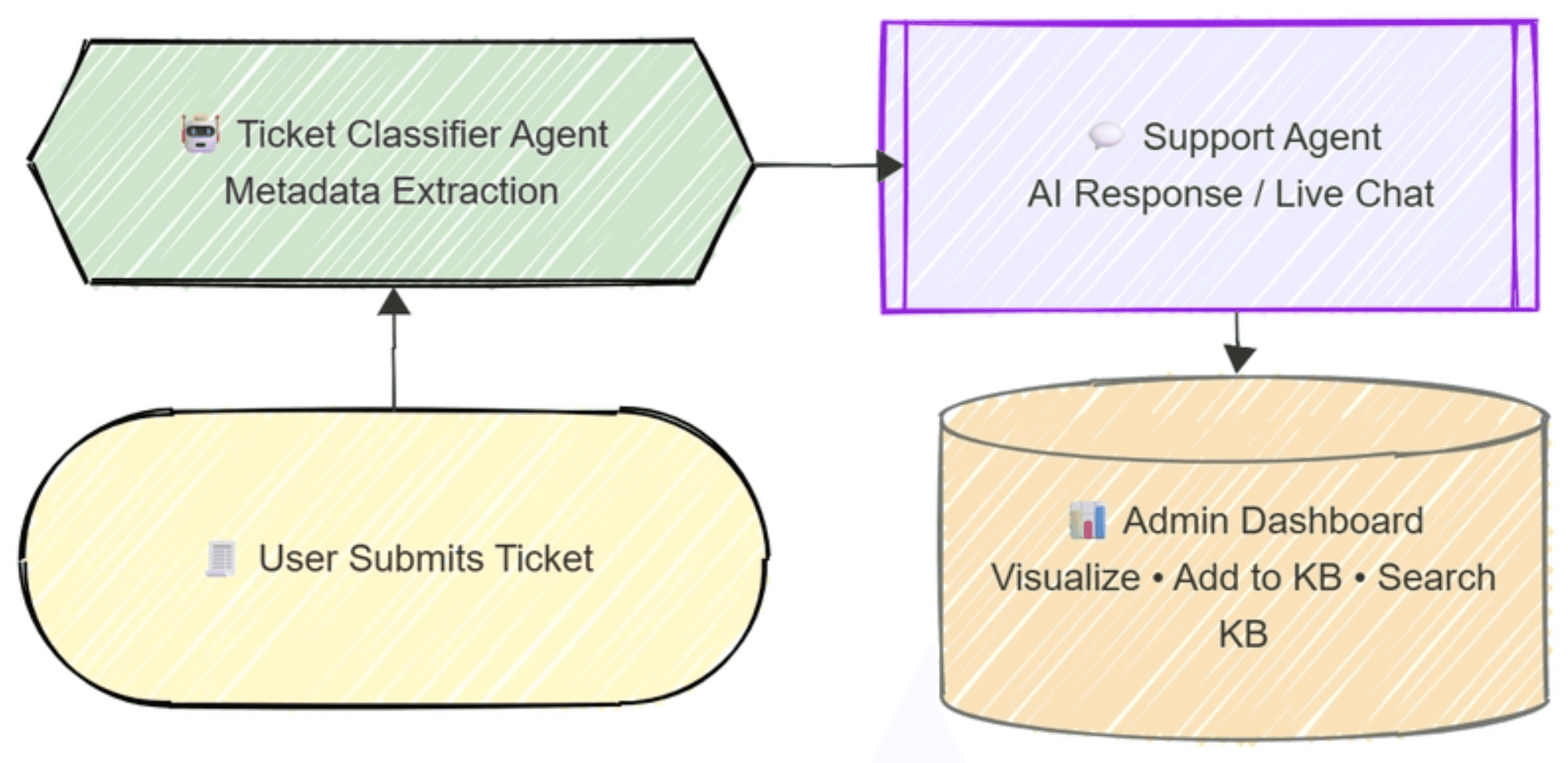
Architecture diagram:
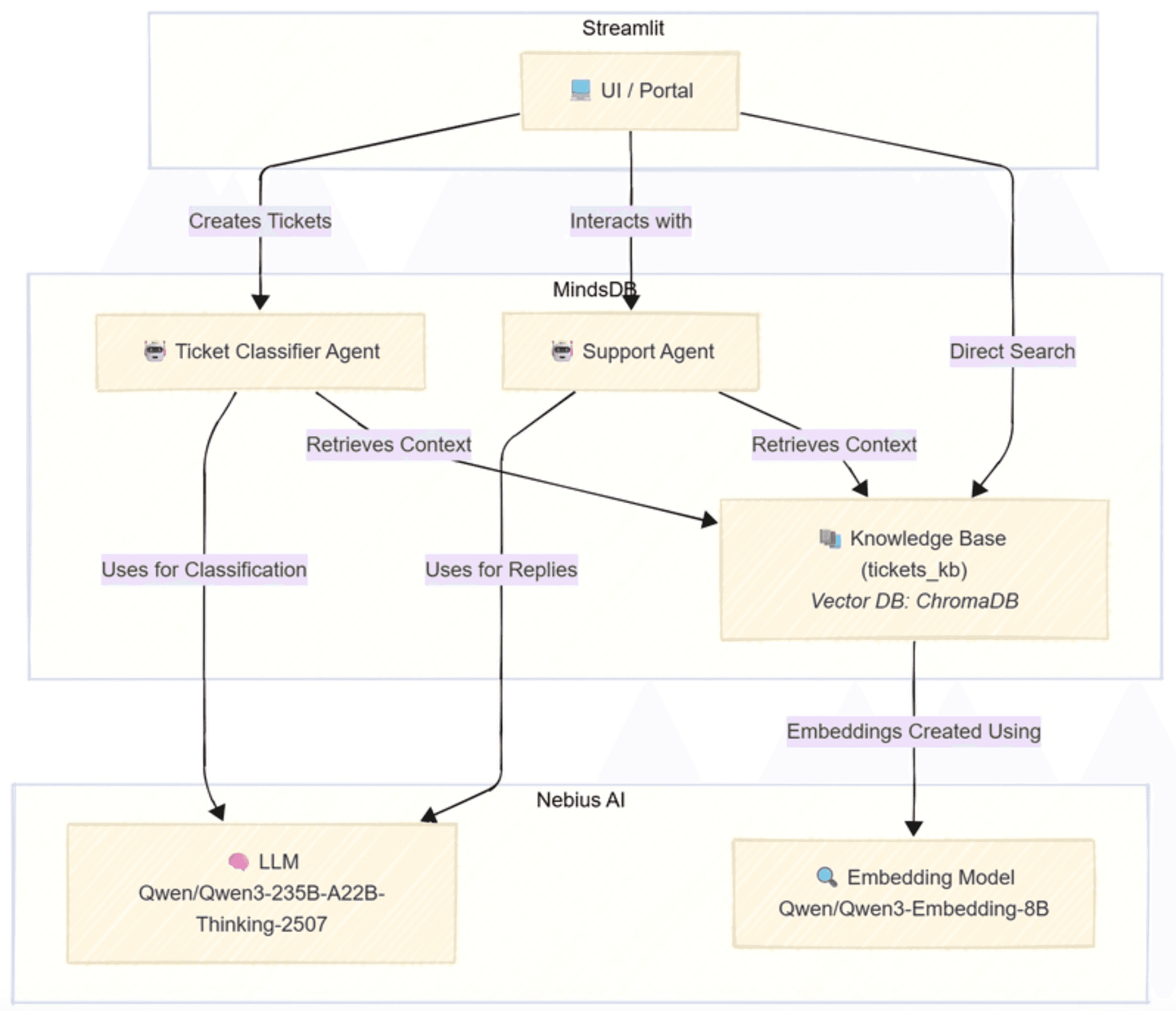
The Ticket Classifier Agent predicts structured metadata in JSON format which can be parsed directly in python using
json.loads()The Support Agent handles ongoing chat with context from the Knowledge Base
Both AI Agents are powered by MindsDB which manages the AI and KB layers.
For more information about the architecture of Janus, visit here.
How Janus Was Built.
Tech Stack:
UI: Streamlit
AI & KB Layer: MindsDB
Vector Database: ChromaDB
LLM Provider: Nebius
Programming Language: Python
The connection between Streamlit and MindsDB is handled via the MindsDB Python SDK.
AI Setup
MindsDB integrates with external AI providers (having OpenAI compatible APIs) for model inference.
For this project, Nebius was used as the provider endpoint. The LLM used is Qwen/Qwen3-235B-A22B-Thinking-2507, and the embedding model is Qwen/Qwen3-Embedding-8B.
Two MindsDB AI Agents power the workflow:
Ticket Classifier – Predicts metadata such as type, category, and priority.
Support Agent – Generates AI responses using the Knowledge Base for context.
The Knowledge Base combines a vector database (ChromaDB) with embedding model for contextual retrieval.
“If you’d like to see my rough work including KB creation, AI agent logic, querying, and some files database operations check out the notebook here.”
Installation
Clone the github repository
git clone https://github.com/k0msenapati/janus.git
cd janus
git clone https://github.com/k0msenapati/janus.git
cd janus
git clone https://github.com/k0msenapati/janus.git
cd janus
git clone https://github.com/k0msenapati/janus.git
cd janus
Download the dataset
# Create data directory if not exists
mkdir -p data

# Download dataset zip via Kaggle API
curl -L -o data/customer-support-tickets.zip \
  https://www.kaggle.com/api/v1/datasets/download/tobiasbueck/multilingual-customer-support-tickets

# Unzip contents to data directory
unzip -o data/customer-support-tickets.zip -d data

# Optional: remove the zip after extraction
rm data/customer-support-tickets.zip
# Create data directory if not exists
mkdir -p data

# Download dataset zip via Kaggle API
curl -L -o data/customer-support-tickets.zip \
  https://www.kaggle.com/api/v1/datasets/download/tobiasbueck/multilingual-customer-support-tickets

# Unzip contents to data directory
unzip -o data/customer-support-tickets.zip -d data

# Optional: remove the zip after extraction
rm data/customer-support-tickets.zip
# Create data directory if not exists
mkdir -p data

# Download dataset zip via Kaggle API
curl -L -o data/customer-support-tickets.zip \
  https://www.kaggle.com/api/v1/datasets/download/tobiasbueck/multilingual-customer-support-tickets

# Unzip contents to data directory
unzip -o data/customer-support-tickets.zip -d data

# Optional: remove the zip after extraction
rm data/customer-support-tickets.zip
# Create data directory if not exists
mkdir -p data

# Download dataset zip via Kaggle API
curl -L -o data/customer-support-tickets.zip \
  https://www.kaggle.com/api/v1/datasets/download/tobiasbueck/multilingual-customer-support-tickets

# Unzip contents to data directory
unzip -o data/customer-support-tickets.zip -d data

# Optional: remove the zip after extraction
rm data/customer-support-tickets.zip
Setup project, environment variables and run setup script
uv sync

cp .env.example .env # add your nebius api key from nebius ai cloud to NEBIUS_API_KEY var

uv run setup.py
uv sync

cp .env.example .env # add your nebius api key from nebius ai cloud to NEBIUS_API_KEY var

uv run setup.py
uv sync

cp .env.example .env # add your nebius api key from nebius ai cloud to NEBIUS_API_KEY var

uv run setup.py
uv sync

cp .env.example .env # add your nebius api key from nebius ai cloud to NEBIUS_API_KEY var

uv run setup.py
Run Streamlit App
source .venv/bin/activate
streamlit run app.py
source .venv/bin/activate
streamlit run app.py
source .venv/bin/activate
streamlit run app.py
source .venv/bin/activate
streamlit run app.py
Impact
Reduced response time as users get immediate AI replies
Consistent ticket classification ensuring better routing and tracking
Visual insights on ticket categories, priorities, and tag trends
Easier management of historical tickets through the Knowledge Base
AI acts as the first responder, handling repetitive issues and freeing human agents for complex cases.
Future Enhancements
Web Search Integration: Adding real-time data retrieval would make the AI agent more dynamic
Backend Upgrade: Creating a FastAPI backend for production scalability
Third-Party Integrations: Utilizing MindsDB data integrations such as Jira, Slack, or Gmail for enterprise integration
Final Thoughts
Janus shows what’s possible when modern AI workflows are paired with MindsDB’s agent and Knowledge Base capabilities. With a modular architecture, real-time AI support, automated classification, and fully integrated analytics, it delivers a powerful blueprint for end-to-end helpdesk automation.
And this is just the beginning. As Janus evolves—through web search integration, backend scaling, and deeper enterprise connectors like Jira or Slack—it can grow into a production-grade, multi-channel support system that dramatically reduces operational overhead.
If you’re exploring how to bring AI into your support stack, Janus is a strong example of what an AI-native helpdesk can look like—and how MindsDB enables it. Check out the project on Github.
Demo
Check out Janus the AI Helpdesk system powered by MindsDB in action.
Enterprise support teams face a constant drain on time and resources—triaging repetitive requests, classifying tickets, and responding to the same issues over and over. The result? Slow turnaround times, inconsistent responses, and support agents overloaded with manual work.
Janus was built to eliminate this bottleneck.
Powered by MindsDB AI Agents and a MindsDB-managed Knowledge Base, Janus transforms the traditional helpdesk into an automated, intelligent system. Users can submit tickets and chat with an AI agent in real time, while admins manage insights, classifications, and Knowledge Base updates from a unified dashboard.
The result is a fast, consistent, AI-first helpdesk workflow that automates classification, conversation, and analytics—reducing manual workload and accelerating resolution times.
The Use Case
The goal was to automate the helpdesk lifecycle.
Users submit tickets and chat with an AI support agent in real time
The system automatically classifies each ticket by intent, priority, and category
Admins get a single dashboard to track trends, promote solved tickets into the Knowledge Base, and search historical data
The outcome is faster response cycles, consistent answers, and actionable insights.
Key Features
1. AI-Driven Ticket Classification
Each ticket is processed by a dedicated MindsDB AI Agent that predicts its type, category, tags, and priority. The model learns from past tickets to improve accuracy over time.
Ticket metadata schema:
 {
     "type": "str",
     "category": "str",
     "priority": "str",
     "tag_1": "str",
     "tag_2": "str"
   }
2. AI Chat Support
A second agent handles real-time conversations, providing instant solutions by leveraging the existing Knowledge Base for context.
3. Admin Dashboard
Admins can view analytics, approve solved cases into the Knowledge Base, and filter data by type, priority, or category.
4. Knowledge Base Management
The Knowledge Base (KB) is managed by MindsDB. It stores both content and metadata for retrieval and reasoning.
KB schema:
   content_columns = ["subject", "body", "answer"]
   metadata_columns = ["type", "priority", "category", "tag_1", "tag_2"]
5. Search and Insights
Admins can visualize ticket trends, most common tags, and distribution of categories directly within the dashboard.
How It Works
Below is the high-level workflow of Janus.
Architecture diagram:
The Ticket Classifier Agent predicts structured metadata in JSON format which can be parsed directly in python using
json.loads()The Support Agent handles ongoing chat with context from the Knowledge Base
Both AI Agents are powered by MindsDB which manages the AI and KB layers.
For more information about the architecture of Janus, visit here.
How Janus Was Built.
Tech Stack:
UI: Streamlit
AI & KB Layer: MindsDB
Vector Database: ChromaDB
LLM Provider: Nebius
Programming Language: Python
The connection between Streamlit and MindsDB is handled via the MindsDB Python SDK.
AI Setup
MindsDB integrates with external AI providers (having OpenAI compatible APIs) for model inference.
For this project, Nebius was used as the provider endpoint. The LLM used is Qwen/Qwen3-235B-A22B-Thinking-2507, and the embedding model is Qwen/Qwen3-Embedding-8B.
Two MindsDB AI Agents power the workflow:
Ticket Classifier – Predicts metadata such as type, category, and priority.
Support Agent – Generates AI responses using the Knowledge Base for context.
The Knowledge Base combines a vector database (ChromaDB) with embedding model for contextual retrieval.
“If you’d like to see my rough work including KB creation, AI agent logic, querying, and some files database operations check out the notebook here.”
Installation
Clone the github repository
git clone https://github.com/k0msenapati/janus.git
cd janus
Download the dataset
# Create data directory if not exists
mkdir -p data

# Download dataset zip via Kaggle API
curl -L -o data/customer-support-tickets.zip \
  https://www.kaggle.com/api/v1/datasets/download/tobiasbueck/multilingual-customer-support-tickets

# Unzip contents to data directory
unzip -o data/customer-support-tickets.zip -d data

# Optional: remove the zip after extraction
rm data/customer-support-tickets.zip
Setup project, environment variables and run setup script
uv sync

cp .env.example .env # add your nebius api key from nebius ai cloud to NEBIUS_API_KEY var

uv run setup.py
Run Streamlit App
source .venv/bin/activate
streamlit run app.py
Impact
Reduced response time as users get immediate AI replies
Consistent ticket classification ensuring better routing and tracking
Visual insights on ticket categories, priorities, and tag trends
Easier management of historical tickets through the Knowledge Base
AI acts as the first responder, handling repetitive issues and freeing human agents for complex cases.
Future Enhancements
Web Search Integration: Adding real-time data retrieval would make the AI agent more dynamic
Backend Upgrade: Creating a FastAPI backend for production scalability
Third-Party Integrations: Utilizing MindsDB data integrations such as Jira, Slack, or Gmail for enterprise integration
Final Thoughts
Janus shows what’s possible when modern AI workflows are paired with MindsDB’s agent and Knowledge Base capabilities. With a modular architecture, real-time AI support, automated classification, and fully integrated analytics, it delivers a powerful blueprint for end-to-end helpdesk automation.
And this is just the beginning. As Janus evolves—through web search integration, backend scaling, and deeper enterprise connectors like Jira or Slack—it can grow into a production-grade, multi-channel support system that dramatically reduces operational overhead.
If you’re exploring how to bring AI into your support stack, Janus is a strong example of what an AI-native helpdesk can look like—and how MindsDB enables it. Check out the project on Github.
Demo
Check out Janus the AI Helpdesk system powered by MindsDB in action.
Products
Open Source
© 2026 All rights reserved by MindsDB.

Start conversational analytics with MindsDB
Production-ready infrastructure for agentic analytics
Start conversational analytics with MindsDB
Production-ready infrastructure for agentic analytics

Products
Open Source
© 2026 All rights reserved by MindsDB.

Products
Open Source
© 2026 All rights reserved by MindsDB.
Start conversational analytics with MindsDB
Production-ready infrastructure for agentic analytics