Area51 - Unifying Enterprise Knowledge Search with MindsDB

Prasanna Saravanan, MindsDB Open Source Contributor
Enterprises don’t struggle because they lack information—they struggle because their information lives in silos. Support knowledge lives in Zendesk. Engineering truth lives in Jira. Institutional memory lives in Confluence. The result is a daily maze of context-switching, duplicated investigation, and slow resolutions.
We wanted to find out what it would take to unify these knowledge islands into a single, intelligent search layer—without spinning up a vector database, writing ETL pipelines, or maintaining brittle orchestration code.
So we built Area51 for MindsDB's Hacktoberfest, a production-ready multi-source RAG system powered entirely by MindsDB’s Knowledge Bases. What traditionally requires five or more separate services—ETL, embeddings, vector storage, semantic search, jobs, and evaluation—is now declarative SQL. In just a few days, we shipped a unified search experience across Zendesk, Jira, and Confluence, complete with three agent interfaces for conversational reasoning, programmatic analytics, and desktop AI assistants.
This is what happens when semantic search, automated embeddings, and zero-ETL data pipelines all live under one roof.
The Problem: Three Islands of Information
Modern enterprises battle knowledge fragmentation every day. Critical information is scattered across distinct platforms:
Zendesk: Customer support tickets, resolutions, and interaction history
Jira: Engineering issues, bug reports, and project tracking
Confluence: Technical documentation, SOPs, and internal guides
This fragmentation creates real operational costs. Support agents waste time switching between systems, trying to piece together context that exists but isn't discoverable. An engineer investigating a bug can't easily see customer impact. Documentation teams operate blind to actual support needs.
This results in slower resolutions, duplicated effort, and knowledge that never reaches the people who need it.
The Solution: One Query, Complete Context
We built Area51 - a unified semantic search system that connects all three platforms through MindsDB Knowledge Bases. Instead of building separate ETL pipelines, custom vector databases, and orchestration layers, MindsDB handles everything declaratively.
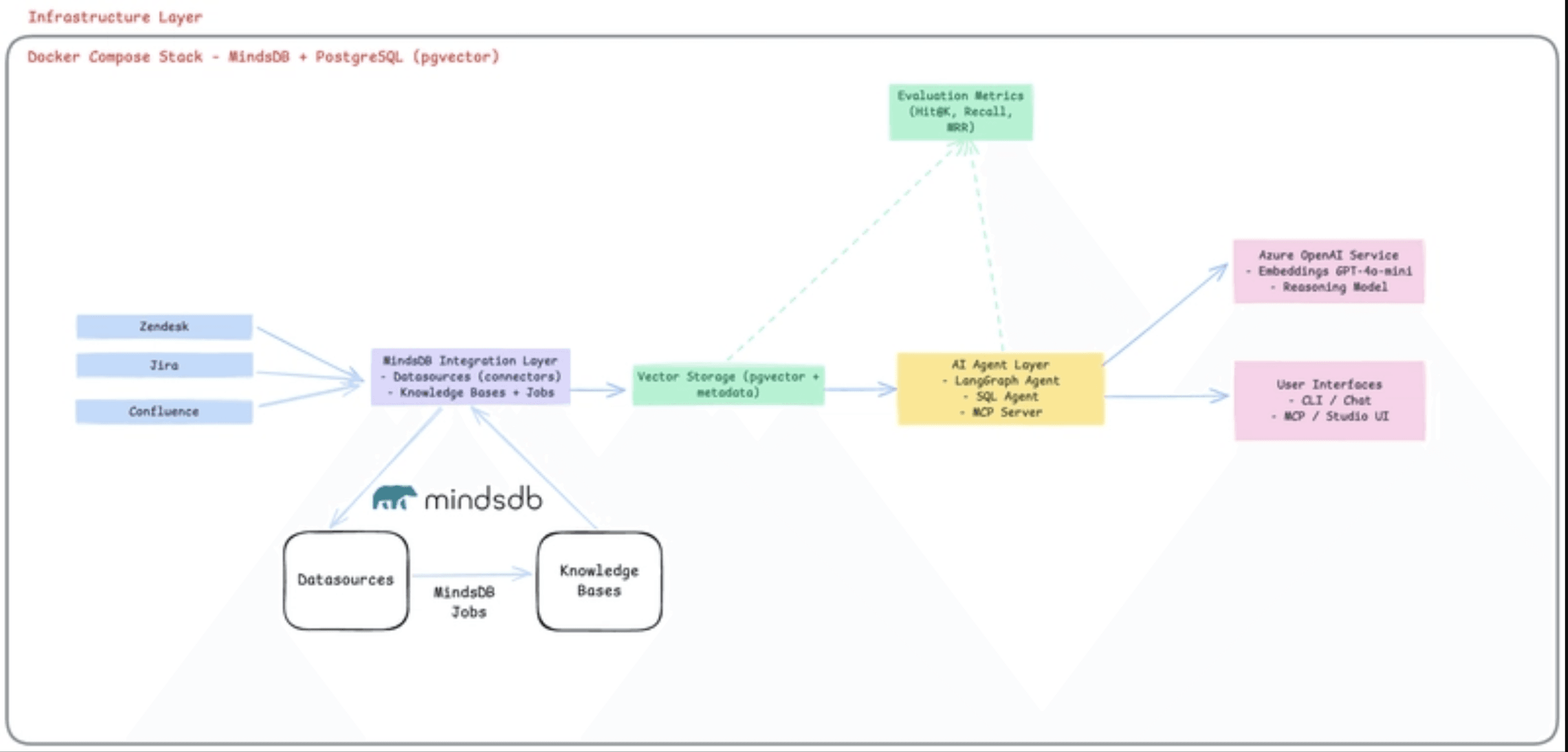
The system automatically syncs all three platforms, provides semantic search that understands relationships and context, and stays current without manual intervention. Most importantly, it offers distinct agent interfaces for different workflows:
LangGraph Agent - Conversational, multi-turn reasoning for complex interactions
MindsDB SQL Agent - High-performance direct queries to run agents directly from the MindsDB UI
MCP Server - Integration with AI assistants like Cursor and Claude Desktop
What MindsDB Replaced
What We Needed | Traditional Approach | With MindsDB |
|---|---|---|
Data Integration | Custom ETL scripts per source |
|
Embeddings | Separate service + API calls | Automatic chunking + embedding |
Vector Storage | Pinecone/Weaviate/Supabase | Built-in pgvector integration |
Search Engine | Custom semantic search code | Hybrid SQL queries with |
ETL Orchestration | Airflow/Kubernetes CronJobs |
|
Evaluation | Custom metrics framework |
|
Architecture Deep Dive
Area51 integrates Zendesk, Jira, and Confluence through MindsDB Knowledge Bases using hybrid semantic search. Here's how it works:
Data Integration Layer
Three MindsDB datasources connect directly to external APIs:
-- One statement per integration, zero API codeCREATE DATASOURCE zendesk_datasource WITH ENGINE = 'zendesk';
CREATE DATASOURCE jira_datasource WITH ENGINE = 'jira';
CREATE DATASOURCE confluence_datasource WITH ENGINE = 'confluence';
-- One statement per integration, zero API codeCREATE DATASOURCE zendesk_datasource WITH ENGINE = 'zendesk';
CREATE DATASOURCE jira_datasource WITH ENGINE = 'jira';
CREATE DATASOURCE confluence_datasource WITH ENGINE = 'confluence';
-- One statement per integration, zero API codeCREATE DATASOURCE zendesk_datasource WITH ENGINE = 'zendesk';
CREATE DATASOURCE jira_datasource WITH ENGINE = 'jira';
CREATE DATASOURCE confluence_datasource WITH ENGINE = 'confluence';
-- One statement per integration, zero API codeCREATE DATASOURCE zendesk_datasource WITH ENGINE = 'zendesk';
CREATE DATASOURCE jira_datasource WITH ENGINE = 'jira';
CREATE DATASOURCE confluence_datasource WITH ENGINE = 'confluence';
Each datasource handles authentication, pagination, and rate limiting automatically. No custom ETL code required.
Knowledge Base Layer
Three separate knowledge bases, each with Azure OpenAI embeddings.
Confluence - For companies official documentations
Jira - For engineering/technical tickets
Zendesk - For customer tickets
MindsDB automatically:
Chunks documents intelligently
Generates embeddings via Azure OpenAI
Stores vectors in pgvector
Creates hybrid search indexes
Handles versioning and metadata
Automation Layer: Zero-Ops ETL
Traditional approach: Airflow DAGs, Kubernetes CronJobs, custom monitoring dashboards.
MindsDB approach:
CREATE JOB jira_refresh_job (
    insert into jira_kb
    select * from jira_datasource.issues;
) EVERY hour;
CREATE JOB jira_refresh_job (
    insert into jira_kb
    select * from jira_datasource.issues;
) EVERY hour;
CREATE JOB jira_refresh_job (
    insert into jira_kb
    select * from jira_datasource.issues;
) EVERY hour;
CREATE JOB jira_refresh_job (
    insert into jira_kb
    select * from jira_datasource.issues;
) EVERY hour;
Translation: "Keep the knowledge base updated hourly, with incremental refreshes, forever."
We created three jobs running on different schedules:
Zendesk KB: Every 30 minutes
Jira KB: Every 30 minutes
Confluence KB: Every day
Zero DevOps overhead. MindsDB handles scheduled execution, incremental updates, failure retries, and status tracking.
The Three Agent Interfaces
1. LangGraph Conversational Agent
The LangGraph agent provides a visual development interface and conversational interaction through an intelligent routing system.
Starting the Agent:
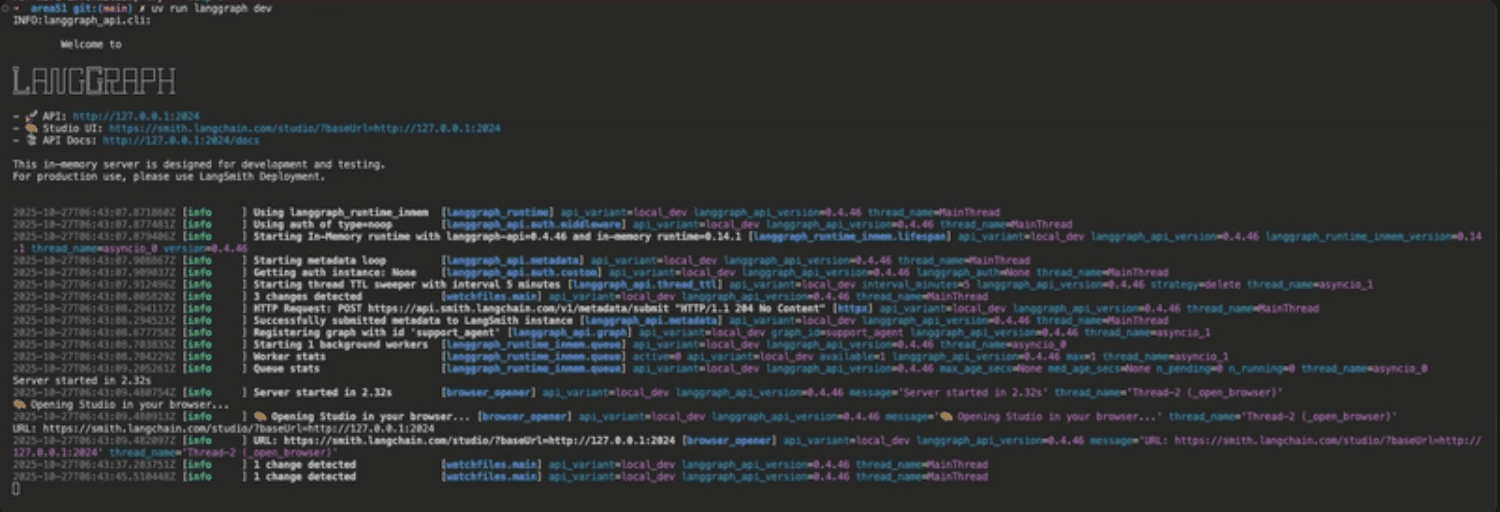
uv run langgraph dev
uv run langgraph dev
uv run langgraph dev
uv run langgraph dev
The server starts on http://127.0.0.1:2024 and automatically opens LangChain Studio in your browser, showing the graph visualization of the workflow.
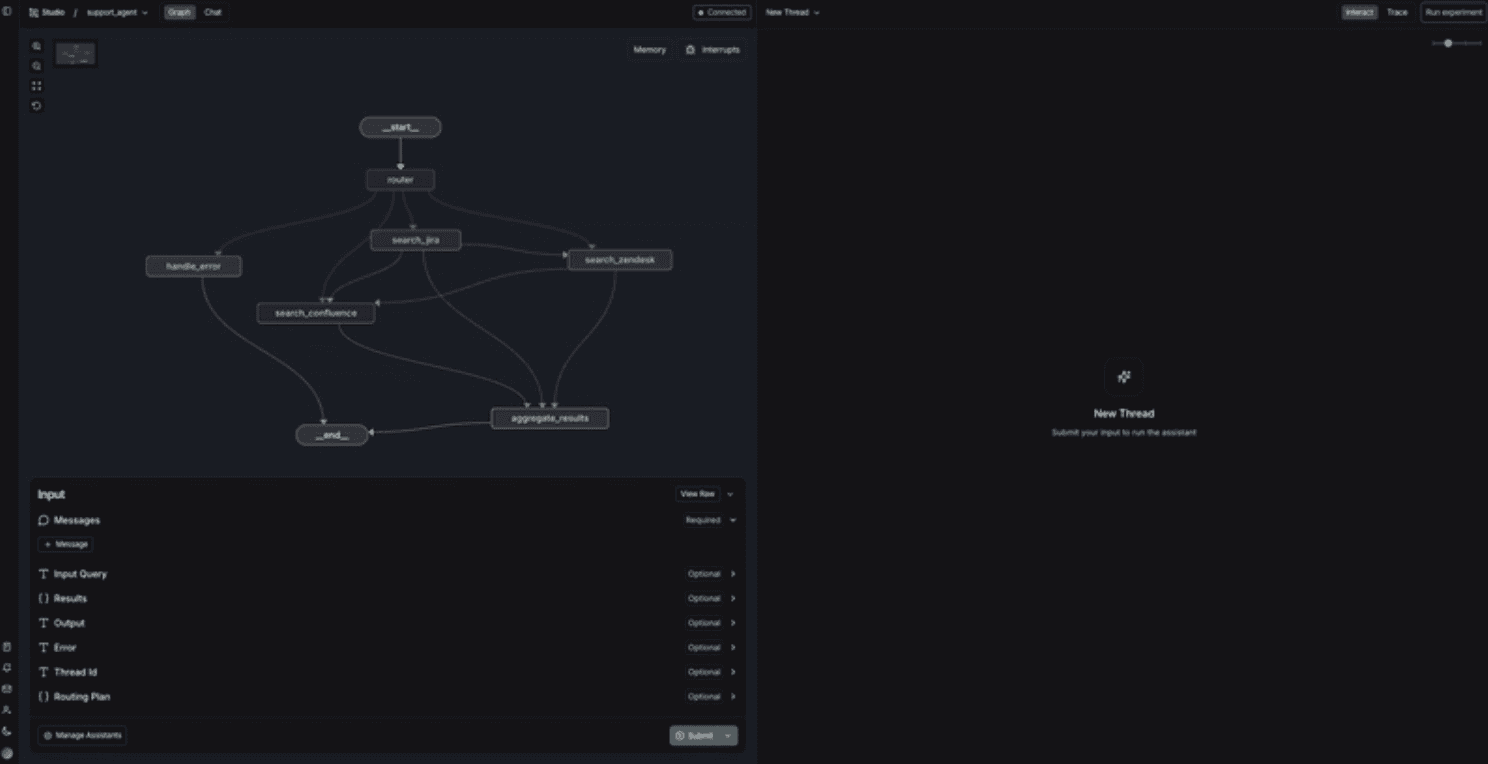
Graph Architecture:
The support_agent graph uses intelligent routing:
Router - Analyzes queries and determines which systems to search
Search Nodes - Three parallel operations:
search_jira- Search Jira issuessearch_zendesk- Search Zendesk ticketssearch_confluence- Search Confluence documentation
Aggregate Results - Synthesizes findings into unified responses
Error Handling - Manages failures gracefully
Example Interaction:
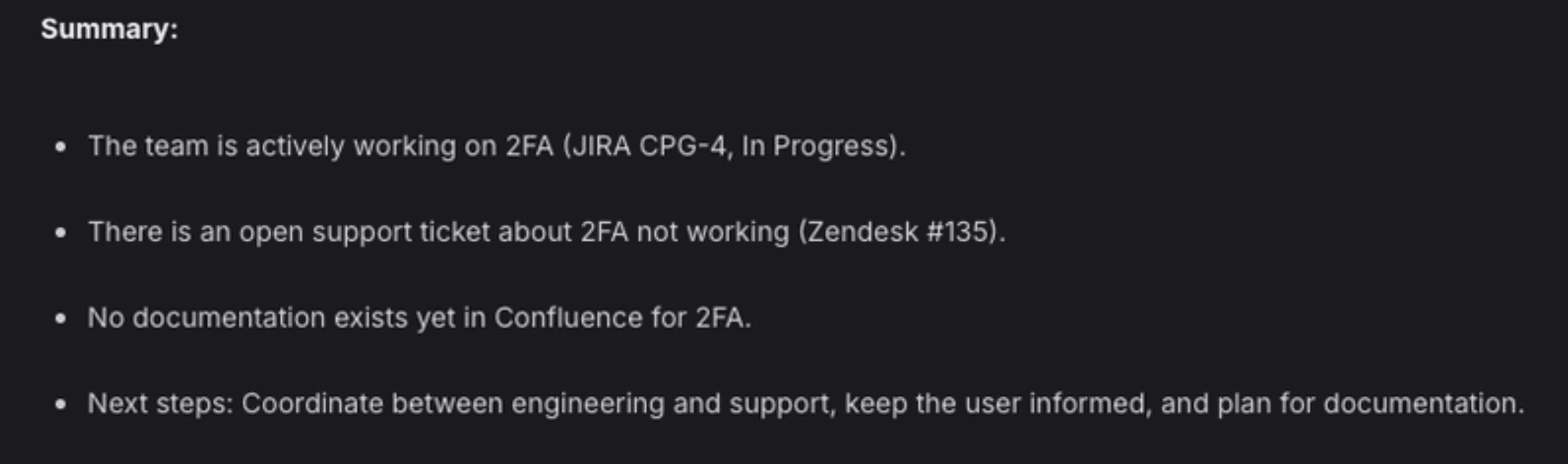
Query: ”Is the team working on something related to 2FA? and are there any support tickets on the same?”
Agent Response:
2. MindsDB SQL Agent
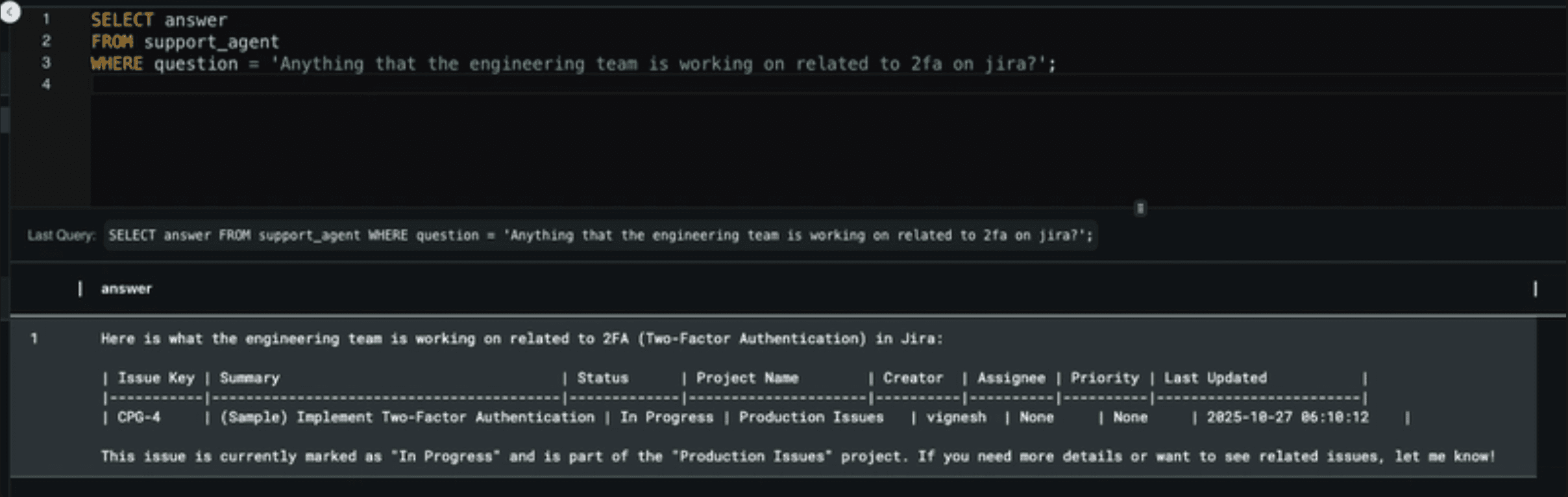
The MindsDB SQL agent provides high-performance direct queries, automatically created during setup.
Accessing via MindsDB Studio:
Open MindsDB Studio at
http://localhost:47334Navigate to the SQL Editor
Query using natural language:
SELECT answer
FROM support_agent
WHERE question = 'Anything that the engineering team is working on related to 2fa on jira?';
SELECT answer
FROM support_agent
WHERE question = 'Anything that the engineering team is working on related to 2fa on jira?';
SELECT answer
FROM support_agent
WHERE question = 'Anything that the engineering team is working on related to 2fa on jira?';
SELECT answer
FROM support_agent
WHERE question = 'Anything that the engineering team is working on related to 2fa on jira?';
The agent understands questions semantically and returns relevant results from all knowledge bases, automatically routing to Jira, Zendesk, or Confluence as needed.
Programmatic Access:
import mindsdb_sdk

server = mindsdb_sdk.connect('http://localhost:47334')
kb = server.knowledge_bases.get('zendesk_kb')

# Execute semantic search
results = kb.find('payment errors', limit=10)
import mindsdb_sdk

server = mindsdb_sdk.connect('http://localhost:47334')
kb = server.knowledge_bases.get('zendesk_kb')

# Execute semantic search
results = kb.find('payment errors', limit=10)
import mindsdb_sdk

server = mindsdb_sdk.connect('http://localhost:47334')
kb = server.knowledge_bases.get('zendesk_kb')

# Execute semantic search
results = kb.find('payment errors', limit=10)
import mindsdb_sdk

server = mindsdb_sdk.connect('http://localhost:47334')
kb = server.knowledge_bases.get('zendesk_kb')

# Execute semantic search
results = kb.find('payment errors', limit=10)
3. MCP Server for AI Assistants
The MCP (Model Context Protocol) server enables AI assistants like Cursor and Claude Desktop to search across all knowledge bases through natural conversation.
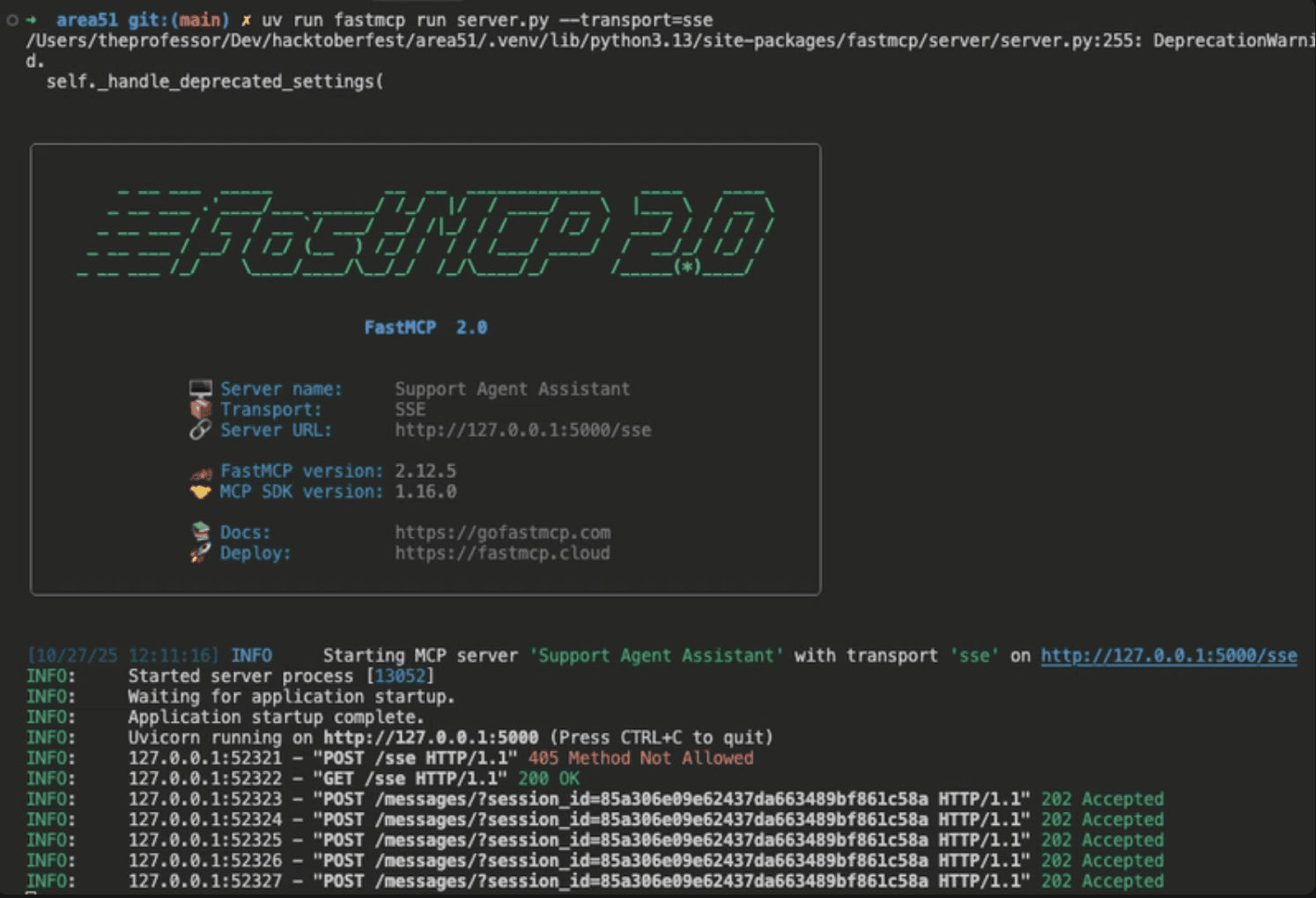
Starting the Server:
uv run fastmcp run server.py --transportuv run fastmcp run server.py --transportuv run fastmcp run server.py --transportuv run fastmcp run server.py --transportServer starts on http://127.0.0.1:5000/sse with the name "Support Agent Assistant".
Configure Cursor:
Add to Cursor settings:
{
  "mcpServers": {
    "area51-support-agent": {
      "command": "uv",
      "args": ["run", "fastmcp", "run", "server.py", "--transport=sse"],
      "env": {
        "MINDSDB_URL": "http://localhost:47334"
      }
    }
  }
}
{
  "mcpServers": {
    "area51-support-agent": {
      "command": "uv",
      "args": ["run", "fastmcp", "run", "server.py", "--transport=sse"],
      "env": {
        "MINDSDB_URL": "http://localhost:47334"
      }
    }
  }
}
{
  "mcpServers": {
    "area51-support-agent": {
      "command": "uv",
      "args": ["run", "fastmcp", "run", "server.py", "--transport=sse"],
      "env": {
        "MINDSDB_URL": "http://localhost:47334"
      }
    }
  }
}
{
  "mcpServers": {
    "area51-support-agent": {
      "command": "uv",
      "args": ["run", "fastmcp", "run", "server.py", "--transport=sse"],
      "env": {
        "MINDSDB_URL": "http://localhost:47334"
      }
    }
  }
}
Once configured, ask Cursor: "Search for authentication errors in Zendesk" and it will use the MCP server to query your knowledge bases.
Hybrid Search: The Best of Both Worlds
MindsDB's MATCHES operator unlocks semantic search, while traditional SQL enables structured filtering.
Semantic Search
Find relevant tickets using natural language understanding:
SELECT *
FROM confluence_kb
WHERE content = 'docker'
ORDER BY relevance DESC
LIMIT 5
SELECT *
FROM confluence_kb
WHERE content = 'docker'
ORDER BY relevance DESC
LIMIT 5
SELECT *
FROM confluence_kb
WHERE content = 'docker'
ORDER BY relevance DESC
LIMIT 5
SELECT *
FROM confluence_kb
WHERE content = 'docker'
ORDER BY relevance DESC
LIMIT 5
The semantic search understands that "docker" relates to "open source hosting" without requiring exact keyword matches.
Structured Filtering
Query specific metadata fields for precise results:
SELECT *
FROM jira_kb
WHERE status = 'In Progress'
SELECT *
FROM jira_kb
WHERE status = 'In Progress'
SELECT *
FROM jira_kb
WHERE status = 'In Progress'
SELECT *
FROM jira_kb
WHERE status = 'In Progress'
Hybrid Search
Combine semantic understanding with structured metadata filters:
SELECT *
FROM zendesk_kb
WHERE content = '2fa'
and hybrid_search=true
and hybrid_search_alpha=0.6
LIMIT 10
SELECT *
FROM zendesk_kb
WHERE content = '2fa'
and hybrid_search=true
and hybrid_search_alpha=0.6
LIMIT 10
SELECT *
FROM zendesk_kb
WHERE content = '2fa'
and hybrid_search=true
and hybrid_search_alpha=0.6
LIMIT 10
SELECT *
FROM zendesk_kb
WHERE content = '2fa'
and hybrid_search=true
and hybrid_search_alpha=0.6
LIMIT 10
This query semantically searches for 2fa-related content while simultaneously filtering by while using hybrid search functionality of mindsDb.
Real-World Impact
Use Case 1: Distinguishing Feature Requests from Documentation Gaps
A customer asks how to bulk export transaction data via the API. The agent queries: "bulk export transaction data API"
Confluence: No documentation found
Jira: Finds "FEAT-445: Implement bulk data export endpoint" in development
Zendesk: Finds 3 similar tickets from past month
Result: Support can confidently respond that this is a planned feature with expected delivery next release, rather than creating a feature request.
Use Case 2: Finding Relevant Documentation to Resolve Tickets
Customer reports: "Getting 401 errors when calling the payments endpoint"
The agent queries: "authentication failures payments API 401 errors"
Confluence: Returns "API Authentication Troubleshooting Guide" with dedicated section on 401 errors
Zendesk: Finds 15 resolved tickets with similar issues
Pattern Analysis: Most common resolution is using sandbox keys in production
Result: Issue typically resolved in 5 minutes with existing documentation.
Use Case 3: Leveraging Historical Context for Faster Resolution
Customer: "Dashboard widgets loading very slowly since yesterday"
The agent queries: "dashboard performance slow loading widgets"
Zendesk: Shows 8 tickets in past 24 hours, plus historical spike 3 months ago
Jira: Finds current investigation (DASH-892) and past issue (DASH-756) with similar root cause
Confluence: Returns monitoring runbook and database maintenance procedures
Result: Engineering team checks database indexes first, finds the issue in 15 minutes instead of hours of investigation. Historical pattern recognition prevents reinventing the wheel.
Performance Metrics
Area51 achieves strong performance across all three knowledge bases with sub-second query times and high relevance.
Knowledge Base | Hit Rate | Recall Score | Avg Query Time |
|---|---|---|---|
Confluence KB | 94.0% | 0.940 | 0.15s |
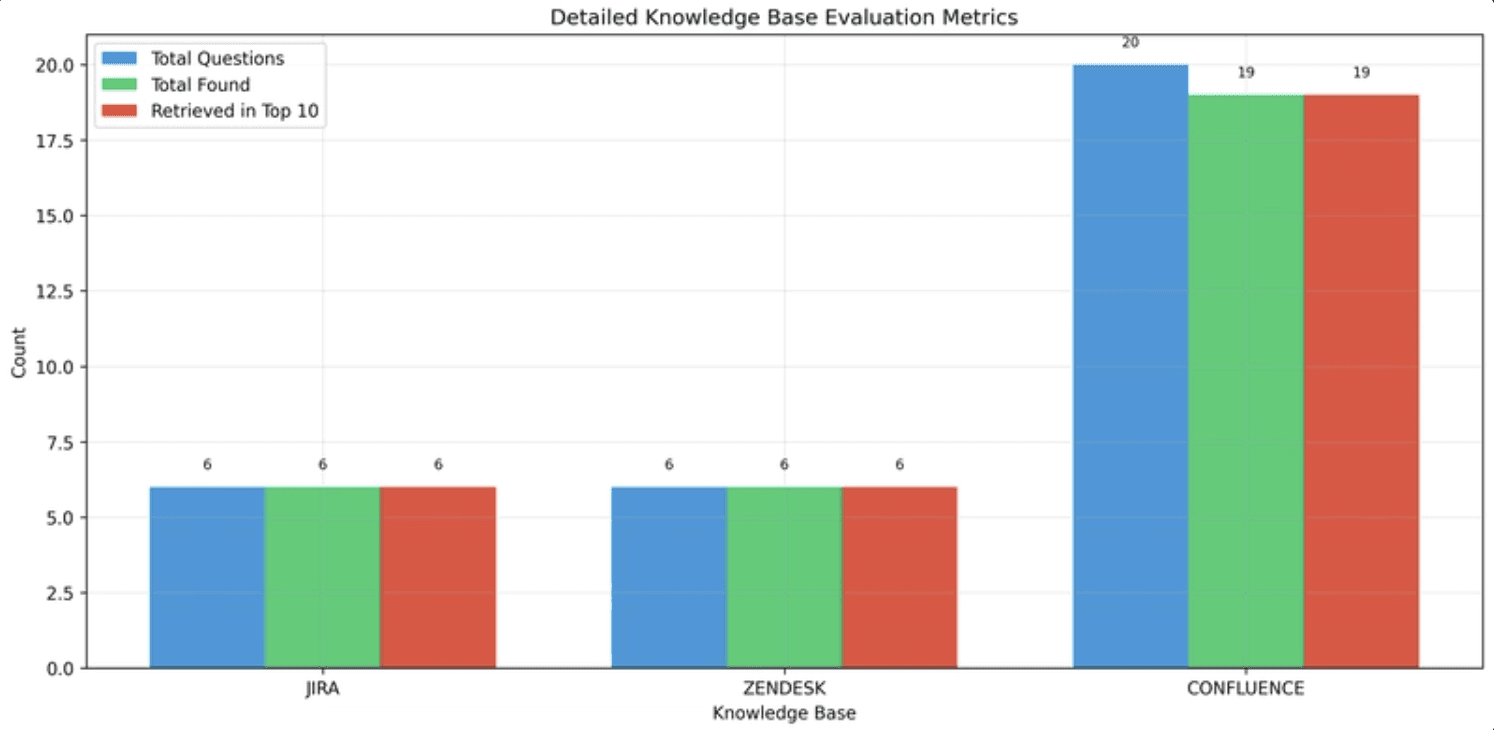
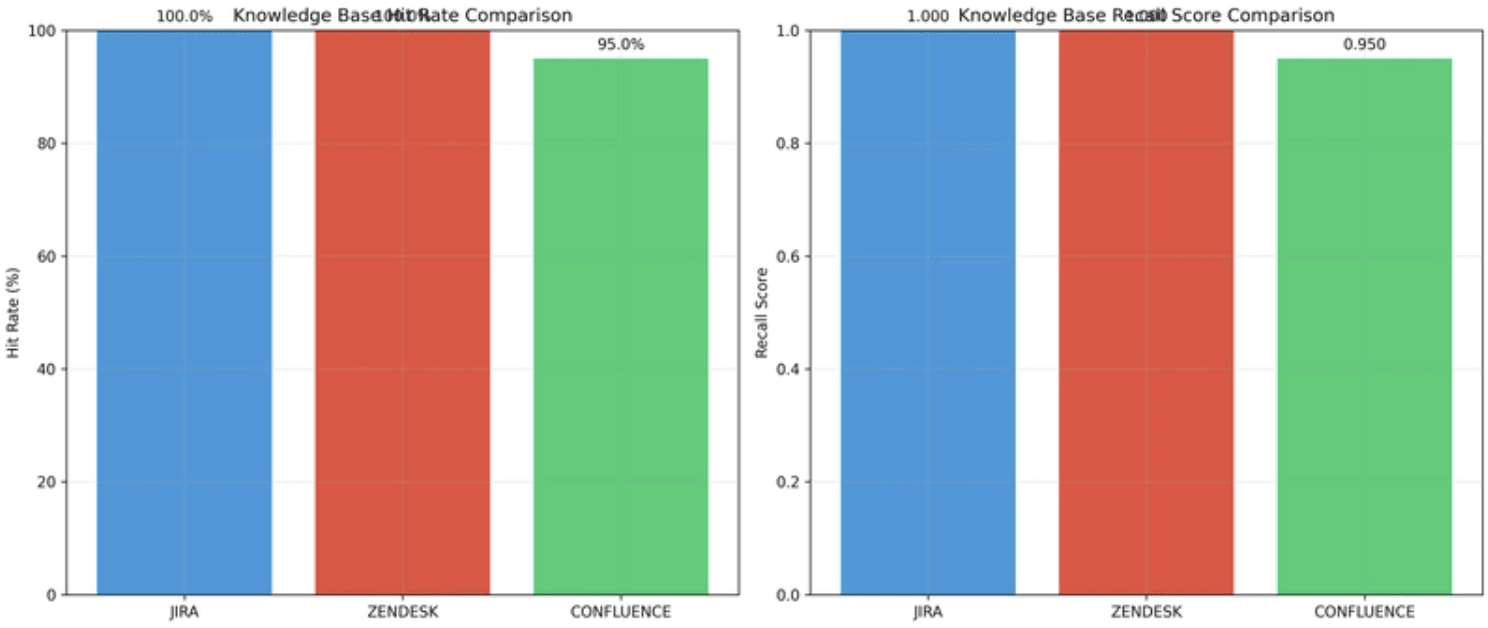
Metrics are generated using MindsDB's built-in evaluation framework, which calculates hit rates, cumulative recall, and mean reciprocal rank. The system auto-generates test questions from knowledge base content for continuous quality monitoring.
Evaluation Command
EVALUATE KNOWLEDGE_BASE confluence_kb
USING
    test_table = 'pgvector_datasource.confluence_test_table',
    version = 'doc_id',
    generate_data = false,
    evaluate = true
EVALUATE KNOWLEDGE_BASE confluence_kb
USING
    test_table = 'pgvector_datasource.confluence_test_table',
    version = 'doc_id',
    generate_data = false,
    evaluate = true
EVALUATE KNOWLEDGE_BASE confluence_kb
USING
    test_table = 'pgvector_datasource.confluence_test_table',
    version = 'doc_id',
    generate_data = false,
    evaluate = true
EVALUATE KNOWLEDGE_BASE confluence_kb
USING
    test_table = 'pgvector_datasource.confluence_test_table',
    version = 'doc_id',
    generate_data = false,
    evaluate = true
Returns comprehensive metrics including Hit@1, Hit@5, Hit@10, MRR, and recall scores.
Deployment
Our entire system runs in a single Docker Compose file:
services:
  mindsdb:
    build: .
    ports:
      - "47334:47334"
  pgvector:
    image: pgvector/pgvector:pg16
    ports:
      - "5432:5432"
services:
  mindsdb:
    build: .
    ports:
      - "47334:47334"
  pgvector:
    image: pgvector/pgvector:pg16
    ports:
      - "5432:5432"
services:
  mindsdb:
    build: .
    ports:
      - "47334:47334"
  pgvector:
    image: pgvector/pgvector:pg16
    ports:
      - "5432:5432"
services:
  mindsdb:
    build: .
    ports:
      - "47334:47334"
  pgvector:
    image: pgvector/pgvector:pg16
    ports:
      - "5432:5432"
Setup script (setup.py) handles:
Starting containers
Creating datasources
Creating knowledge bases
Inserting initial data
Creating agents
Scheduling refresh jobs
Technical Stack
Layer | Technology | Why |
|---|---|---|
LLM | Azure OpenAI (GPT-4o-mini) | Cost-effective embeddings + reasoning |
Orchestration | LangGraph | Multi-turn agent flows |
Vector Storage | pgvector (via MindsDB) | Postgres-native, no extra infra |
Data Layer | MindsDB Knowledge Bases | SQL-native, zero ETL |
Connectors | MindsDB integrations | Jira, Zendesk, Confluence |
Agent Framework | MindsDB SQL Agent | Direct hybrid query interface |
MCP Wrapper | FastMCP | Claude Desktop integration |
Hosting | Docker Compose | Single |
Getting Started
Prerequisites:
Docker and Docker Compose
Python 3.10+
Azure OpenAI API key
Zendesk/Jira/Confluence API credentials
GitHub Repository: https://github.com/prasnna-saravanan/area-51
Installation:
# Clone the repository
git clone <repo-url>
cd area51

# Set up Python environment
python -m venv .venv
source .venv/bin/activate
pip install -r requirements.txt

# Configure environment variablescp .env.example .env
# Edit .env with your API credentials# Run setup script
python setup.py --mode
# Clone the repository
git clone <repo-url>
cd area51

# Set up Python environment
python -m venv .venv
source .venv/bin/activate
pip install -r requirements.txt

# Configure environment variablescp .env.example .env
# Edit .env with your API credentials# Run setup script
python setup.py --mode
# Clone the repository
git clone <repo-url>
cd area51

# Set up Python environment
python -m venv .venv
source .venv/bin/activate
pip install -r requirements.txt

# Configure environment variablescp .env.example .env
# Edit .env with your API credentials# Run setup script
python setup.py --mode
# Clone the repository
git clone <repo-url>
cd area51

# Set up Python environment
python -m venv .venv
source .venv/bin/activate
pip install -r requirements.txt

# Configure environment variablescp .env.example .env
# Edit .env with your API credentials# Run setup script
python setup.py --mode
You can watch the full demo of the project here.
Conclusion
Area51 proves that unified enterprise search doesn't need sprawling infrastructure or months of engineering effort. By shifting from hand-built pipelines to declarative, SQL-driven Knowledge Bases, we created a production-grade RAG system that syncs itself, evaluates itself, and powers intelligent agents across multiple interfaces—all while connecting directly to Zendesk, Jira, and Confluence.
Instead of stitching together ETL jobs, vector stores, and semantic search code, MindsDB gives you a single layer where data integration, embeddings, hybrid search, and scheduled refreshes simply work. The result is a dramatic reduction in operational overhead and a step change in how teams discover and use knowledge.
Support agents resolve issues faster. Engineers investigate with full context. Documentation teams understand what matters most. And AI assistants—from LangGraph flows to Cursor and Claude Desktop—become genuinely useful because they finally have unified, up-to-date enterprise knowledge to reason over.
If you're looking to replace fragmented workflows with a single, intelligent search layer, Area51 is the blueprint—and MindsDB is the engine that makes it possible. Check out the full project here.
Let the knowledge islands disappear.
Enterprises don’t struggle because they lack information—they struggle because their information lives in silos. Support knowledge lives in Zendesk. Engineering truth lives in Jira. Institutional memory lives in Confluence. The result is a daily maze of context-switching, duplicated investigation, and slow resolutions.
We wanted to find out what it would take to unify these knowledge islands into a single, intelligent search layer—without spinning up a vector database, writing ETL pipelines, or maintaining brittle orchestration code.
So we built Area51 for MindsDB's Hacktoberfest, a production-ready multi-source RAG system powered entirely by MindsDB’s Knowledge Bases. What traditionally requires five or more separate services—ETL, embeddings, vector storage, semantic search, jobs, and evaluation—is now declarative SQL. In just a few days, we shipped a unified search experience across Zendesk, Jira, and Confluence, complete with three agent interfaces for conversational reasoning, programmatic analytics, and desktop AI assistants.
This is what happens when semantic search, automated embeddings, and zero-ETL data pipelines all live under one roof.
The Problem: Three Islands of Information
Modern enterprises battle knowledge fragmentation every day. Critical information is scattered across distinct platforms:
Zendesk: Customer support tickets, resolutions, and interaction history
Jira: Engineering issues, bug reports, and project tracking
Confluence: Technical documentation, SOPs, and internal guides
This fragmentation creates real operational costs. Support agents waste time switching between systems, trying to piece together context that exists but isn't discoverable. An engineer investigating a bug can't easily see customer impact. Documentation teams operate blind to actual support needs.
This results in slower resolutions, duplicated effort, and knowledge that never reaches the people who need it.
The Solution: One Query, Complete Context
We built Area51 - a unified semantic search system that connects all three platforms through MindsDB Knowledge Bases. Instead of building separate ETL pipelines, custom vector databases, and orchestration layers, MindsDB handles everything declaratively.
The system automatically syncs all three platforms, provides semantic search that understands relationships and context, and stays current without manual intervention. Most importantly, it offers distinct agent interfaces for different workflows:
LangGraph Agent - Conversational, multi-turn reasoning for complex interactions
MindsDB SQL Agent - High-performance direct queries to run agents directly from the MindsDB UI
MCP Server - Integration with AI assistants like Cursor and Claude Desktop
What MindsDB Replaced
What We Needed | Traditional Approach | With MindsDB |
|---|---|---|
Data Integration | Custom ETL scripts per source |
|
Embeddings | Separate service + API calls | Automatic chunking + embedding |
Vector Storage | Pinecone/Weaviate/Supabase | Built-in pgvector integration |
Search Engine | Custom semantic search code | Hybrid SQL queries with |
ETL Orchestration | Airflow/Kubernetes CronJobs |
|
Evaluation | Custom metrics framework |
|
Architecture Deep Dive
Area51 integrates Zendesk, Jira, and Confluence through MindsDB Knowledge Bases using hybrid semantic search. Here's how it works:
Data Integration Layer
Three MindsDB datasources connect directly to external APIs:
-- One statement per integration, zero API codeCREATE DATASOURCE zendesk_datasource WITH ENGINE = 'zendesk';
CREATE DATASOURCE jira_datasource WITH ENGINE = 'jira';
CREATE DATASOURCE confluence_datasource WITH ENGINE = 'confluence';
Each datasource handles authentication, pagination, and rate limiting automatically. No custom ETL code required.
Knowledge Base Layer
Three separate knowledge bases, each with Azure OpenAI embeddings.
Confluence - For companies official documentations
Jira - For engineering/technical tickets
Zendesk - For customer tickets
MindsDB automatically:
Chunks documents intelligently
Generates embeddings via Azure OpenAI
Stores vectors in pgvector
Creates hybrid search indexes
Handles versioning and metadata
Automation Layer: Zero-Ops ETL
Traditional approach: Airflow DAGs, Kubernetes CronJobs, custom monitoring dashboards.
MindsDB approach:
CREATE JOB jira_refresh_job (
    insert into jira_kb
    select * from jira_datasource.issues;
) EVERY hour;
Translation: "Keep the knowledge base updated hourly, with incremental refreshes, forever."
We created three jobs running on different schedules:
Zendesk KB: Every 30 minutes
Jira KB: Every 30 minutes
Confluence KB: Every day
Zero DevOps overhead. MindsDB handles scheduled execution, incremental updates, failure retries, and status tracking.
The Three Agent Interfaces
1. LangGraph Conversational Agent
The LangGraph agent provides a visual development interface and conversational interaction through an intelligent routing system.
Starting the Agent:
uv run langgraph dev
The server starts on http://127.0.0.1:2024 and automatically opens LangChain Studio in your browser, showing the graph visualization of the workflow.
Graph Architecture:
The support_agent graph uses intelligent routing:
Router - Analyzes queries and determines which systems to search
Search Nodes - Three parallel operations:
search_jira- Search Jira issuessearch_zendesk- Search Zendesk ticketssearch_confluence- Search Confluence documentation
Aggregate Results - Synthesizes findings into unified responses
Error Handling - Manages failures gracefully
Example Interaction:
Query: ”Is the team working on something related to 2FA? and are there any support tickets on the same?”
Agent Response:
2. MindsDB SQL Agent
The MindsDB SQL agent provides high-performance direct queries, automatically created during setup.
Accessing via MindsDB Studio:
Open MindsDB Studio at
http://localhost:47334Navigate to the SQL Editor
Query using natural language:
SELECT answer
FROM support_agent
WHERE question = 'Anything that the engineering team is working on related to 2fa on jira?';
The agent understands questions semantically and returns relevant results from all knowledge bases, automatically routing to Jira, Zendesk, or Confluence as needed.
Programmatic Access:
import mindsdb_sdk

server = mindsdb_sdk.connect('http://localhost:47334')
kb = server.knowledge_bases.get('zendesk_kb')

# Execute semantic search
results = kb.find('payment errors', limit=10)
3. MCP Server for AI Assistants
The MCP (Model Context Protocol) server enables AI assistants like Cursor and Claude Desktop to search across all knowledge bases through natural conversation.
Starting the Server:
uv run fastmcp run server.py --transportServer starts on http://127.0.0.1:5000/sse with the name "Support Agent Assistant".
Configure Cursor:
Add to Cursor settings:
{
  "mcpServers": {
    "area51-support-agent": {
      "command": "uv",
      "args": ["run", "fastmcp", "run", "server.py", "--transport=sse"],
      "env": {
        "MINDSDB_URL": "http://localhost:47334"
      }
    }
  }
}
Once configured, ask Cursor: "Search for authentication errors in Zendesk" and it will use the MCP server to query your knowledge bases.
Hybrid Search: The Best of Both Worlds
MindsDB's MATCHES operator unlocks semantic search, while traditional SQL enables structured filtering.
Semantic Search
Find relevant tickets using natural language understanding:
SELECT *
FROM confluence_kb
WHERE content = 'docker'
ORDER BY relevance DESC
LIMIT 5
The semantic search understands that "docker" relates to "open source hosting" without requiring exact keyword matches.
Structured Filtering
Query specific metadata fields for precise results:
SELECT *
FROM jira_kb
WHERE status = 'In Progress'
Hybrid Search
Combine semantic understanding with structured metadata filters:
SELECT *
FROM zendesk_kb
WHERE content = '2fa'
and hybrid_search=true
and hybrid_search_alpha=0.6
LIMIT 10
This query semantically searches for 2fa-related content while simultaneously filtering by while using hybrid search functionality of mindsDb.
Real-World Impact
Use Case 1: Distinguishing Feature Requests from Documentation Gaps
A customer asks how to bulk export transaction data via the API. The agent queries: "bulk export transaction data API"
Confluence: No documentation found
Jira: Finds "FEAT-445: Implement bulk data export endpoint" in development
Zendesk: Finds 3 similar tickets from past month
Result: Support can confidently respond that this is a planned feature with expected delivery next release, rather than creating a feature request.
Use Case 2: Finding Relevant Documentation to Resolve Tickets
Customer reports: "Getting 401 errors when calling the payments endpoint"
The agent queries: "authentication failures payments API 401 errors"
Confluence: Returns "API Authentication Troubleshooting Guide" with dedicated section on 401 errors
Zendesk: Finds 15 resolved tickets with similar issues
Pattern Analysis: Most common resolution is using sandbox keys in production
Result: Issue typically resolved in 5 minutes with existing documentation.
Use Case 3: Leveraging Historical Context for Faster Resolution
Customer: "Dashboard widgets loading very slowly since yesterday"
The agent queries: "dashboard performance slow loading widgets"
Zendesk: Shows 8 tickets in past 24 hours, plus historical spike 3 months ago
Jira: Finds current investigation (DASH-892) and past issue (DASH-756) with similar root cause
Confluence: Returns monitoring runbook and database maintenance procedures
Result: Engineering team checks database indexes first, finds the issue in 15 minutes instead of hours of investigation. Historical pattern recognition prevents reinventing the wheel.
Performance Metrics
Area51 achieves strong performance across all three knowledge bases with sub-second query times and high relevance.
Knowledge Base | Hit Rate | Recall Score | Avg Query Time |
|---|---|---|---|
Confluence KB | 94.0% | 0.940 | 0.15s |
Metrics are generated using MindsDB's built-in evaluation framework, which calculates hit rates, cumulative recall, and mean reciprocal rank. The system auto-generates test questions from knowledge base content for continuous quality monitoring.
Evaluation Command
EVALUATE KNOWLEDGE_BASE confluence_kb
USING
    test_table = 'pgvector_datasource.confluence_test_table',
    version = 'doc_id',
    generate_data = false,
    evaluate = true
Returns comprehensive metrics including Hit@1, Hit@5, Hit@10, MRR, and recall scores.
Deployment
Our entire system runs in a single Docker Compose file:
services:
  mindsdb:
    build: .
    ports:
      - "47334:47334"
  pgvector:
    image: pgvector/pgvector:pg16
    ports:
      - "5432:5432"
Setup script (setup.py) handles:
Starting containers
Creating datasources
Creating knowledge bases
Inserting initial data
Creating agents
Scheduling refresh jobs
Technical Stack
Layer | Technology | Why |
|---|---|---|
LLM | Azure OpenAI (GPT-4o-mini) | Cost-effective embeddings + reasoning |
Orchestration | LangGraph | Multi-turn agent flows |
Vector Storage | pgvector (via MindsDB) | Postgres-native, no extra infra |
Data Layer | MindsDB Knowledge Bases | SQL-native, zero ETL |
Connectors | MindsDB integrations | Jira, Zendesk, Confluence |
Agent Framework | MindsDB SQL Agent | Direct hybrid query interface |
MCP Wrapper | FastMCP | Claude Desktop integration |
Hosting | Docker Compose | Single |
Getting Started
Prerequisites:
Docker and Docker Compose
Python 3.10+
Azure OpenAI API key
Zendesk/Jira/Confluence API credentials
GitHub Repository: https://github.com/prasnna-saravanan/area-51
Installation:
# Clone the repository
git clone <repo-url>
cd area51

# Set up Python environment
python -m venv .venv
source .venv/bin/activate
pip install -r requirements.txt

# Configure environment variablescp .env.example .env
# Edit .env with your API credentials# Run setup script
python setup.py --mode
You can watch the full demo of the project here.
Conclusion
Area51 proves that unified enterprise search doesn't need sprawling infrastructure or months of engineering effort. By shifting from hand-built pipelines to declarative, SQL-driven Knowledge Bases, we created a production-grade RAG system that syncs itself, evaluates itself, and powers intelligent agents across multiple interfaces—all while connecting directly to Zendesk, Jira, and Confluence.
Instead of stitching together ETL jobs, vector stores, and semantic search code, MindsDB gives you a single layer where data integration, embeddings, hybrid search, and scheduled refreshes simply work. The result is a dramatic reduction in operational overhead and a step change in how teams discover and use knowledge.
Support agents resolve issues faster. Engineers investigate with full context. Documentation teams understand what matters most. And AI assistants—from LangGraph flows to Cursor and Claude Desktop—become genuinely useful because they finally have unified, up-to-date enterprise knowledge to reason over.
If you're looking to replace fragmented workflows with a single, intelligent search layer, Area51 is the blueprint—and MindsDB is the engine that makes it possible. Check out the full project here.
Let the knowledge islands disappear.
Products
Open Source
© 2026 All rights reserved by MindsDB.
Start conversational analytics with MindsDB
Production-ready infrastructure for agentic analytics
Start conversational analytics with MindsDB
Production-ready infrastructure for agentic analytics

Products
Open Source
© 2026 All rights reserved by MindsDB.
Products
Open Source
© 2026 All rights reserved by MindsDB.
Start conversational analytics with MindsDB
Production-ready infrastructure for agentic analytics